Sponsored

Only get Welcome screen half the time

Cuffuffles

New Member
First Name
Lucy
Joined
Dec 21, 2024
Threads
1
Messages
2
Reaction score
0
Location
Queensland, Australia
Car(s)
‘24 Toyota Supra 3.0 GTS
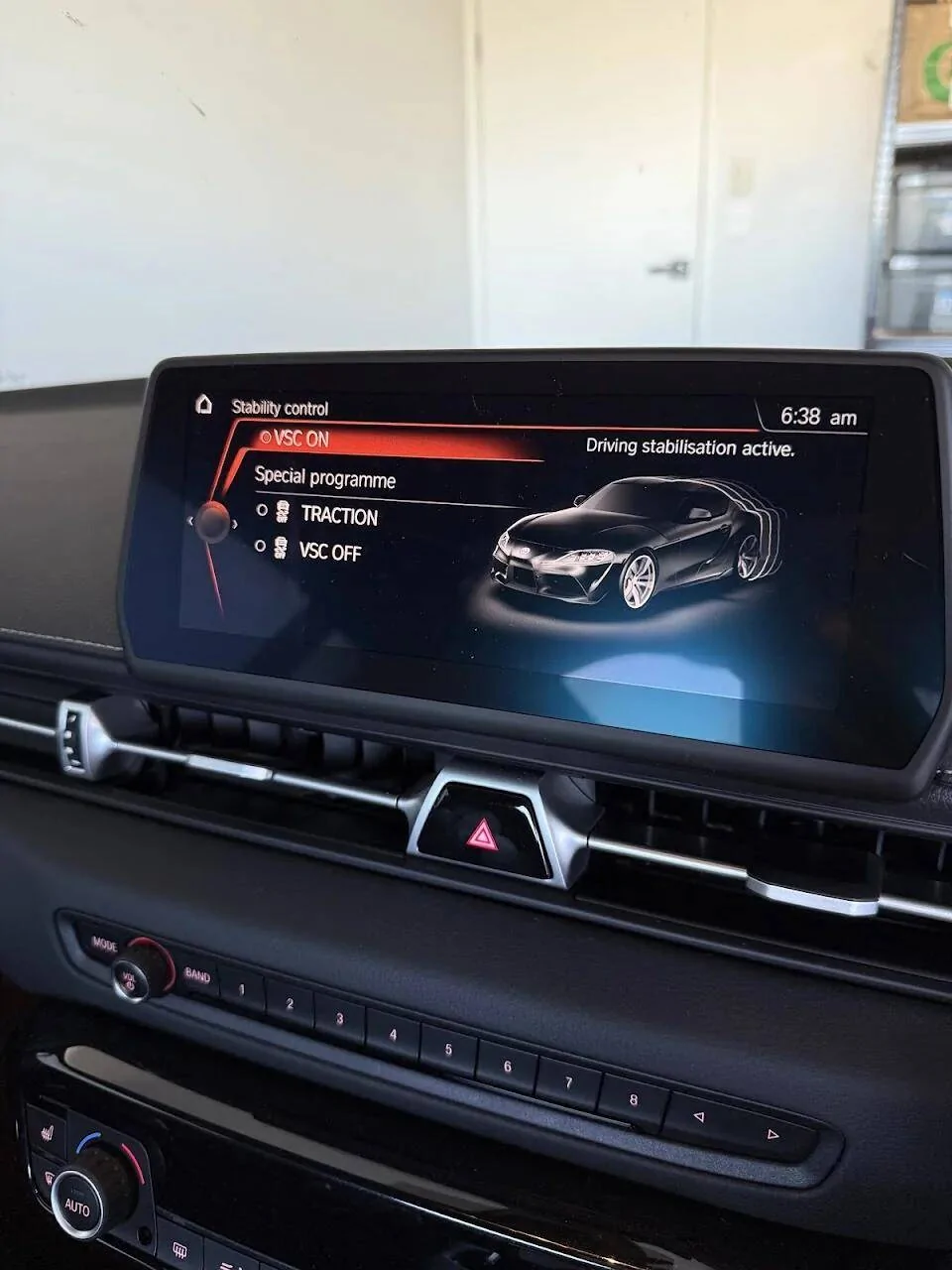
I have a brand new '24 3.0 premium auto and I am having a weird problem I haven't been able to find anything about online. 50% of the time I get in the car I get the expected 'Welcome Lucy' before it continues to the main screen/carplay once connected. The other 50% of the time I get the stability control screen which also automatically moves to the main menu after some time, but completely skips the welcome screen. VSC has always been on when the car has been turned off, the only time I've touched it was to turn it off and back on to see if that fixes this issue (it didn't).

Everything seems to work, no dash lights or warnings etc, but I would much prefer the expected welcome screen each time instead. I have also made sure to do the 'Getting started' section but didn't help.

It never seems to turn on/off by itself and the menu never appears mid drive (like what I'd expect if the button itself was faulty and triggering itself). It just sometimes appears when getting in the car.

Does anyone have any ideas?

I have tried to remove the popup like below but no change. (Did this from Z4 menu if that matters...)
FeatureECUMenuSubMenuSetting
Remove Stability Control PopupHeadunit3008 FESSTABILITY_CONTROL_POPUPnicht_aktiv


This is the screen I'm talking about.
1734902390872-dr.webp
Sponsored


concept

Well-Known Member
First Name
Dave
Joined
Sep 1, 2023
Threads
23
Messages
1,125
Reaction score
796
Location
Southern CA
Car(s)
2024 Supra 45th, Mikan 2008 Mazda MX5 PRHT manual
That does sound like a strange issue! Since you've already checked the basics and the dealer hasn't been able to replicate the problem, it might be worth considering a few additional steps:

  1. Software Update: Sometimes, issues like this can be resolved with a software update. Check with your dealer if there are any updates available for your car's infotainment system.
  2. Reset the System: Try performing a full reset of the infotainment system. This can sometimes resolve glitches that aren't immediately obvious.
  3. Check for Fault Codes: Even if there are no dash lights or warnings, there might still be fault codes stored in the car's computer. A dealer or an indy mechanic can run a diagnostic check to see if there's anything unusual.
  4. Contact Toyota Support: Since this is a new model, it might be a known issue that hasn't been widely reported yet. Contacting Toyota's customer support or technical assistance might provide some insights.
 
OP
OP
Cuffuffles

Cuffuffles

New Member
First Name
Lucy
Joined
Dec 21, 2024
Threads
1
Messages
2
Reaction score
0
Location
Queensland, Australia
Car(s)
‘24 Toyota Supra 3.0 GTS
That does sound like a strange issue! Since you've already checked the basics and the dealer hasn't been able to replicate the problem, it might be worth considering a few additional steps:

  1. Software Update: Sometimes, issues like this can be resolved with a software update. Check with your dealer if there are any updates available for your car's infotainment system.
  2. Reset the System: Try performing a full reset of the infotainment system. This can sometimes resolve glitches that aren't immediately obvious.
  3. Check for Fault Codes: Even if there are no dash lights or warnings, there might still be fault codes stored in the car's computer. A dealer or an indy mechanic can run a diagnostic check to see if there's anything unusual.
  4. Contact Toyota Support: Since this is a new model, it might be a known issue that hasn't been widely reported yet. Contacting Toyota's customer support or technical assistance might provide some insights.
Still need to check if there is an update.

I tried to reset but not sure if I did it correctly. I held the power/volume button down for 70 or so seconds with engine on - screen turned off and back on 3 times in that time but didn't feel much like a reset, each time it turned off it took the same amount of time to come back on.
I also tried it with engine off though the screen turned off pretty quick and just never came back on until I released the button. Issue persisted after both - first screen I see after it comes back on is the VSC screen lol.

I checked the codes, nothing.

Toyota support might be next on the list unfortunately.

It also looks like it takes time - if I stop for fuel and car off/locked and back on in a few minutes I get the expected welcome screen. A longer (5m+ or so) time turned off and it starts with the VSC screen.
 

concept

Well-Known Member
First Name
Dave
Joined
Sep 1, 2023
Threads
23
Messages
1,125
Reaction score
796
Location
Southern CA
Car(s)
2024 Supra 45th, Mikan 2008 Mazda MX5 PRHT manual
I haven't tried this, myself but this is what I found regarding a hard infotainment reset:
Note that this will erase all personalized settings and data.
  1. Navigate to the “Settings” menu on the infotainment system.
  2. Locate the “System” or “General” settings within the menu.
  3. Find the “Reset” or “Factory Reset” option and select it.
  4. Follow the on-screen prompts to confirm the reset and allow the system to reboot.
After the hard reset, the infotainment system will return to its default factory settings. You can then reconfigure the system according to your preferences.
 

kern417

Well-Known Member
First Name
Kevin
Joined
May 25, 2020
Threads
0
Messages
124
Reaction score
148
Location
Cincinnati
Car(s)
2018 440i
the way it was explained to me: the goal is to give you the idrive experience as quickly as possible, but the welcome screen is also a loading screen. so if you wake up the car by unlocking the trunk to put in your bags or something, and take longer to get to the door, it may not display the welcome message. it's usually when the car goes to sleep and then you return to the car and immediately open the driver's door.
Sponsored


Top