Sponsored

Try to get video to play on multi media screen

Sauceii

Well-Known Member
Joined
Aug 31, 2020
Threads
27
Messages
210
Reaction score
105
Location
Nj
Car(s)
2021 A90 Pemium
I hooked up the obd2 and used bimmercode to turn off the seat belt chime , the start up warning and active sound . I then also allowed video while driving and used the I drive knob to get it all set correct , or so I thought . I’m still not able to get video to play on my phone via usb and when I try the screen mirroring neither of my phones find the car . Has anyone else done this and can shed some light ? I’d like to watch DBZ and here my turbo swoosh at the same time hahahah
Sponsored

 

songbong

Member
First Name
michael
Joined
Aug 27, 2019
Threads
1
Messages
18
Reaction score
4
Location
houston
Car(s)
2012 370z, 2021 MKV Supra
Hey I was wondering were you trying to watch off like hulu or netflix?
 

Jediyogi

Well-Known Member
Joined
Apr 12, 2020
Threads
18
Messages
77
Reaction score
37
Location
Sydney Australia
Car(s)
Supra GR A90
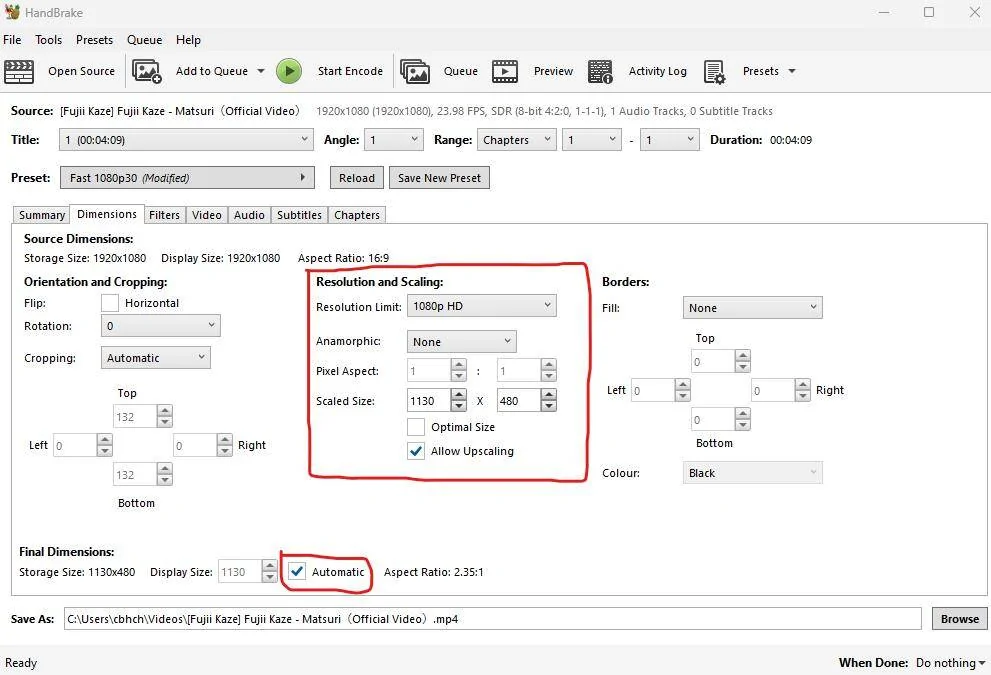
You need to enable video in motion - turned off by default for safety reasons and the video file/s need to be 480p resolution with mp4 codec
 

HenryA91

Member
First Name
Chris
Joined
Nov 4, 2020
Threads
0
Messages
23
Reaction score
37
Location
Annapolis
Car(s)
Refraction Blue A91
Any update on this? I've been trying to figure this out for a few days now but cannot get any video to play from my iphone.
 

songbong

Member
First Name
michael
Joined
Aug 27, 2019
Threads
1
Messages
18
Reaction score
4
Location
houston
Car(s)
2012 370z, 2021 MKV Supra
If you're trying to use a streaming service I don't think it'll work, the apps stop it from running on the screen mirroring
 

APanoMKV

Well-Known Member
Joined
Mar 14, 2020
Threads
9
Messages
84
Reaction score
28
Location
San Francisco
Car(s)
2020 Supra LE
Vehicle Showcase
1
Someone made a BimmerCode usage guide for the Supra and if I’m not mistaken they said that video in motion isn’t supported for Apple devices
 

harutora

Member
First Name
Harutora
Joined
Aug 21, 2024
Threads
1
Messages
18
Reaction score
9
Location
Vancouver
Car(s)
2024 MT GR Supra 3.0 Premium (Absolute Zero)
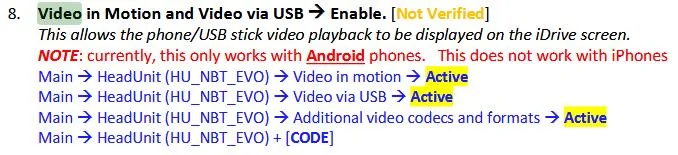
I know this thread is old, but I'll post this anyways, I managed to get the video in motion to work perfectly, you need to use BIMMERCODE (needs a paid license) to code in the function as it is turned off by default. You also need to enable the "Additional video codecs and formats." for the part where it "only works with android phones" it is referring to the video in motion VIA the screen mirroring feature, as iPhones do not allow this due to (I assume) carplay.
Screenshot 2024-09-20 074043.webp


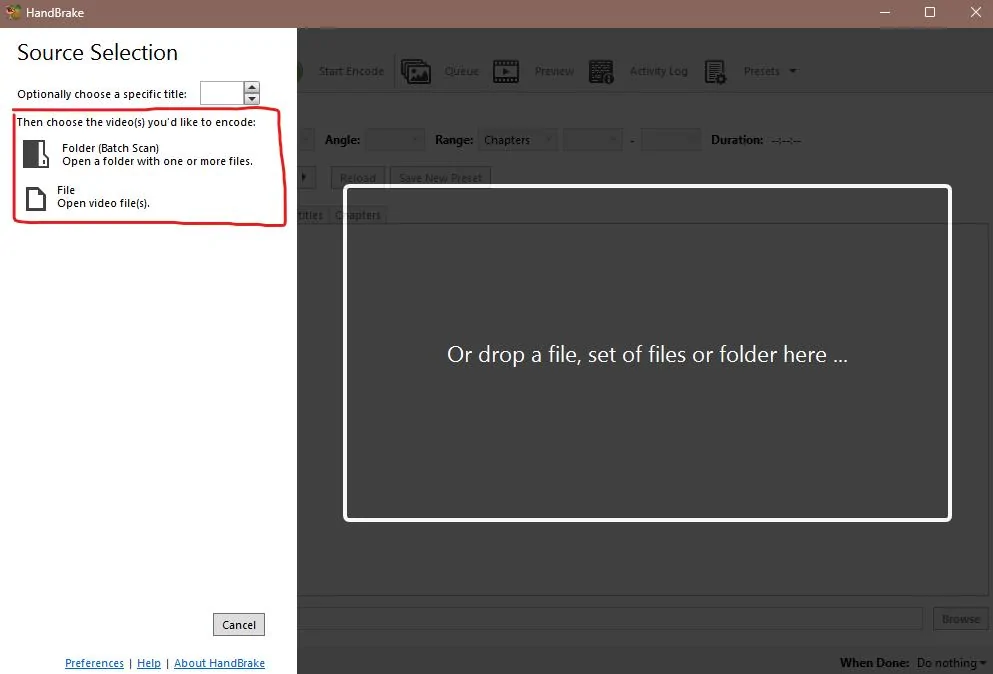
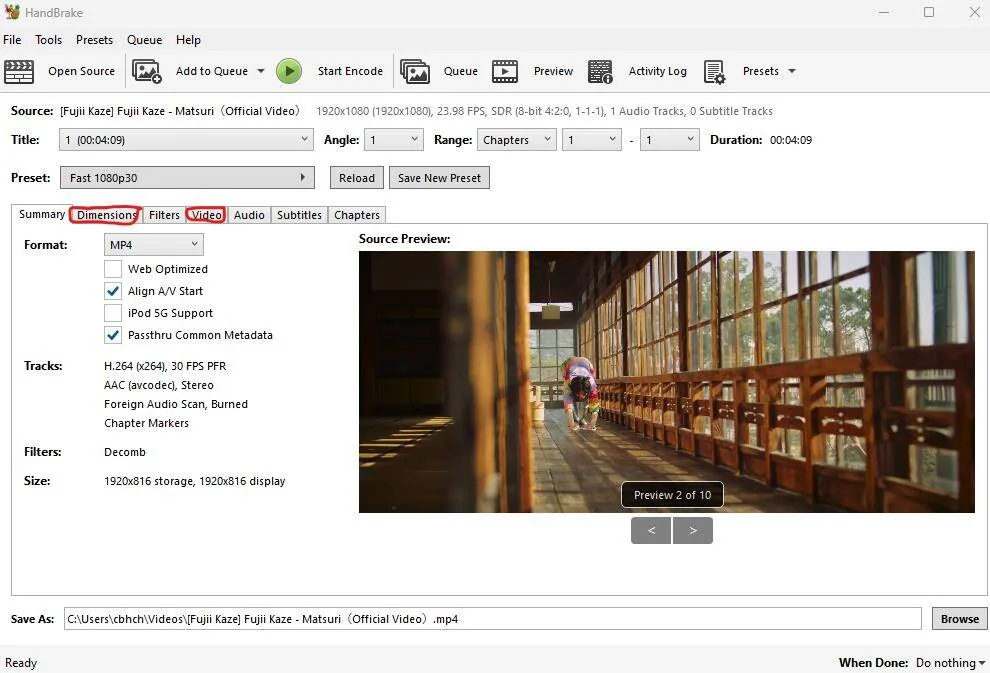
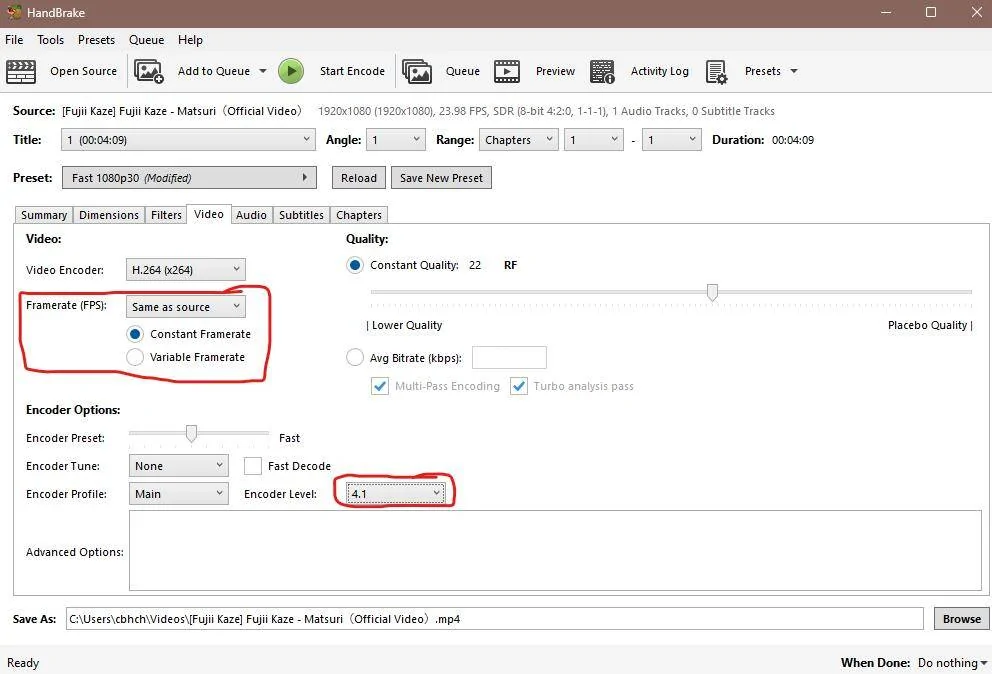
Like Jediyogi said, (IF YOU ARE USING A USB) they need to be video files in x264 codec, and 480p resolution. You can use a free software called handbrake to encode the video files.
Screenshot 2024-09-20 073347.webp


Just copy these settings and export it onto a USB stick. For the dimensions, only put in the 480p on the right hand side, and then just click on the left bar and it will automatically input the number required for the same aspect ratio.
Screenshot 2024-09-20 073704.webp
Screenshot 2024-09-20 073931.webp
Screenshot 2024-09-20 073809.webp

Then just click browse, and choose your USB drive's file location, then click start encode and then you can eject the USB. After that you can take the USB to your car, plug it in, navigate to the media section and select USB, (the USB will rename itself to whatever your USB is named to, you can change the name at your computer by right clicking it.)
Then it will display all of the video/audio files on the drive, and then you can select one there.
as long as you coded it in with BIMMERCODE, it will keep playing the video when you drive. Just be safe and don't crash your car lol.
Sponsored


Top