Sponsored

trash site

OP
OP
razorlab

razorlab

Well-Known Member
First Name
Bryan
Joined
Oct 2, 2021
Threads
29
Messages
8,568
Reaction score
16,797
Location
Hudson Valley, NY
Car(s)
Not a Corvette.
Thanks for the info!

Just an FYI from your first post. ECUTEK also allows for self tuning, it's just that most folks don't buy the USB dongle and it requires a laptop. I used to tune my BRZ like this and hope to do the same with my MT if ECUTEK decides to support the new ECUs. Would prefer to avoid going through the hassle of selling what I have to then get the BM3 hardware.
Not on this platform.
Sponsored
 

zrk

Well-Known Member
First Name
Zack
Joined
Apr 20, 2021
Threads
80
Messages
8,473
Reaction score
14,119
Location
Chicago, IL
Car(s)
2021 Supra - Nocturnal Black
Thanks for the info!

Just an FYI from your first post. ECUTEK also allows for self tuning, it's just that most folks don't buy the USB dongle and it requires a laptop. I used to tune my BRZ like this and hope to do the same with my MT if ECUTEK decides to support the new ECUs. Would prefer to avoid going through the hassle of selling what I have to then get the BM3 hardware.
Ecutek doesn't allow for self tuning on this platform. You have to hold a master tuner license.
 

UYCR

Well-Known Member
First Name
Ubec
Joined
Dec 5, 2022
Threads
0
Messages
225
Reaction score
199
Location
Harrisburg, PA
Car(s)
A91-MT
Well darn. I definitely don't want to pay for that but I have a buddy who has it so I might have to borrow his stuff whenever ECUTEK decides to become available for '23+. It sorta makes sense that the the master tuner is needed since it's also requited for boosted BRZs. Just didn't expect it for vehicles boosted from factory. Definitely much cheaper to go the DIY route with BM3.
 
OP
OP
razorlab

razorlab

Well-Known Member
First Name
Bryan
Joined
Oct 2, 2021
Threads
29
Messages
8,568
Reaction score
16,797
Location
Hudson Valley, NY
Car(s)
Not a Corvette.
Okay, I finally got to the point where I have a good enough handle on the ECU strategies on this platform and done enough testing to get a pretty solid custom tune on my personal Supra this year. I have been testing and datalogging on the street and during all my track sessions, which has been invaluable to get my head around everything.

Now I want to share with others that might be interested in self-tuning on this platform with Bootmod3.

I'll start with fuel tuning, because it's the most straight forward part of the tuning platform. I'll continue to make new posts with different parts of the tuning process and eventually update the first post to have it all.

Tuning your AFR targets is probably the easiest part of tuning with modern lambda-target ecus and the supra/B58 platform is no exception. There are a couple more involved bits when you start using ethanol, and I will go into those here too.

Let's start with setting lambda targets and how to get the ECU to actually follow those targets...

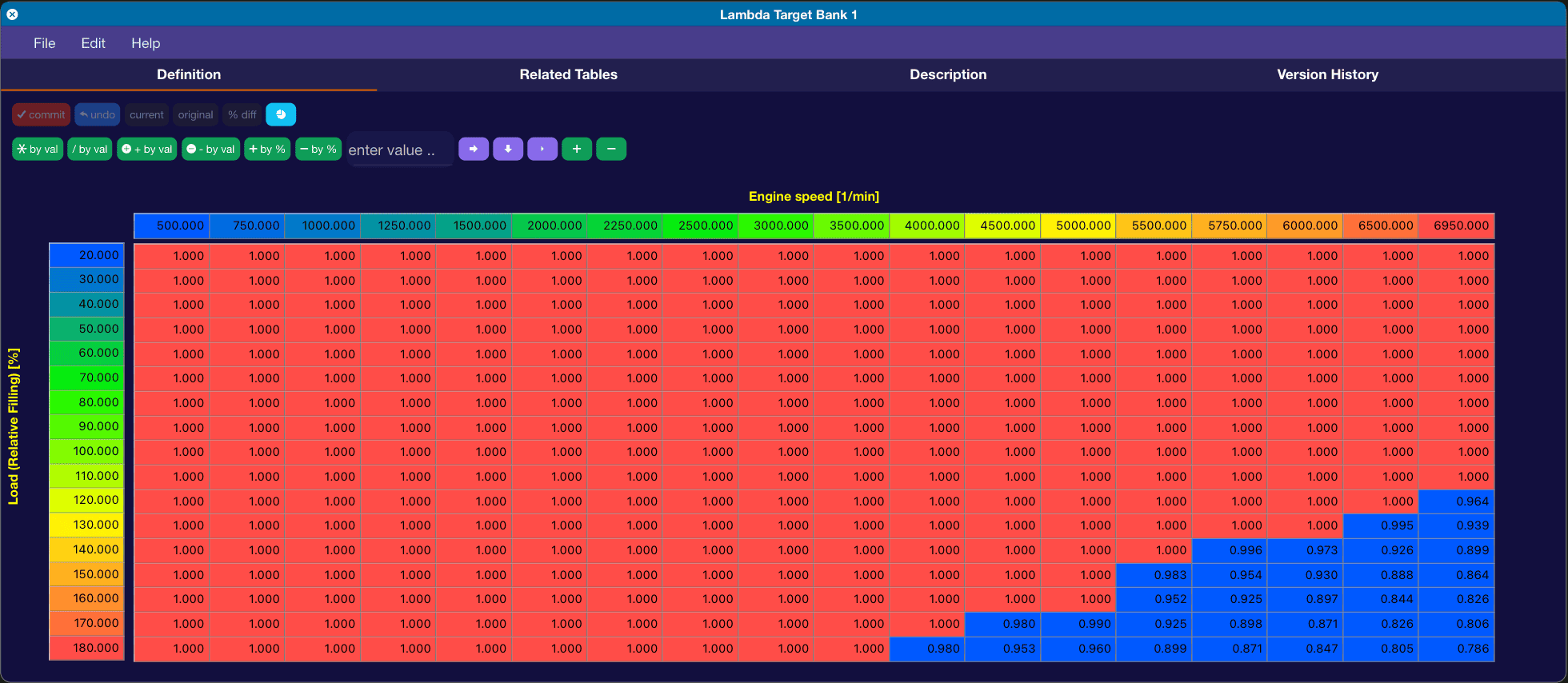
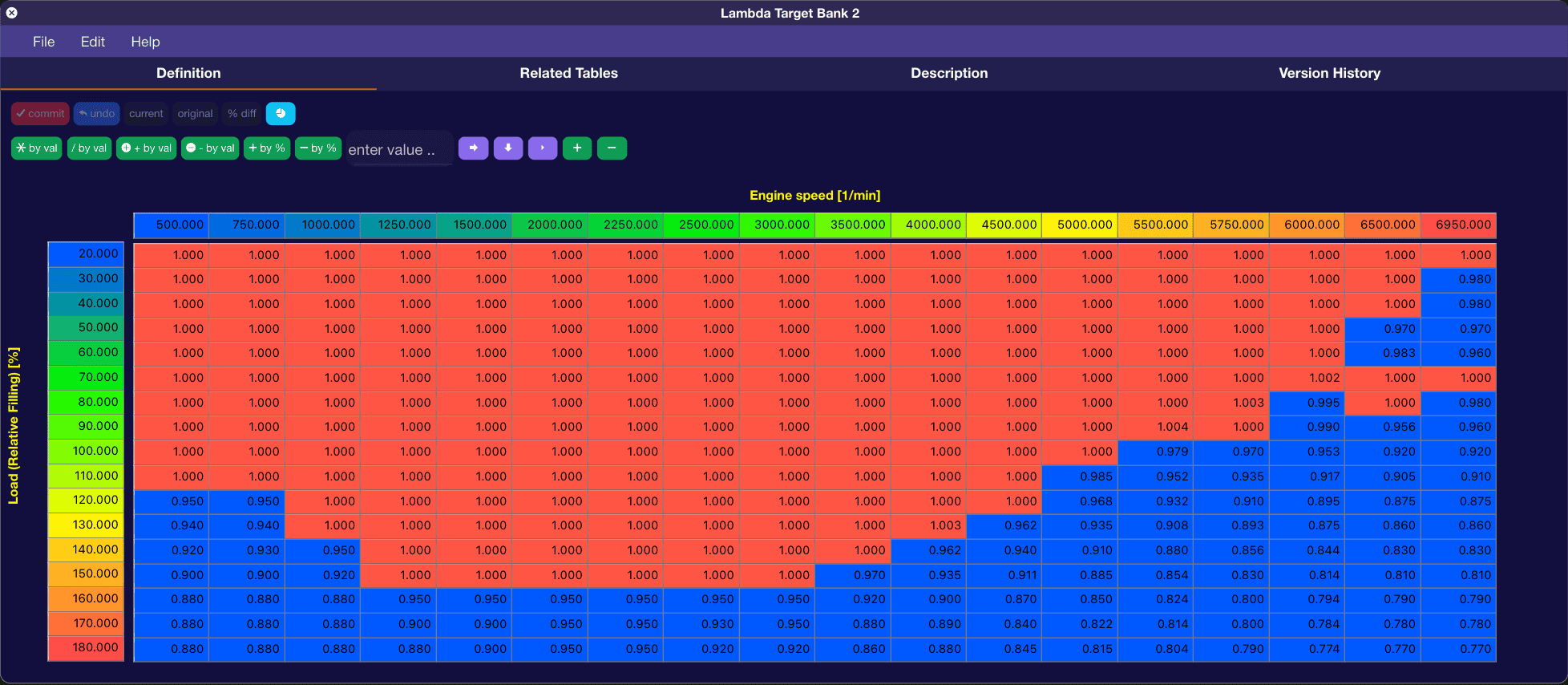
There are two tables you want to set to your desired lambda. Lambda Target Bank 1 and Bank 2.
The OEM values for these tables look like this:

Screenshot 2024-06-24 at 5.07.05 PM.png

Screenshot 2024-06-24 at 5.07.24 PM.png


Now, if you have a 2020, the car will almost NEVER use these tables, and will try and target 1.0 Lambda (14.7 AFR) at almost all times, unless it sees high cat or EGT temps. In WOT it will richen slightly to low 14.X AFR. The 2021+ models go into enrich mode sooner and you will see high 13's at WOT.

In order for the ECU to use these tables instantly, which is preferred when tuning, you must change the following tables:
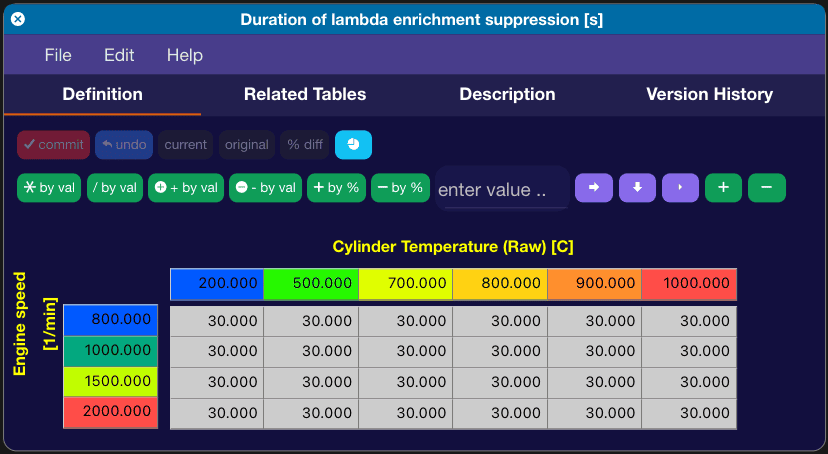
The first one is "Duration of lambda enrichment suppression". This dictates, in seconds, how long it will take the ECU to move to the Lambda Target tables, after an enrichment event triggers. On my 2020, you will see the table is set to 30 seconds. Very rare you will ever be going WOT for 30 seconds straight unless you are on the Autobahn or similar.

OEM values:
Screenshot 2024-06-24 at 4.57.23 PM.png


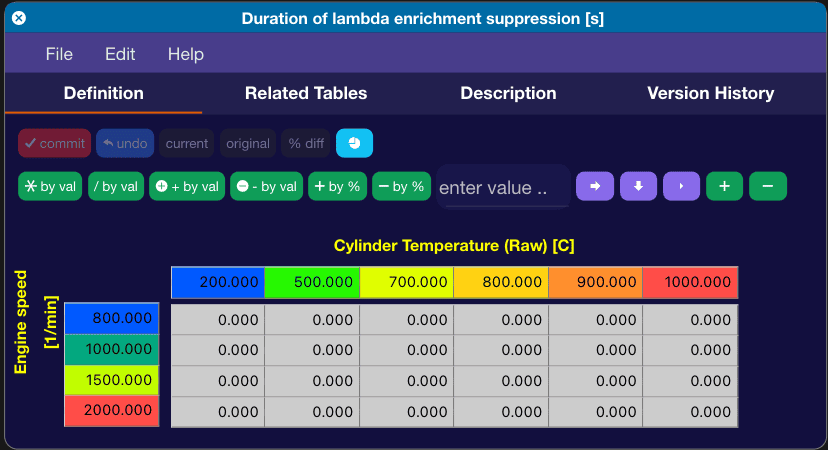
You will want to zero out this table like this:
Screenshot 2024-06-24 at 5.17.40 PM.png


Now, you want to also change the next three tables in order for the ECU to actually switch over to the Lambda Target tables.

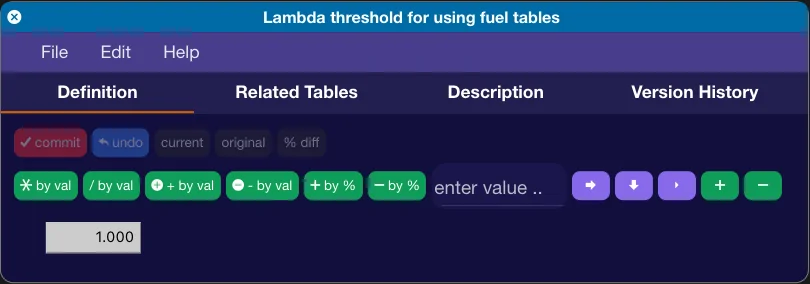
Lambda threshold for using fuel tables:
Screenshot 2024-06-24 at 4.58.03 PM.png

Set this from 1.000 to 0.700

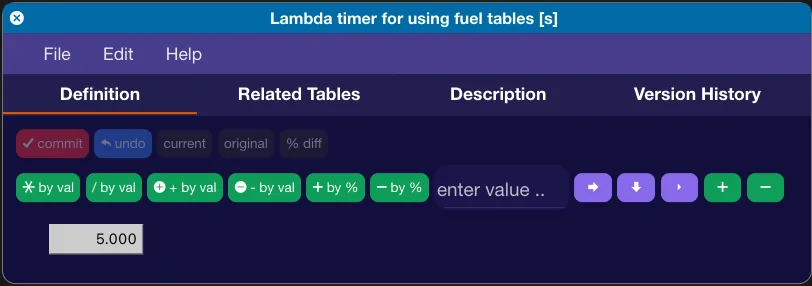
Lambda timer for using fuel tables:
Screenshot 2024-06-24 at 4.58.27 PM.png

Set this from 5.000 to 0.000

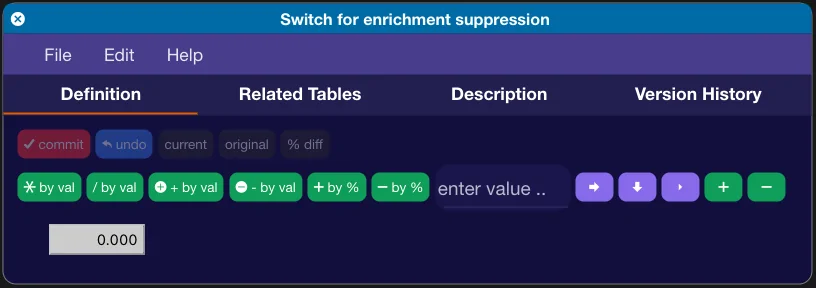
Switch for enrichment suppression:
Screenshot 2024-06-24 at 4.58.59 PM.png

Set this from 0.000 to 255.000

Now, going back to the Lambda Target Bank 1/2 tables...

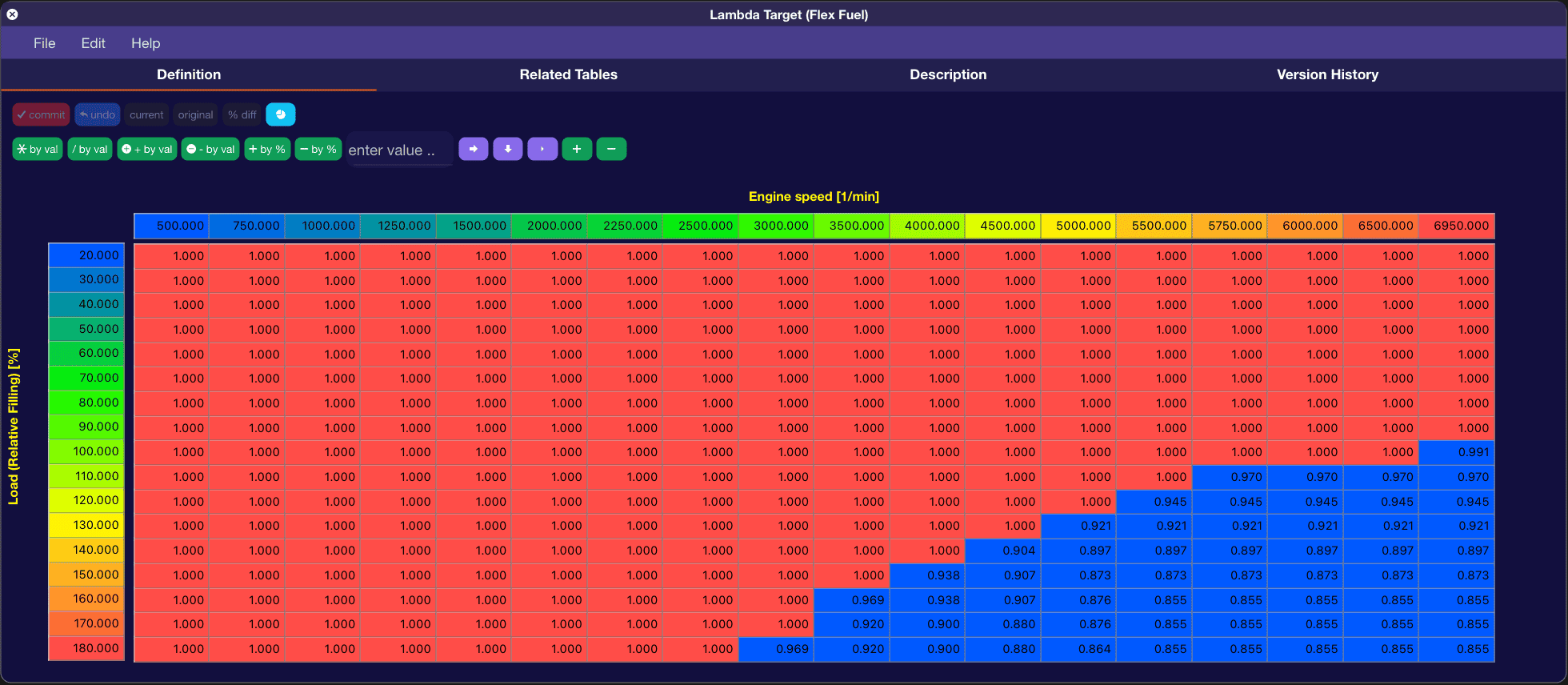
Set these values to what Lambda you are wanting to target at what RPM and Load. Here is an example from my own personal Supra tune. Keep in mind I run an E40 fuel mix so I target leaner Lambda then one would on pump gas.
Screenshot 2024-06-24 at 5.27.29 PM.png


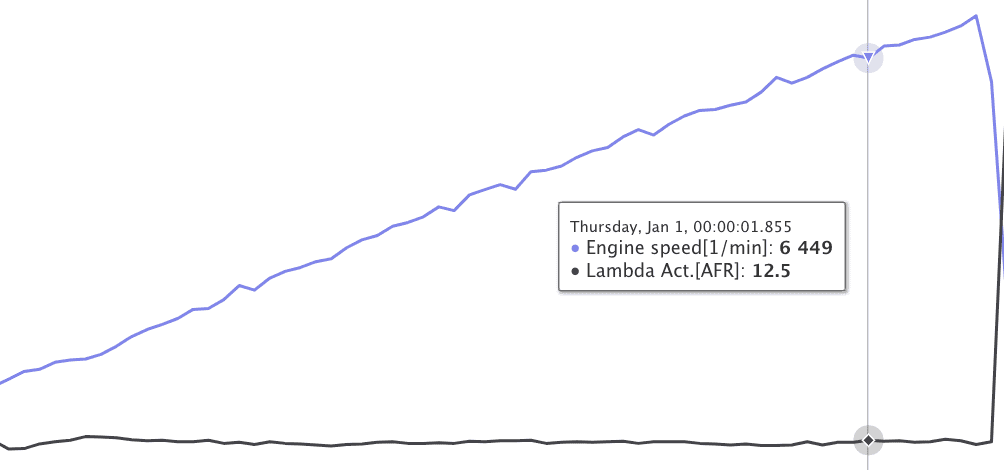
This translates to about 12.5 AFR at WOT:
Screenshot 2024-06-24 at 5.30.06 PM.png


That is it for basic fuel target tuning. My next post will be going over tables you will want to tune to get around some fuel load limitations and other tables you want to change if you are using Ethanol.
 
OP
OP
razorlab

razorlab

Well-Known Member
First Name
Bryan
Joined
Oct 2, 2021
Threads
29
Messages
8,568
Reaction score
16,797
Location
Hudson Valley, NY
Car(s)
Not a Corvette.
Continuation of fuel tuning. These tables should be tuned if you are running an ethanol mix.

Under the "Scaler" section under Fueling in BM3 you will find two tables you need to change if you are running an ethanol mix.

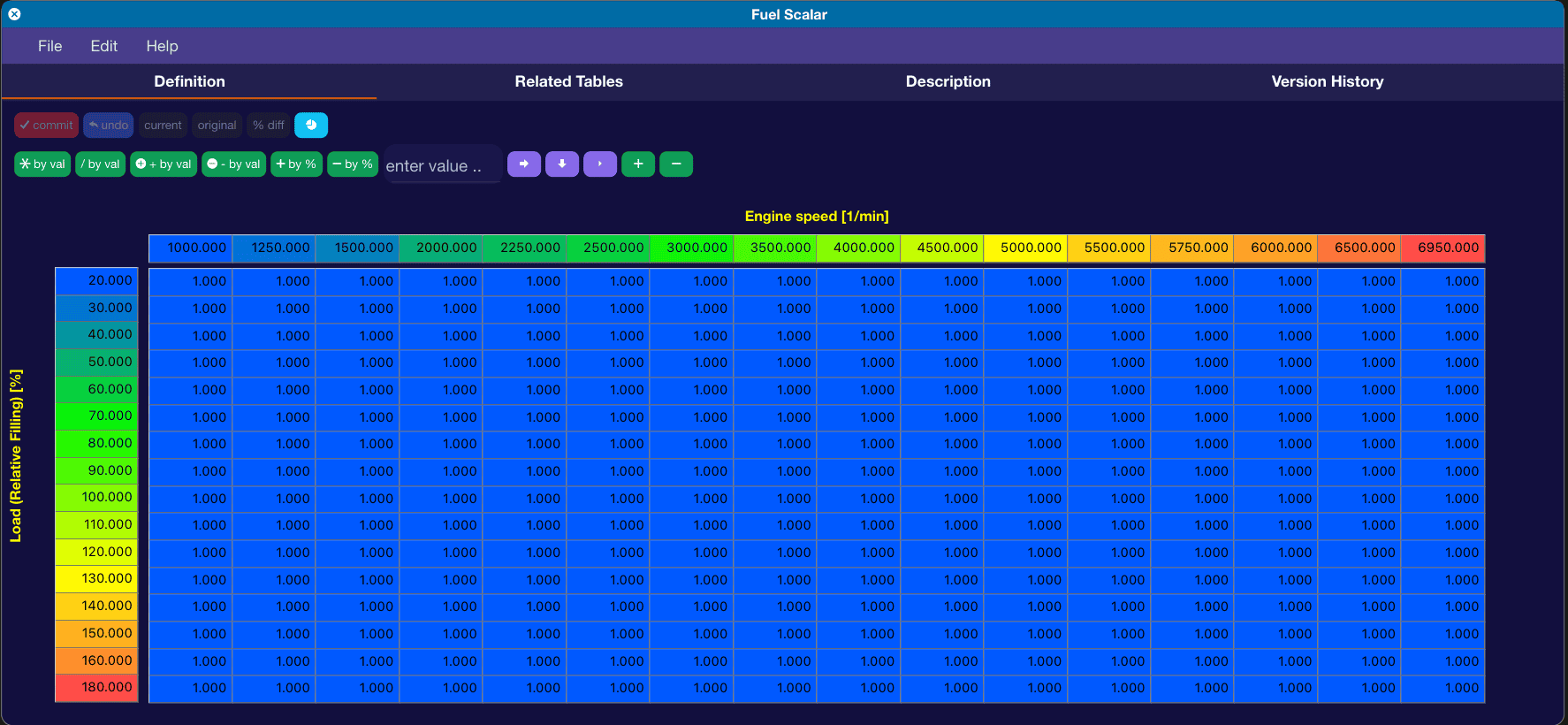
The first table is "Fuel Scalar". Factory tuning has this set at 1.000, which means no global scalar is being applied. This table is used to scale global fueling to make sure your STFT and LTFT fuel trims are in-line and don't have to work as much to hit your target fueling lambda. I set this table to 1.150 all across on my Supra since I am running an E40 mix. This will scale it 15% higher.

Screenshot 2024-06-25 at 9.56.35 AM.png


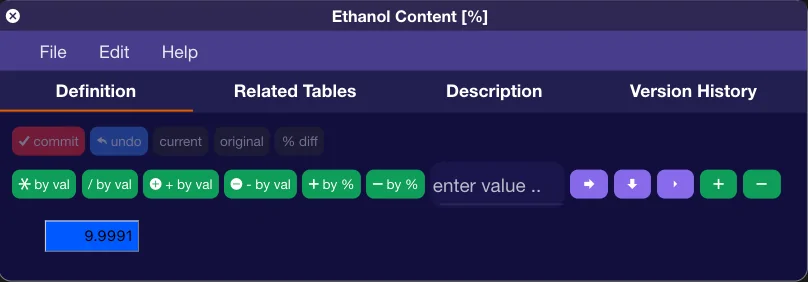
The next table is called "Ethanol Content %", this is another scalar table that also scales fueling globally. From the factory this is set at 9.9991 to account for most pump gas having 10% Ethanol in it.

Screenshot 2024-06-25 at 3.25.39 PM.png


If you are running a flex-fuel tune, then I would not touch this table and use the larger 3D table in your flex tune I outlined above for global fuel scaling. If you are not running a flex-fuel tune and just want to tune for a set amount of Ethanol, then set this to whatever percentage you plan to run. If you plan on running 40% Ethanol, then set this to 40.

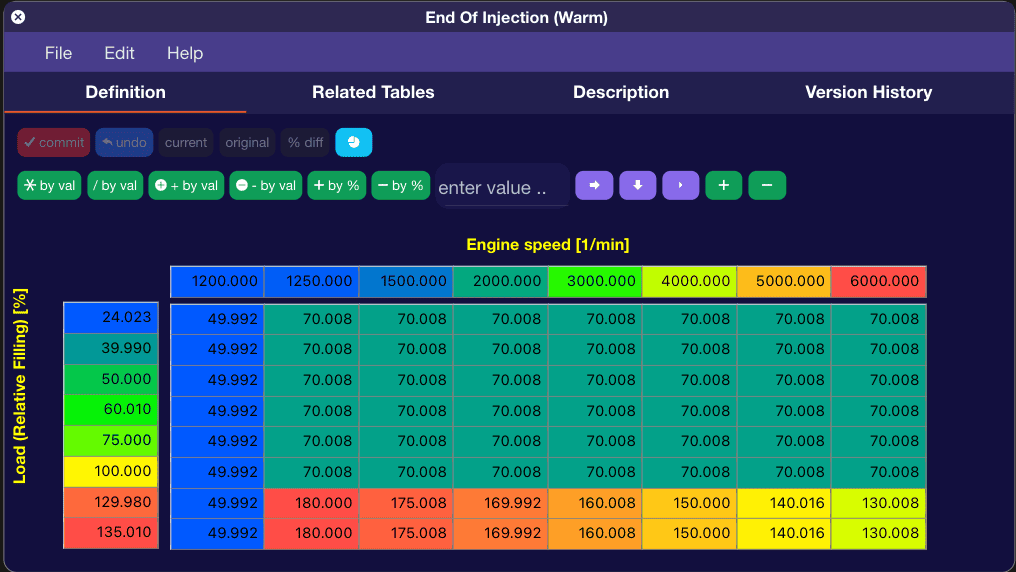
If you are running higher boost levels, or a larger turbo that can run more boost to redline, and ethanol, another table you will need to tune is the "End of Injection (Warm)" table. This basically modifies the injection angle. You can see if you are hitting the limits of this by logging the "relative filling limit active" parameter. If it logs as 8, then you need to tweak this table.

Screenshot 2024-06-25 at 3.28.27 PM.png


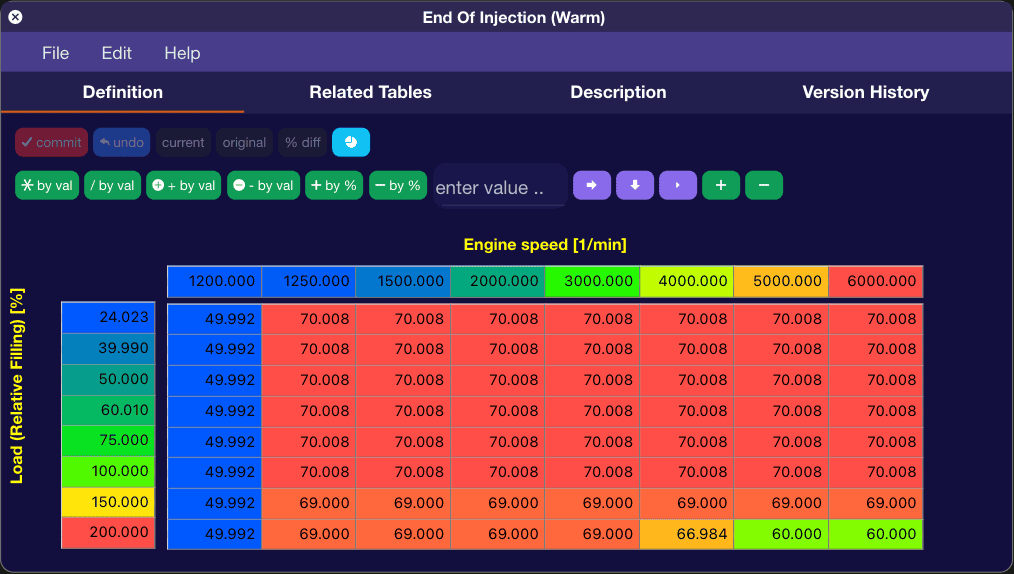
For my personal Supra, running on E40 and more than 22psi all the way to redline, I not only rescaled the Load Axis to have a 150 and 200 load, since the car is running over 200 load, but I also reduced the angle to be tighter, in order to deliver the fuel that is demanded. You can see these changes here:

Screenshot 2024-06-25 at 3.29.31 PM.png


The next filling limit you are likely to hit with more boost and ethanol is Filling Limit 4, which has to do with the LPFP tables.

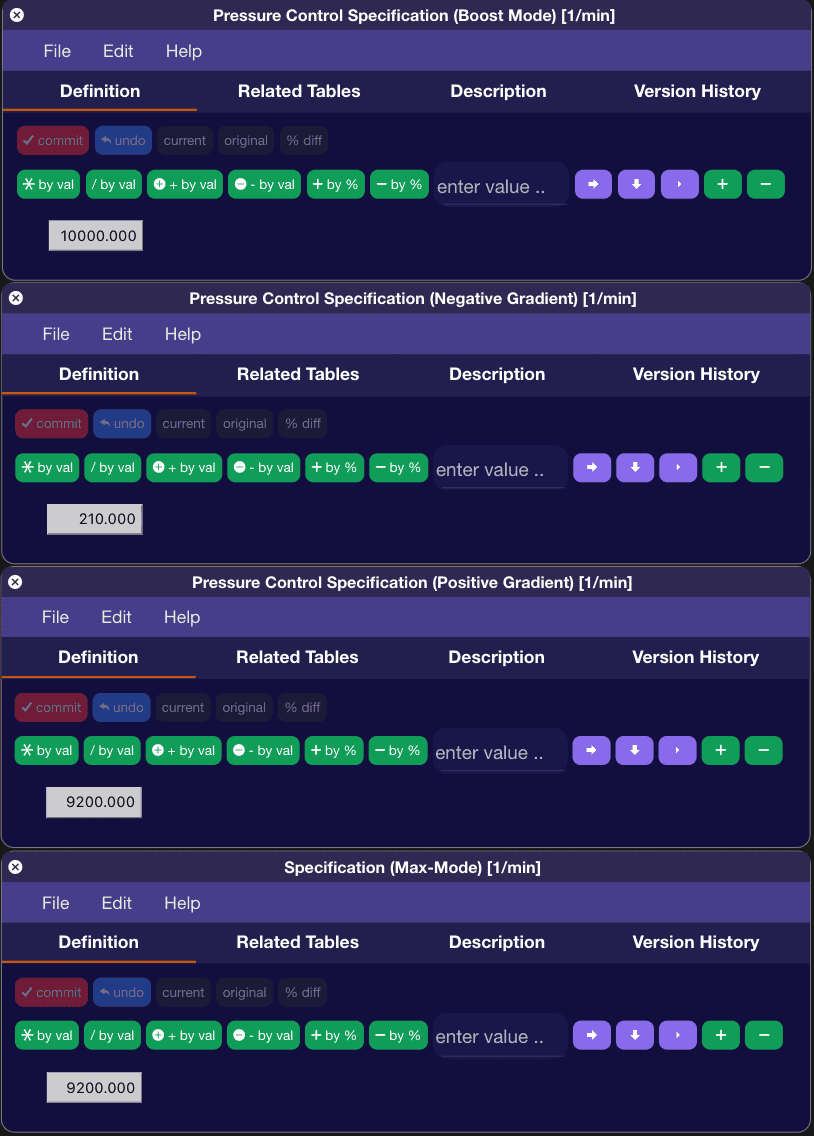
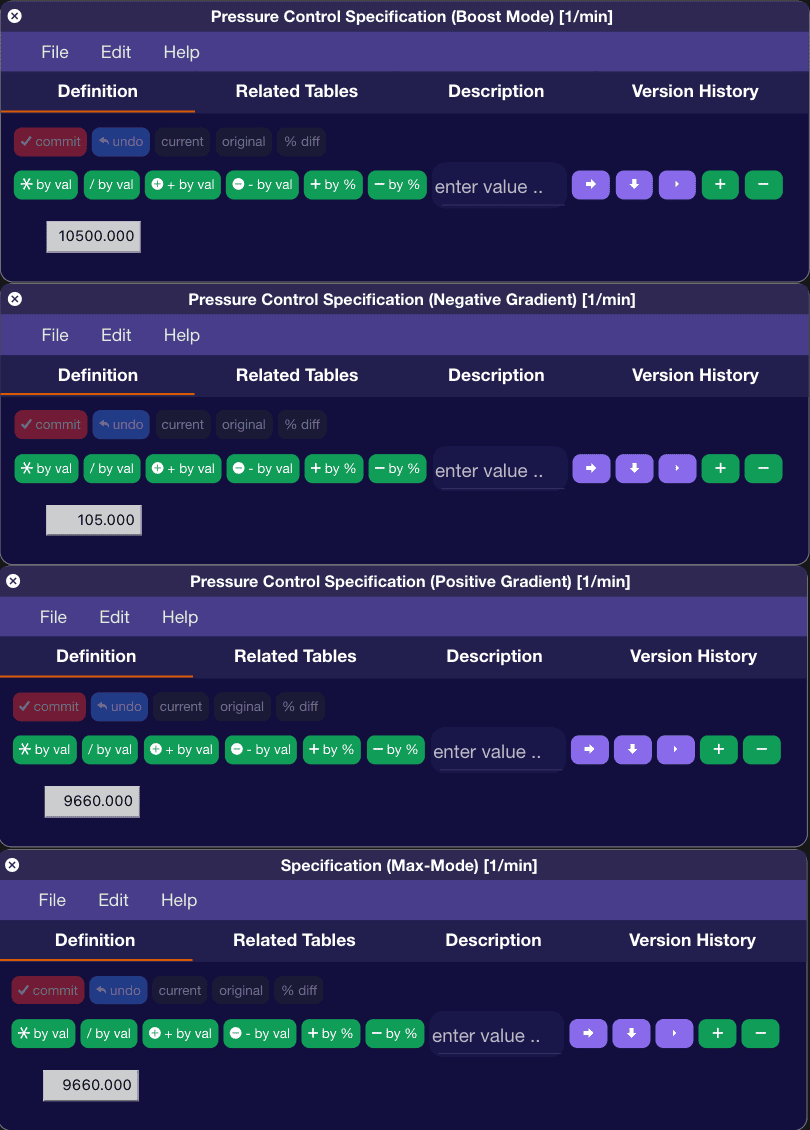
There are four tables you will want to change. Pressure Control Specification (Boost Mode), Pressure Control Specification (Negative Gradient), Pressure Control Specification (Positive Gradient), and Specification (Max-Mode):

Screenshot 2024-06-25 at 3.43.20 PM.png


For my personal Supra, I changed the values in this table to be:

Screenshot 2024-06-25 at 3.45.41 PM.png
 

bk5

Well-Known Member
First Name
BK
Joined
Oct 26, 2023
Threads
2
Messages
217
Reaction score
289
Location
Ohio
Car(s)
CUL A91-MT
Cool stuff!

How does traction control tie into this? Does that have it's own separate tables?

Are you able to program the differential?
 
OP
OP
razorlab

razorlab

Well-Known Member
First Name
Bryan
Joined
Oct 2, 2021
Threads
29
Messages
8,568
Reaction score
16,797
Location
Hudson Valley, NY
Car(s)
Not a Corvette.
How does traction control tie into this? Does that have it's own separate tables?

Are you able to program the differential?
Traction control is in it's own module that we cannot access. Same with the rear differential. Bootmod3/MHD/Ecutek is DME only.

There are two tables in the DME that retard timing based on loss of traction that you can fine tune if needed.
 
OP
OP
razorlab

razorlab

Well-Known Member
First Name
Bryan
Joined
Oct 2, 2021
Threads
29
Messages
8,568
Reaction score
16,797
Location
Hudson Valley, NY
Car(s)
Not a Corvette.
Moving on to Ignition Timing. This is where things start getting a bit more serious and by the time you get it all dialed you might start feeling this way:

i+might+be+a+wizard.gif


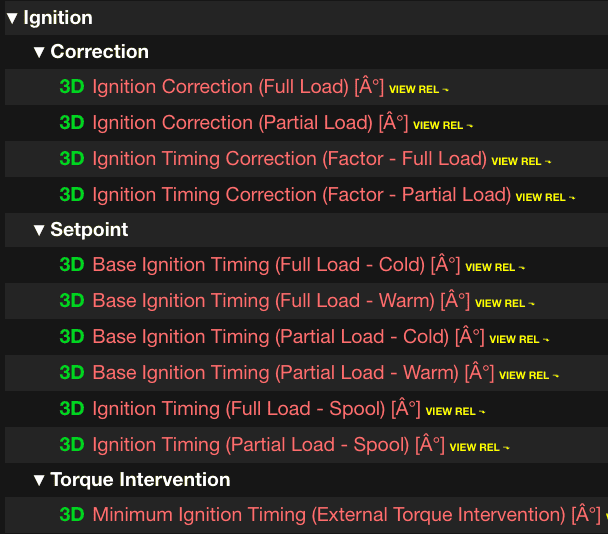
These are the base ignition tables you will want to change:

Screenshot 2024-06-26 at 3.22.53 PM.png


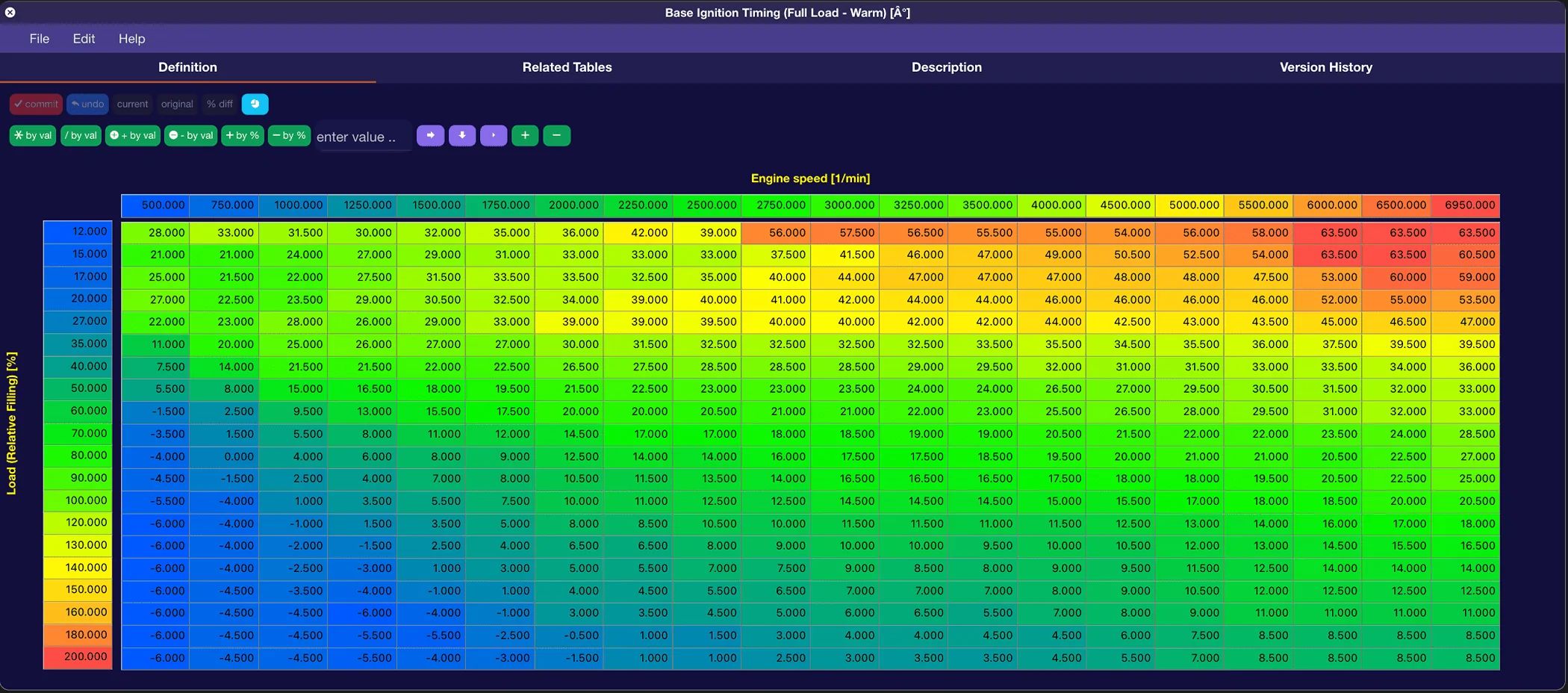
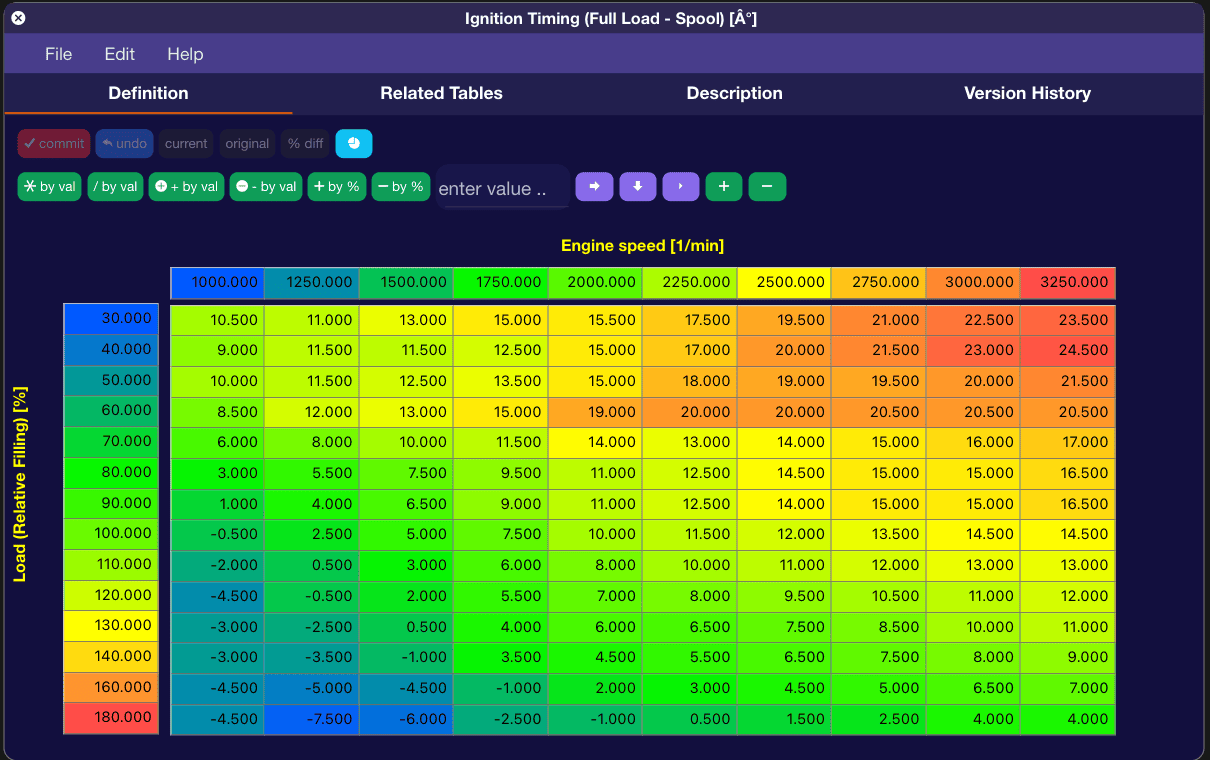
The main table will be the Base Ignition Timing (Full Load - Warm). This is the table that the ECU will use at WOT to set the base ignition values.

Screenshot 2024-06-26 at 2.49.59 PM.webp


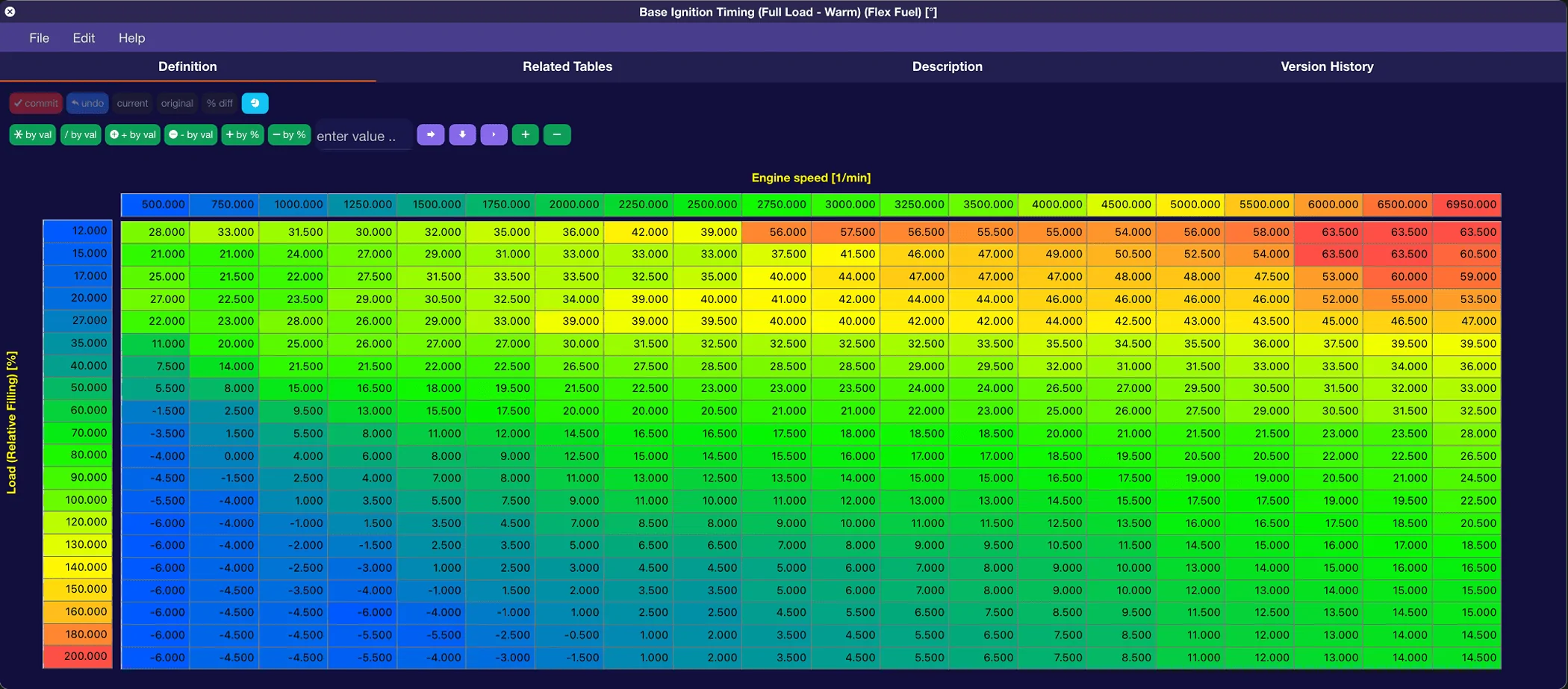
Ignition values will vary depending on the boost and fuel you are running. It will also depend on what you plan on using the car for. Since I track my Supra, I don't push ignition timing to the edge of MBT. Another thing to keep in mind is that the 2020 supra has a higher compression ratio than the 21+, therefore, it will run less ignition timing on average compared the 21+ models.

On my personal Supra, on E40, this is what my Base Ignition Timing (Full Load - Warm) table looks like:

Screenshot 2024-06-26 at 3.05.20 PM.webp


The other base ignition tables, (Full Load - Cold), (Partial Load - Warm), (Partial Load - Cold) I usually set to be a bit lower with ignition timing. This is where lots of datalogging in different driving situations will help you with dialing them in.

Another thing logging will help you dial in are the Ignition Timing Spool tables. There are two, Full Load and Partial Load. If you see timing reduction, by logging (RAM) Ignition Timing Corr. (Total), while the car is spooling into boost, then start reducing ignition timing values in these tables.

Screenshot 2024-06-26 at 3.08.44 PM.png


Speaking of ignition timing correction, let's talk about the correction tables now.

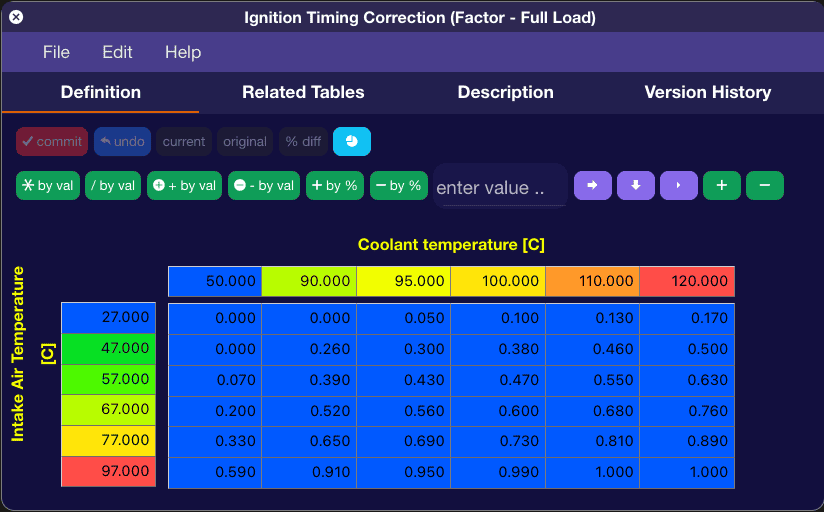
The first two tables to look at are Ignition Timing Correction (Factor - Full Load) and (Factor - Partial Load).

Screenshot 2024-06-26 at 3.13.49 PM.png


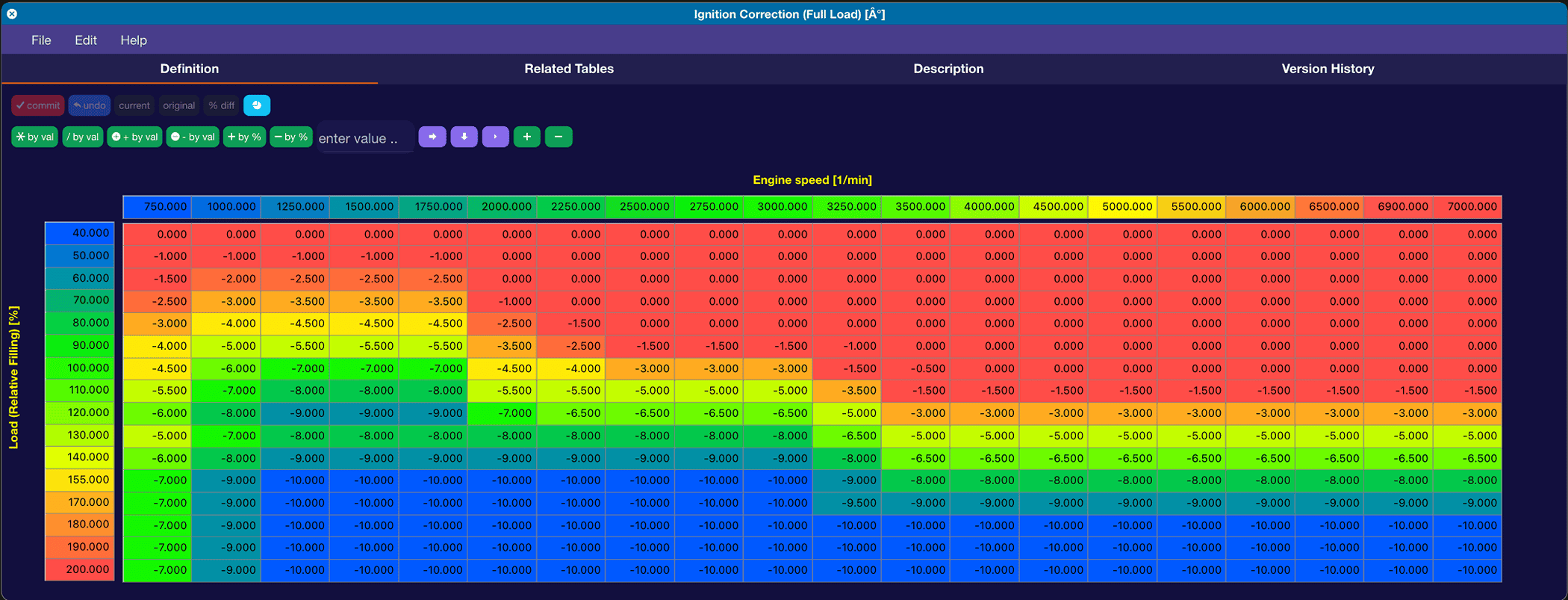
This table has IAT on one axis and Coolant Temp on the other Axis, with the table values being a lookup factor for this table, Ignition Correction (Full Load):

Screenshot 2024-06-26 at 3.15.50 PM.png


So, a simple example here is, if we look at the Ignition Timing Correction (Factor - Full Load) table above, at 47c IAT and 120c Coolant temp, it's going to use 50% (0.500) of whatever value is in the Ignition Correction (Full Load) at the current Load and RPM. So let's say you are at 180 load and 6500 rpm, it would reduce your ignition timing by 5* (50% of -10*).

Both these tables are set pretty aggressively from the factory, to accommodate for all different types of environments and driving styles. If you are running an ethanol mix, you can bring down both these tables from being so aggressive. MAKE SURE YOU LOG and take baby steps here. These tables help save the engine, so don't get too greedy.

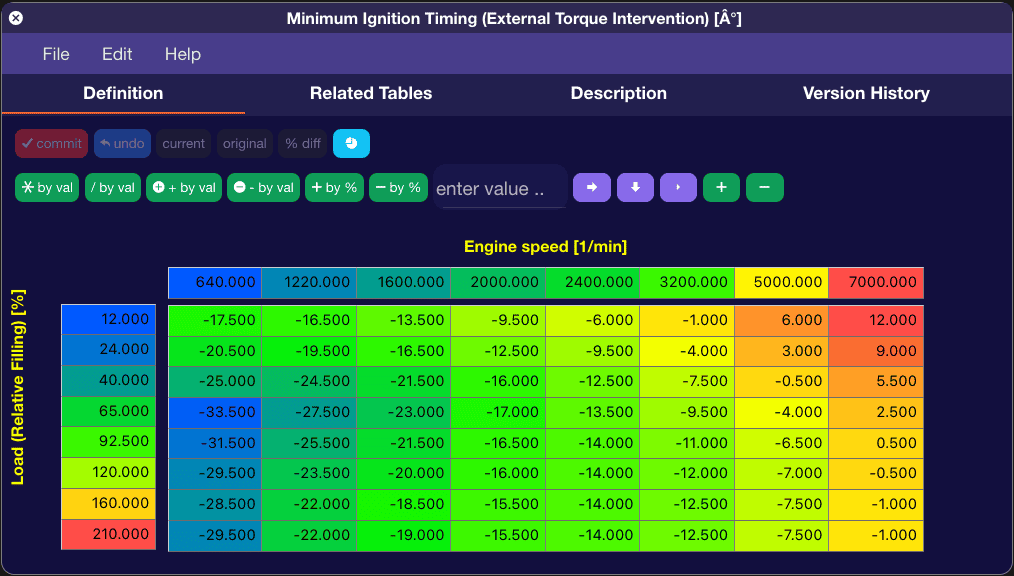
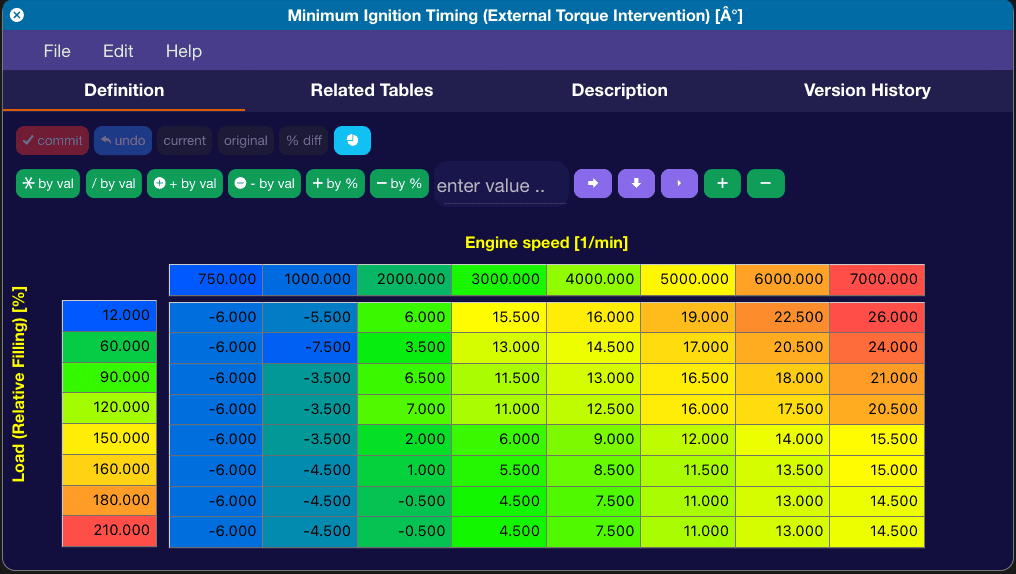
The last table you want to tweak is Minimum Ignition Timing (External Torque Intervention):

Screenshot 2024-06-26 at 3.26.22 PM.png


The ECU will lookup this table in a loss of traction event (if you have Traction Control on). Keep in mind this is the minimum (floor) ignition timing the ECU can bring itself down to. So for example, if you have a large loss of traction at 5000 RPM, the ECU can reduce your ignition timing all the way down to -7.5*. This table is pretty aggressive and you will absolutely feel the timing being reduced when this table is active. I found that the car already does other things for loss of traction like throttle reduction and such, so for my personal Supra, I just have this table match my normal WOT ignition table, essentially making it so there is no ignition timing reduction at WOT when there is a loss of traction event. This actually makes the car far more controllable on track (If you keep TC on), in my experience.

This is what the table looks like in my tune. I even went to the extent of rescaling both axis for more granular control.

Screenshot 2024-06-26 at 3.32.33 PM.png


When logging, make sure you log these items in order to see how everything is working:

(RAM) Ignition Timing Corr. Cyl. 1[°]
(RAM) Ignition Timing Corr. Cyl. 2[°]
(RAM) Ignition Timing Corr. Cyl. 3[°]
(RAM) Ignition Timing Corr. Cyl. 4[°]
(RAM) Ignition Timing Corr. Cyl. 5[°]
(RAM) Ignition Timing Corr. Cyl. 6[°]
(RAM) Ignition Timing Cyl. 1[°]
(RAM) Ignition Timing Cyl. 2[°]
(RAM) Ignition Timing Cyl. 3[°]
(RAM) Ignition Timing Cyl. 4[°]
(RAM) Ignition Timing Cyl. 5[°]
(RAM) Ignition Timing Cyl. 6[°]
(RAM) Ignition Timing Total[°]
 

zrk

Well-Known Member
First Name
Zack
Joined
Apr 20, 2021
Threads
80
Messages
8,473
Reaction score
14,119
Location
Chicago, IL
Car(s)
2021 Supra - Nocturnal Black
Factory tuning has this set at 1.000, which means no global scalar is being applied.
Hey! So, we haven't argued about anything for a while, so I will try to start a fight.

Setting this value to 1.0 does not mean that a no global scalar is being applied, there absolutely is. A scalar modifier value will be multiplied on any table against the corresponding value. In this case, the scalar is 1, so the corresponding value isn't modified, but the scalar is still applied.
 
OP
OP
razorlab

razorlab

Well-Known Member
First Name
Bryan
Joined
Oct 2, 2021
Threads
29
Messages
8,568
Reaction score
16,797
Location
Hudson Valley, NY
Car(s)
Not a Corvette.
Hey! So, we haven't argued about anything for a while, so I will try to start a fight.

Setting this value to 1.0 does not mean that a no global scalar is being applied, there absolutely is. A scalar modifier value will be multiplied on any table against the corresponding value. In this case, the scalar is 1, so the corresponding value isn't modified, but the scalar is still applied.
Lol, potato potaaatttto.
 
OP
OP
razorlab

razorlab

Well-Known Member
First Name
Bryan
Joined
Oct 2, 2021
Threads
29
Messages
8,568
Reaction score
16,797
Location
Hudson Valley, NY
Car(s)
Not a Corvette.
It's Load time fellas. Now we are getting into the good stuff...

IaLG69W.gif


I'm sure you have read that our ECU's are load/torque based, which is pretty common for a modern ECU. You might ask, how do I set boost on a load/torque based ECU? Well, to that I say, let's not get ahead of ourselves just yet. Let's talk about Load.

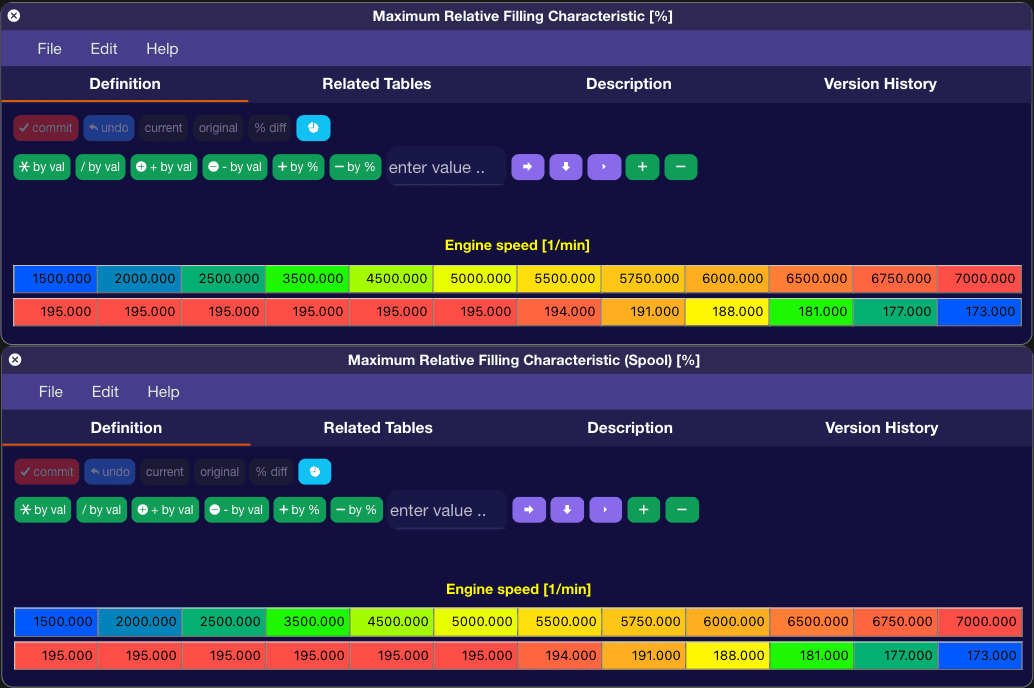
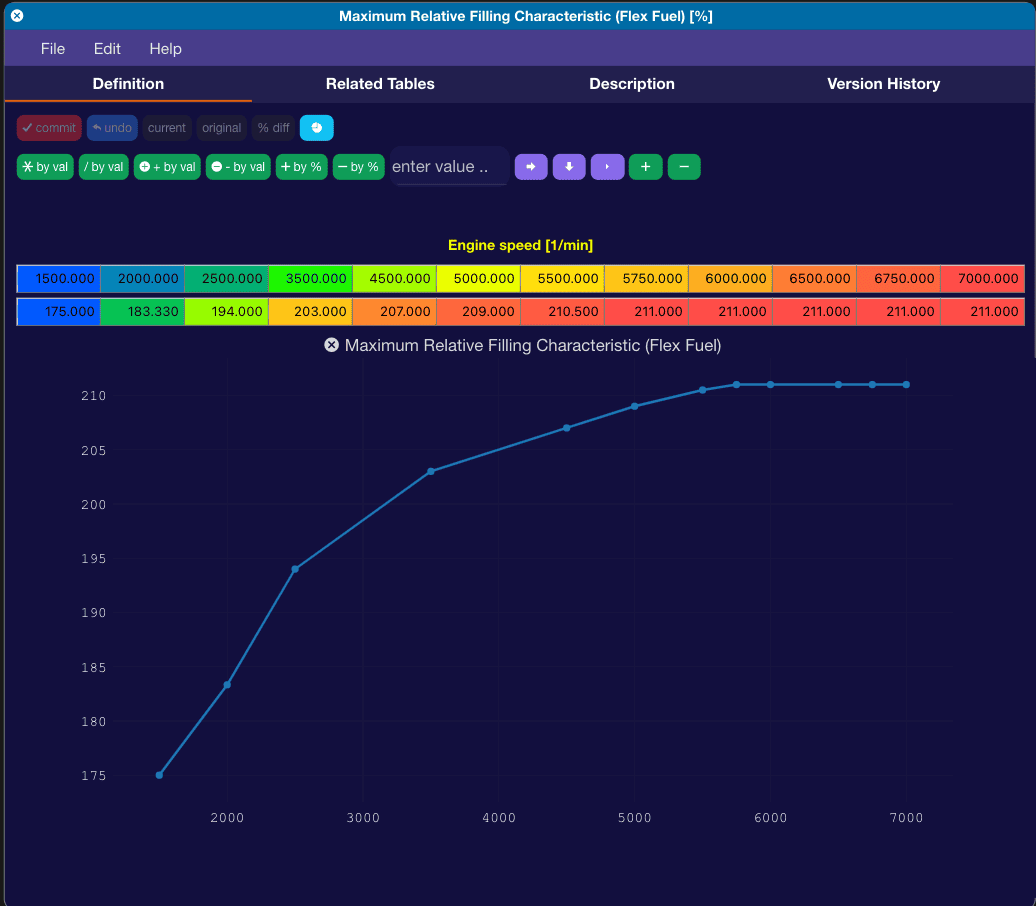
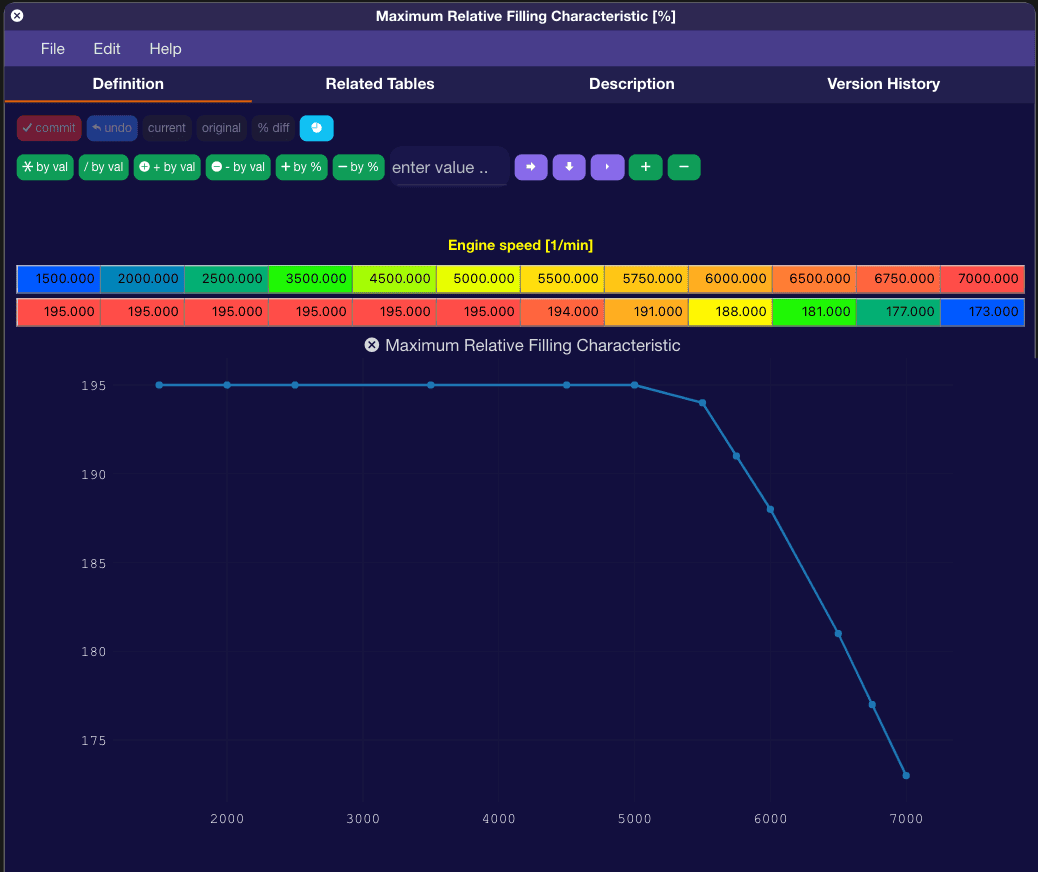
The first table(s) you will want to start tuning are the Maximum Relative Filling Characteristic tables. We have one main one and one used while the turbo is spooling.

Screenshot 2024-07-17 at 12.27.22 PM.png


For simplicity, you can set both these tables to be the same.

These are the main Load limiter tables. If you do not change these, the ECU will try and limit load to whatever numbers are in these tables. It does this by closing the throttle.

Closing the throttle you say? Yes. The ECU uses throttle control as part of it's load/torque management strategy. Some closure is fine, but a well tuned car should have no large throttle closures. If the ECU sees the the load go over, it will start closing the throttle to try and bring the load back down. One way to help prevent this is to treat these tables as a load ceiling instead of a target.

For my personal Supra, with a Pure 700 turbo and E40 fuel, these tables look something like this:

Screenshot 2024-07-17 at 12.34.19 PM.png


This curve looks very similar to my actual boost curve. (*hint)

While the OEM settings are very similar to the OEM boost curve:

Screenshot 2024-07-17 at 12.38.24 PM.png


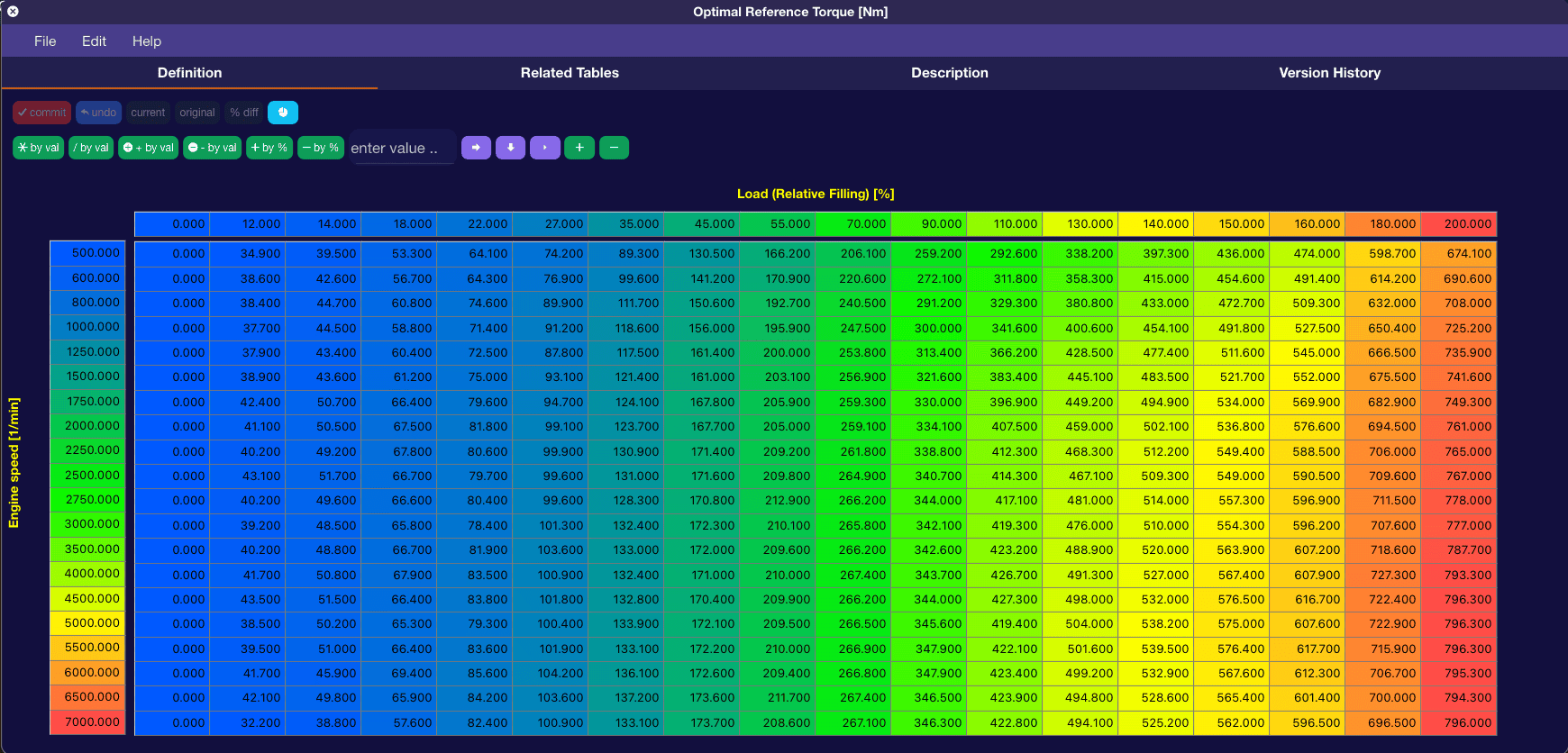
The next table you need to look at is the Optimal Reference Torque table:

Screenshot 2024-07-17 at 12.43.46 PM.png


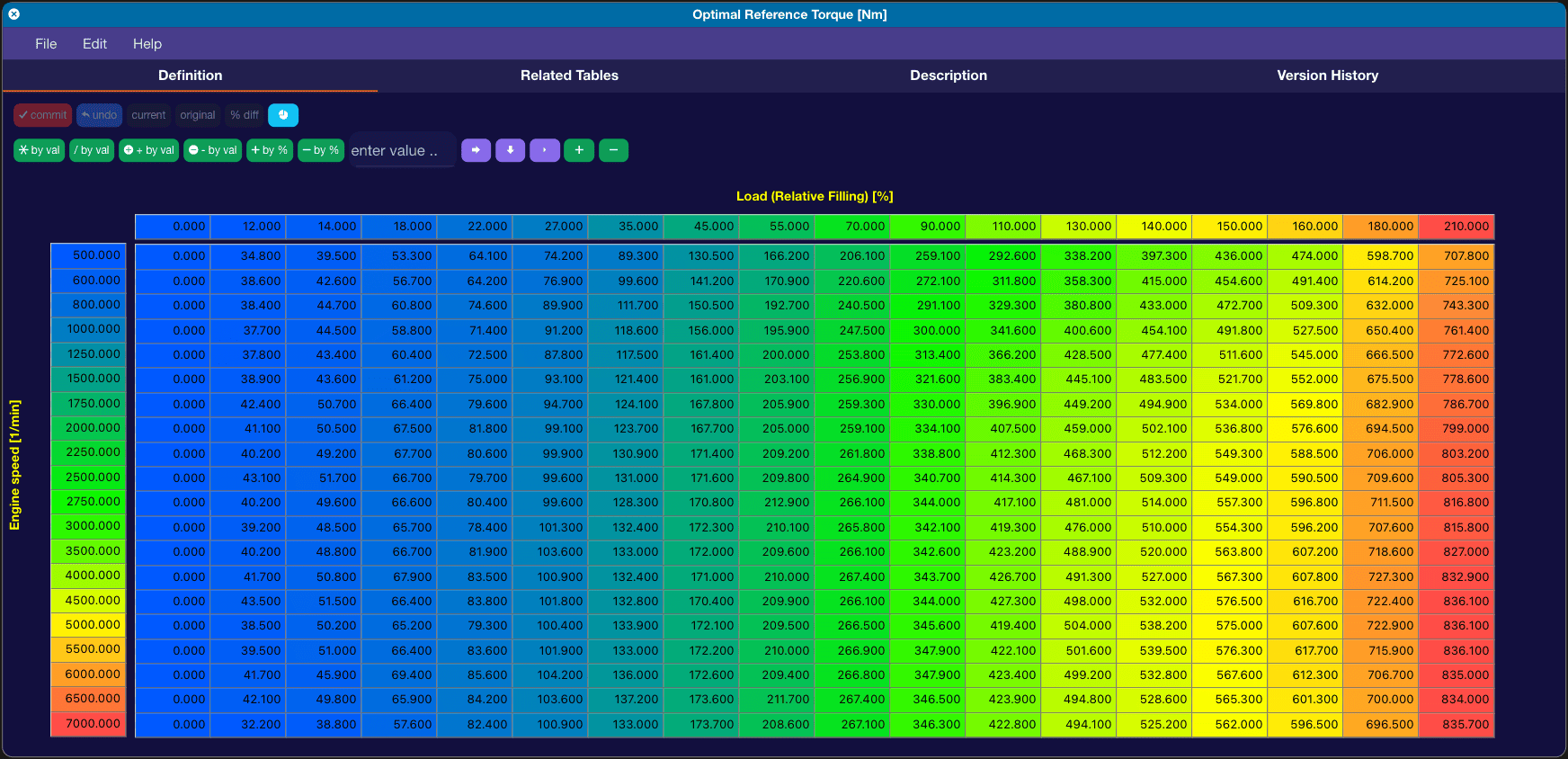
This converts load to torque and sets the load request for a given torque request. With normal setups, you don't have to do much to this table other than extend the last column to make sure the load is higher than what you have in your Maximum Relative Filling Characteristic tables. No matter what numbers you put in the Maximum Relative Filling Characteristic tables, the load will be bound by the right column of this table. So just go ahead and change the last load cell from 200 to 210 or 220, depending on the load you predict you will see. Also make sure to scale the last torque column as well to match.

Something like this:

Screenshot 2024-07-17 at 12.47.51 PM.png


One big thing to keep in mind if you start messing with the torque numbers are that putting lower torque numbers in will increase load, but the torque numbers are reported to the transmission and will change the characteristics of shifts and clamping pressures.

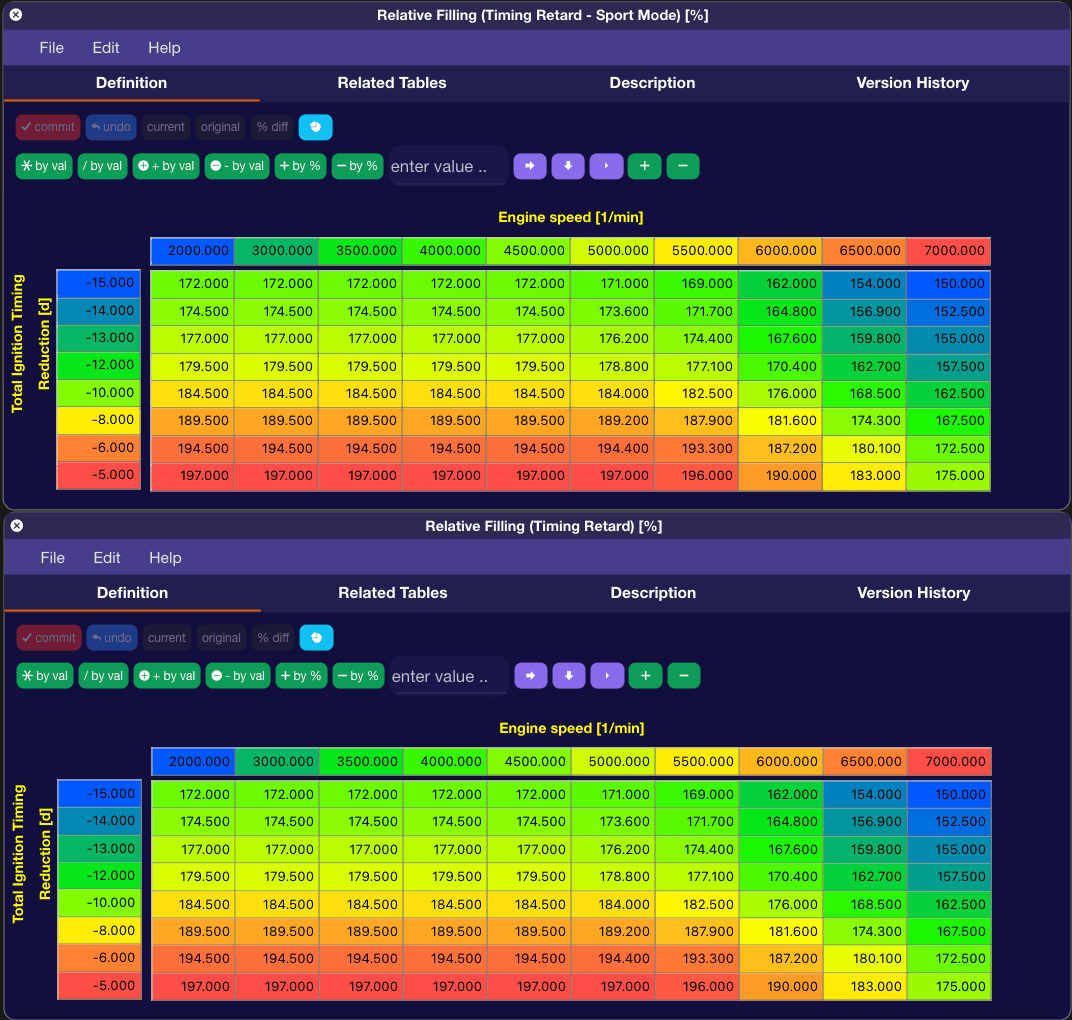
Next two tables are correction tables. Relative Filling (Timing Retard) and Relative Filling (Timing Retard-Sport Mode):

Screenshot 2024-07-17 at 12.59.34 PM.png


These tables can limit load depending on how much ignition timing reduction the ECU is seeing.

You can see the OEM programming is not reducing load at all up to -5* of ignition timing reduction, and then after that, it will start progressively bringing load down as ignition timing reduction increases.

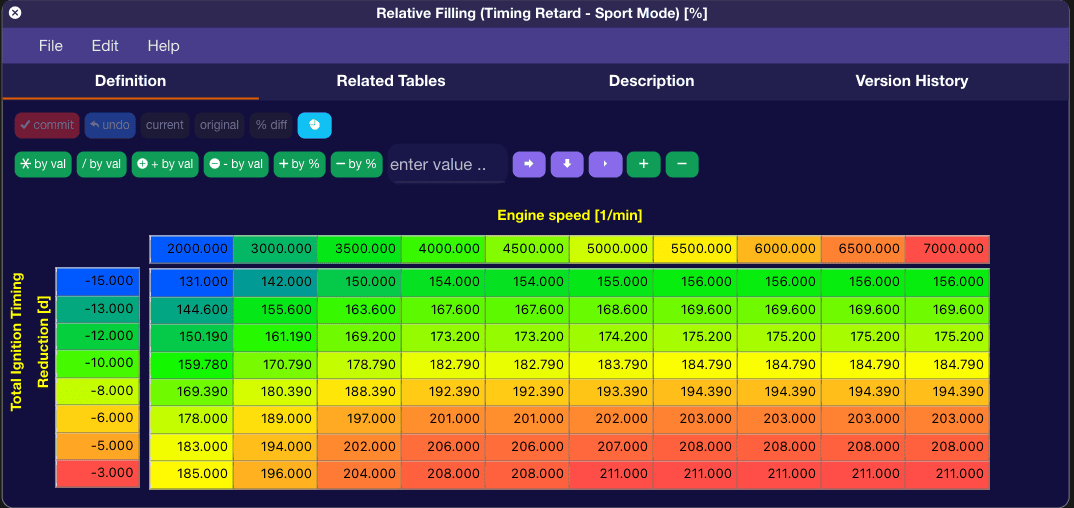
So make sure once you set your Maximum Relative Filling Characteristic tables, copy the values there to the -5* row and then progressively reduce in the other rows, like OEM. Or you can just max the table out so you never get load reduction and cross your fingers and hope for the best.

You can also rescale the left axis to give more granular control. I did this with my personal tune:

Screenshot 2024-07-17 at 1.04.57 PM.png


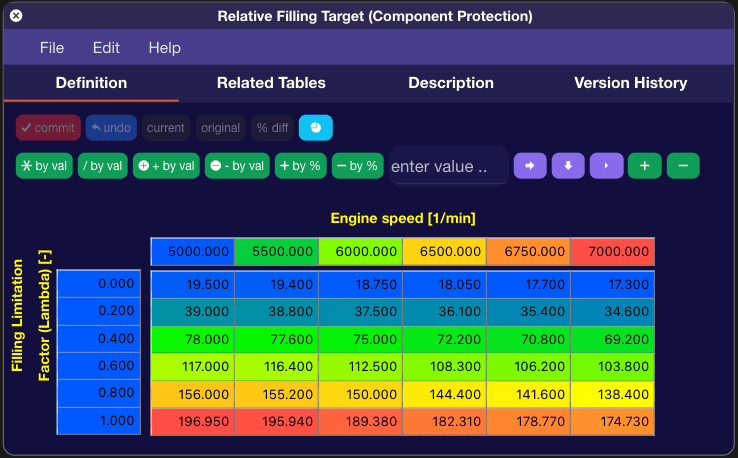
Another table you will want to touch is the Relative Filling Target (Component Protection) table. This will also limit load based on what AFR/Lambda the car is running.

Screenshot 2024-07-17 at 1.08.17 PM.png


Most tunes run a richer AFR/Lambda than OEM, so be sure to adjust this table accordingly.

These last two tables will limit load higher in the RPM range once you start tuning in more boost/power.

Screenshot 2024-07-17 at 1.13.46 PM.png


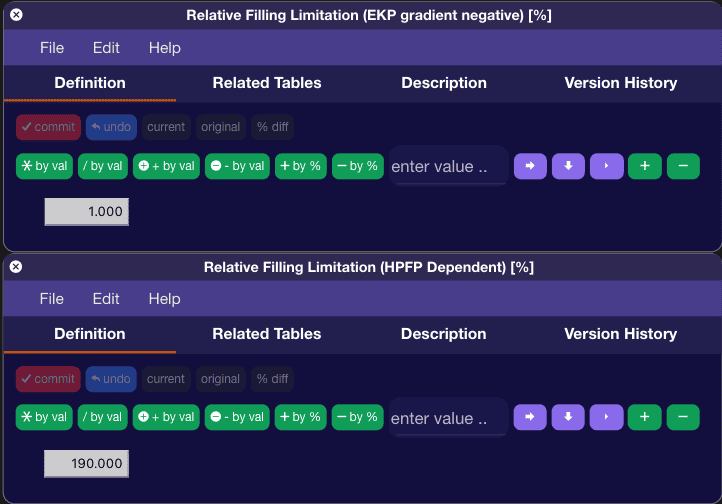
The first one, Relative Filling Limitation (EKP gradient negative) is basically a timer for how long until it starts reducing load if load hits the value in the second table, Relative Filling Limitation (HPFP Dependent).

Set the first table to 0 and set the second table higher than whatever the highest load value you have in your Maximum Relative Filling Characteristic tables.


Top