Sponsored

Tuning Tools now live!

OP
OP
razorlab

razorlab

Well-Known Member
First Name
Bryan
Joined
Oct 2, 2021
Threads
29
Messages
8,669
Reaction score
16,995
Location
Not this fucking shit fuck stupid forum.
Car(s)
Not a Corvette.
Great! Any chance of a full screen graphing, sort of like old style datazap?

I really liked having 2-3 views i could click through with a large view and auto axis scaling, rather than a lot of scrolling up and down.
Do you mean one card with all plots possible?
Sponsored


mk5.Leo

New Member
First Name
Leo
Joined
Mar 11, 2026
Threads
1
Messages
2
Reaction score
0
Location
arizona
Car(s)
2020 Supra
This is awesome! what can i use to record the lap times? thanks.
 
OP
OP
razorlab

razorlab

Well-Known Member
First Name
Bryan
Joined
Oct 2, 2021
Threads
29
Messages
8,669
Reaction score
16,995
Location
Not this fucking shit fuck stupid forum.
Car(s)
Not a Corvette.
Great! Any chance of a full screen graphing, sort of like old style datazap?

I really liked having 2-3 views i could click through with a large view and auto axis scaling, rather than a lot of scrolling up and down.
Would something like this give you what you want? I've been wanting to add resizing for a while now.


ColonelAdama

Well-Known Member
First Name
Adam
Joined
Jan 30, 2023
Threads
2
Messages
1,467
Reaction score
1,672
Location
Greenville, SC
Car(s)
2023 Absolute Zero Supra 3.0 Premium MT, 2015 GTI
Would something like this give you what you want? I've been wanting to add resizing for a while now.

exactly that! very nice implementation. One more idea too, can we upload multiple logs at a time? maybe a max of 3 or 5?
 
OP
OP
razorlab

razorlab

Well-Known Member
First Name
Bryan
Joined
Oct 2, 2021
Threads
29
Messages
8,669
Reaction score
16,995
Location
Not this fucking shit fuck stupid forum.
Car(s)
Not a Corvette.
Tuner Tools v1.1 released.

Some of you will probably very much appreciate the XML feature. ;)

https://norcalmotorsports.org/logapp/

Release notes: (Can also be found in the app by clicking on the info button in the top right)

v1.1 — April 24, 2026

Overall


- Release notes modal (this screen)

- Added new S58 XDF 00005C64148706 to library

- Added support for multi-file upload in My Files


Tune Analysis : Datalog Viewer

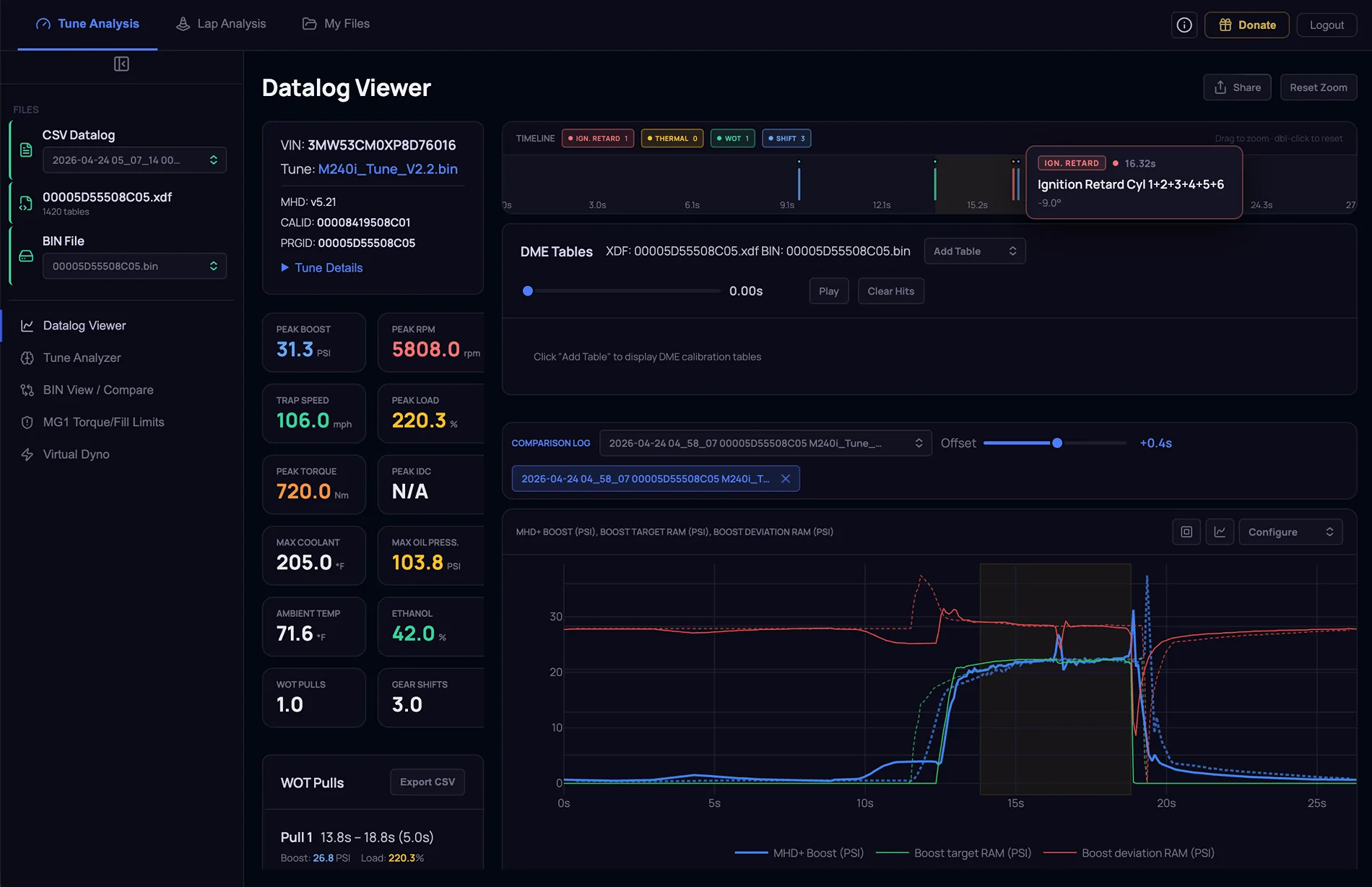
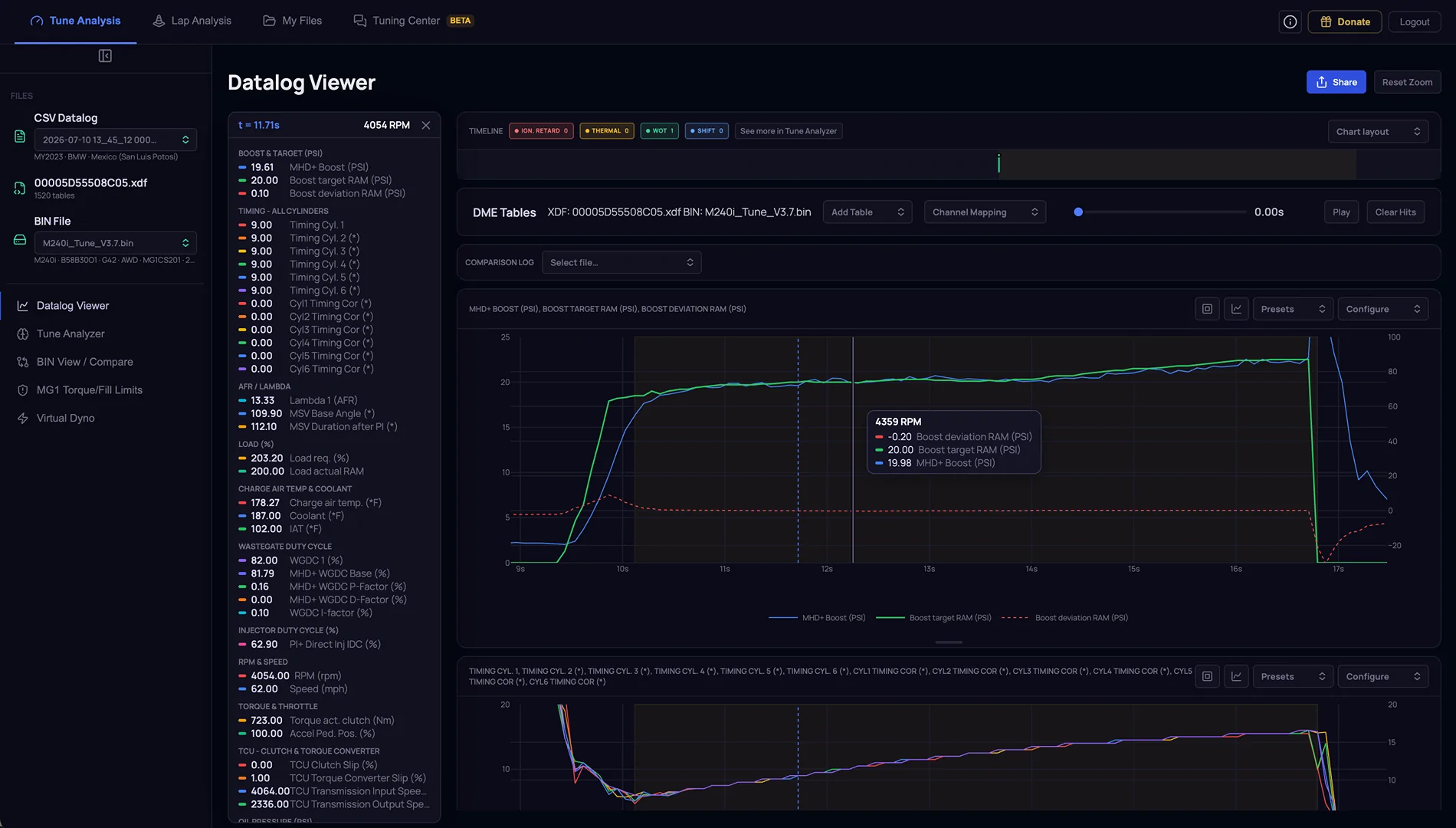
- Added the ability to load a comparison log to overlay onto the current loaded log file. Once the comparison log is loaded, use the Offset slider to align the two log files.

- Timeline markers. When loading a datalog, the system analyzes the file and adds clickable markers to call out certain events on the timeline. Currently showing Ignition Retard, Thermal, WOT, and Shift events. Clicking on a timeline marker zooms in to that event in the log file.

- Datalog plot cards are now user resizable vertically. The size of the card is also remembered across sessions.

- Datalog Viewer Shares: fixed a bug that it would only share the data channels selected at the time of share. Now sharing a datalog retains all logged data channels

- Datalog Viewer Shares: Added the same vertical resizing that was added to the Datalog Viewer

- Default Boost target plot is now a solid thin line instead of dashed for better readability


Tune Analysis : BIN View / Compare

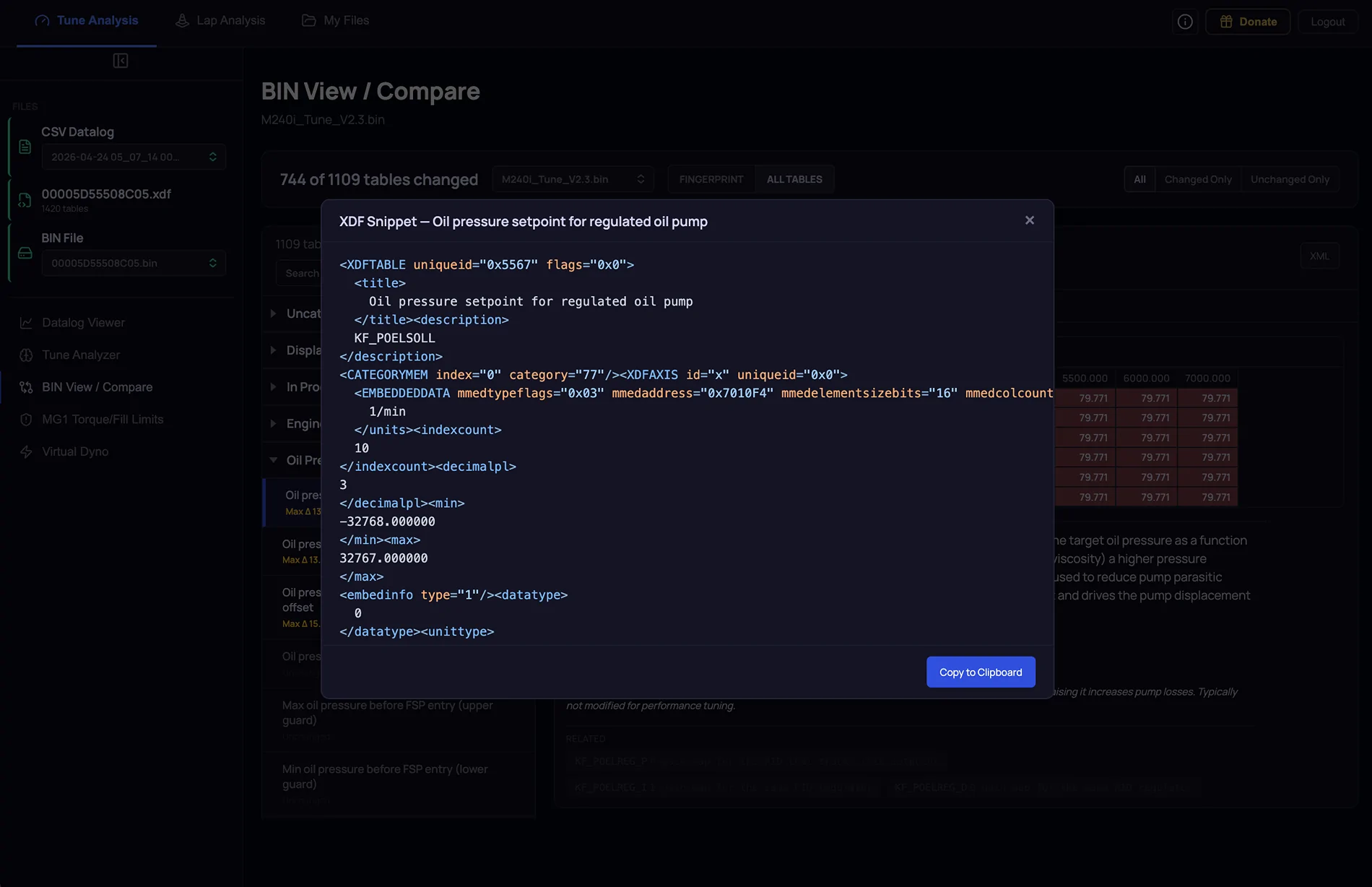
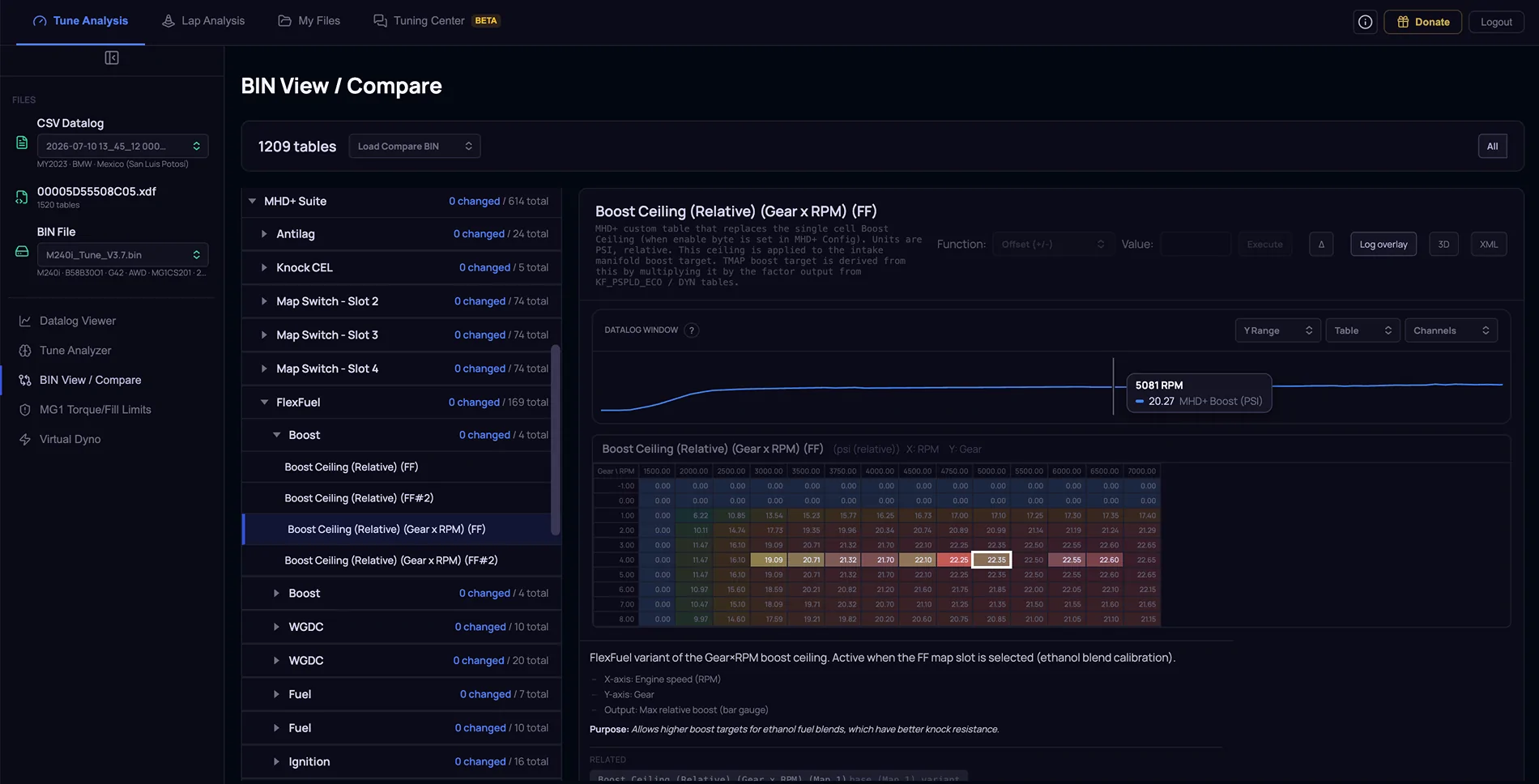
- Added the ability to view and copy the XML snippet for each table.

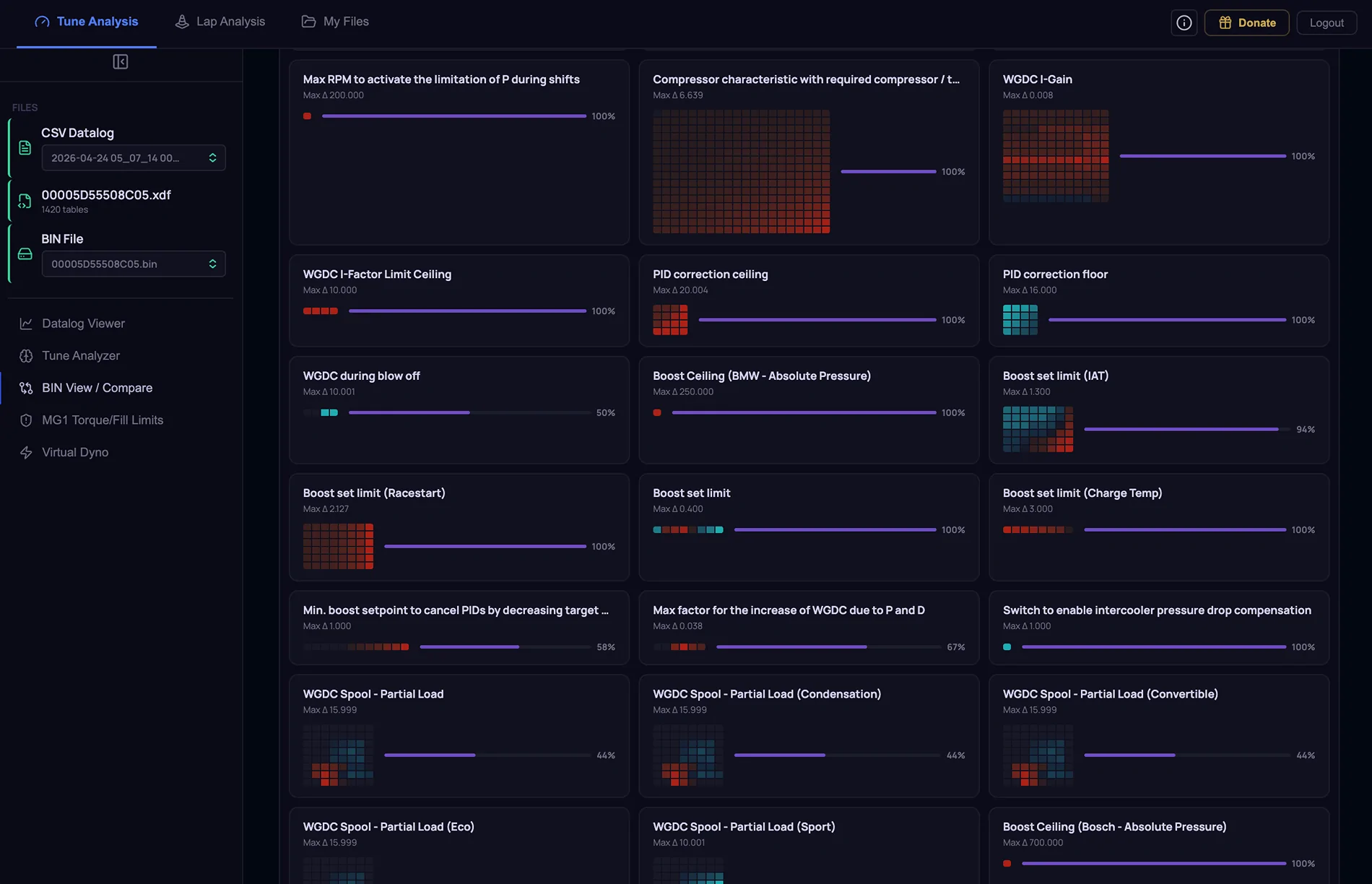
- When you load a BIN to compare, there is a new Fingerprint view that serves as a dashboard for all changes done to the loaded BIN file. Clicking on a table card navigates to the actual table details

- Switch between “Fingerprint” and “All Tables” via a toggle.


Tune Analysis : Virtual Dyno

- When a comparison log is loaded, the HP and lb-ft number colors now match the actual dyno plot colors


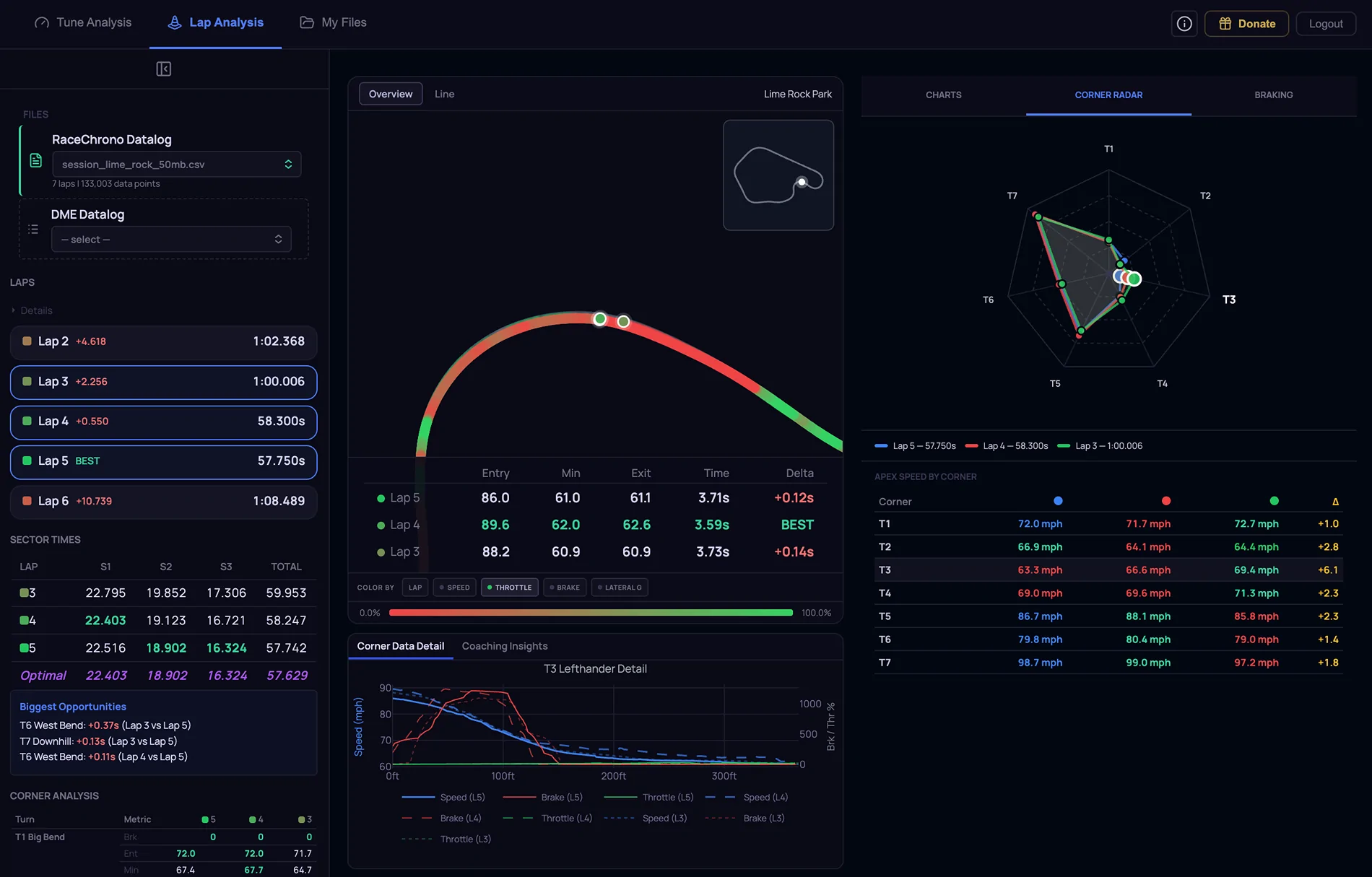
Lap Analysis

- Added support for large CSV uploads up to 200 MB

- Track map can now be colored by Speed, Throttle, Brake, or Lateral G

- Added support for more tracks

- Started to hardcode actual corners and corner names. More to come!

- Added Corner Radar tab on the right. Shows VMIN for each corner with a spider chart and list. When comparing multiple laps, an overlay appears on the spider chart and the list shows the VMIN delta numbers

- Added Braking tab on the right. When selecting multiple laps, braking events for each corner are displayed visually to show braking point differences

Screenshot 2026-04-24 at 1.13.58 PM.webp
Screenshot 2026-04-24 at 1.14.26 PM.webp
Screenshot 2026-04-24 at 1.14.52 PM.webp
Screenshot 2026-04-24 at 1.17.56 PM.webp
 
OP
OP
razorlab

razorlab

Well-Known Member
First Name
Bryan
Joined
Oct 2, 2021
Threads
29
Messages
8,669
Reaction score
16,995
Location
Not this fucking shit fuck stupid forum.
Car(s)
Not a Corvette.
Tuning Tools v1.3 update is now live

https://norcalmotorsports.org/logapp

Tune Analysis : Datalog Viewer

Performance

- Big logs open faster: a live parse indicator, and point decimation tuned for huge captures.
- Fixed a double-render on load.


Pinned Cursor
- Long-press any chart to pin a cursor at that instant, a readout panel appears alongside the charts with every channel's value at that exact moment, and it stays put while you study the pull.

Datalog cell tracing with mini compare plot
- Overlay a datalog directly onto DME tables to see exactly which cells the car operated in, with per-cell hit counts.
- Selectable modes: max, min, delta-from-table, or raw table values, plus a per-table Z-channel picker.
- The companion mini compare plot is zoom-synced: narrow its time window to a single pull and the table overlay recalculates for just that slice, with a shared RPM tooltip tracking your cursor across both.


Chart Defaults
- The default chart cards (and their axis ranges) are now centrally managed — plus a one-click Reset all charts to defaults control.
- Per-cylinder timing-correction channels added to the MHD Timing card defaults.


Tune Analysis : Tune Analyzer

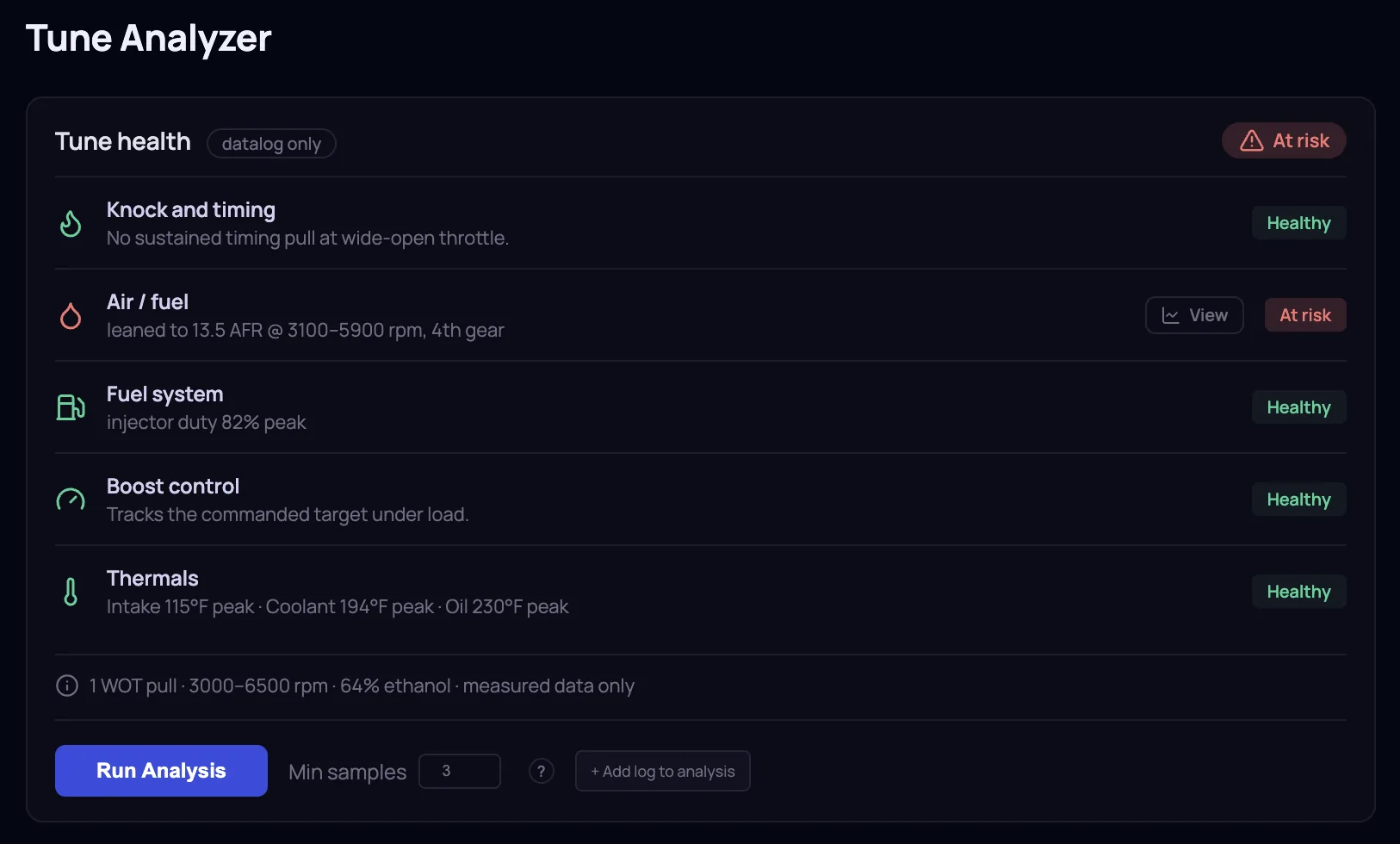
Tune Health scorecard

- Every datalog now gets a health report: Knock, Air/Fuel, Fuel System, Boost Control, and Thermals.
- The noise is engineered out: a condition must persist to flag, and gear shifts are buffered.
- Checks the log can't support are shown greyed rather than hidden, so you always know what was and wasn't evaluated.
- Every finding links straight into the Datalog Viewer at the exact moment it happened.


Flex-fuel aware analysis
- Fuel Scalar and Ignition Timing analysis read the logged flex interpolation and weight their math across the map catalog. Results land on the tables the DME was actually blending.
- Each card shows the blend plainly (e.g. Interpolation: 0.72 · 72% on this table) and defaults to the nearest table.
- A manual interpolation override lets you model a different mix.


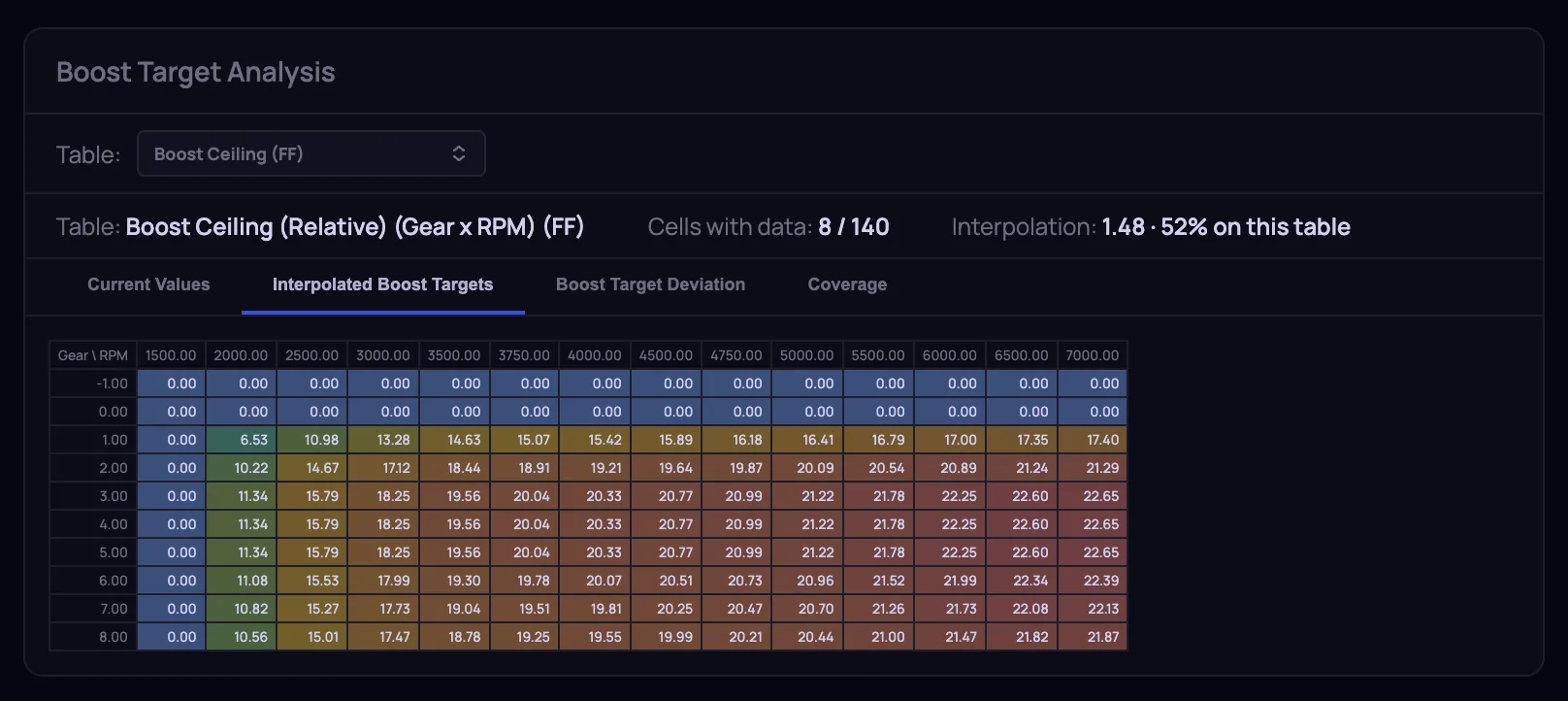
Boost Target Analysis
- New analyzer card reconstructing what the DME sees: Interpolated Boost Targets (flex-weighted) and a Boost Target Deviation tab showing exactly where actual boost ran away from target.

N54 Platform Support added
- Drop in an N54 BIN and the calibration ID is read from the file's contents, with auto-match against a new N54 XDF library.
- N54 table decoding corrected end-to-end: per-element byte order, column-major layouts (WGDC tables now read correctly), and TunerPro hex/ASCII display formats.


Tune Analysis : BIN View / Compare
- The category tree now follows the XDF's own ordering, matching the layout you know from TunerPro.
- Table search also matches A2L names, not just display titles.
- Tables defined as hex or string in the XDF render correctly.
- The per-table axis picker now shows exactly which datalog channel Use global default resolves to.


S58 definition defined table updates
- 00005C64145007 : +170
- 00005C64144606 : +168
- 00005C64143C05 : +151
- 00005C640A6405 : +8
- 00005C640A8205 : +8
- 00005C640A8C05 : +8


B58 definition defined table updates
- 00005D55506406 : +160
- 00005D55506405 : +134
- 00005D55505008 : +114
- 00005D5550480C : +99
- 00005D55503C05 : +70
- 00005D55504809 : +70
- 00005D55504807 : +62
- 00005D55503705 : +49
- 00005D55502807 : +46
- 00005D55465A09 : +16
- 00005D55463C07 : +14
- 00005D55464605 : +14
- 00005D55465005 : +14
- 00005D55465A07 : +14
- 00005D55466408 : +14
- 00005D55468205 : +14
- The rest have 10 or less updates.


My Files
- Create folders (with subfolders), drag files in, and the tree carries through the whole app.
- Favorites for one-tap access, rename in place, and bulk select to move or delete in one action.


MG1 Torque / Fill Limits
- Cleaned up and updated all Fill/Torque limit descriptions and tables.

Tuning Center (BETA)
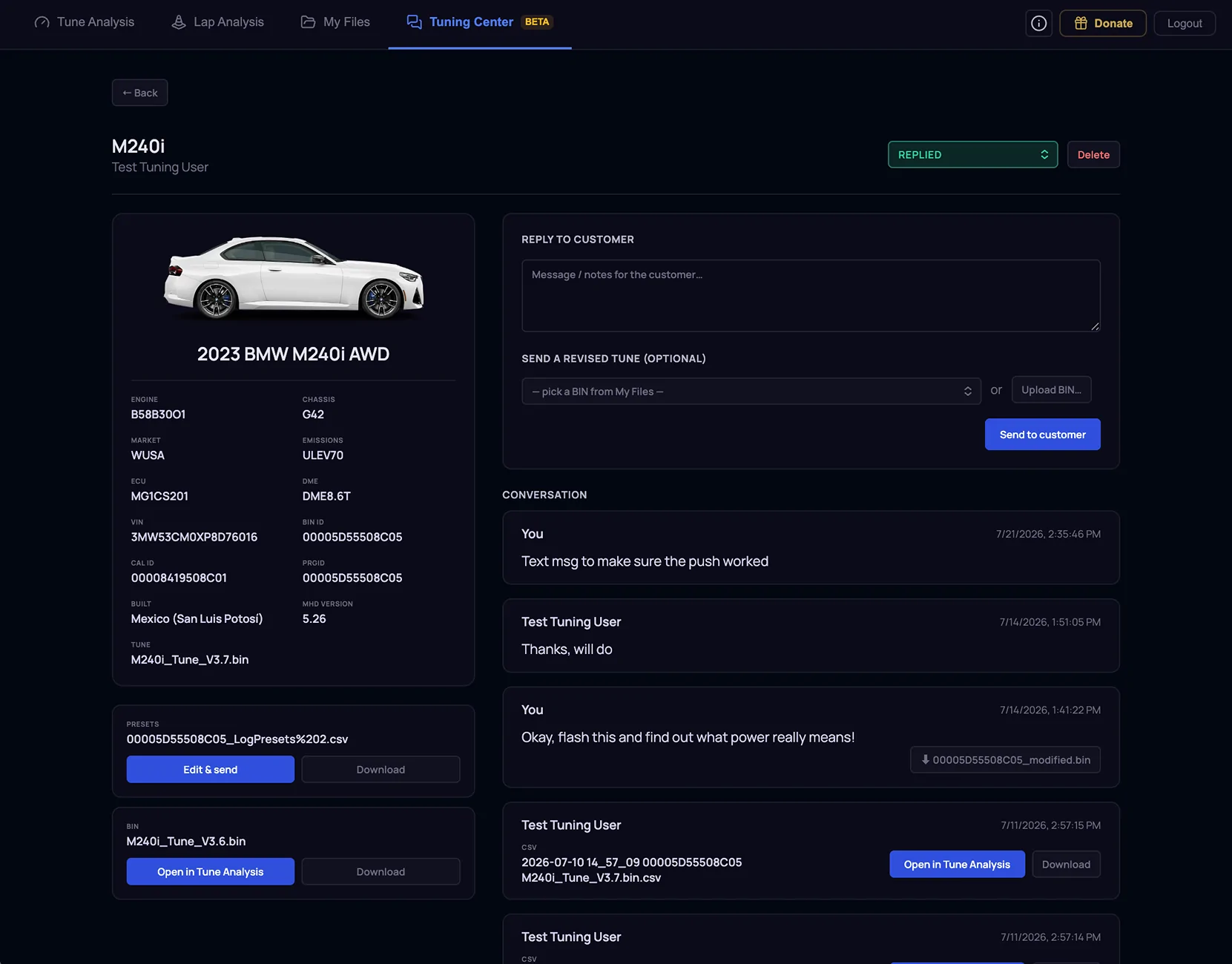
- Remote tuning, built into the platform. The Tuning Center turns the back-and-forth of custom tuning, the emails, the misnamed files, the "did you get my log?" texts into one guided, trackable workspace.
-
Companion Mobile App coming soon

For the Tuner

- Reviews workspace built around customers, not uploads. Cases group by customer with mini vehicle cards — model and car image resolved automatically from the VIN and the BIN's own descriptor.
- Everything in context. Open a case and the original submission (BIN, log presets, car details, customer's notes) sits beside the full conversation and every log they've ever sent.
- Open in Tune. One click loads the customer's BIN and CSV logs straight into the viewer, tables, analyzer, compare… no download-and-reupload shuffle.
- Reply with the fix. Send a revision straight from My Files or upload one; ship updated log presets alongside it; set the case status as work progresses.
- Never miss a reply. An attention dot in the nav lights up the moment a customer sends something new, and customer submissions file themselves into My Files under each customer automatically.


For Customers
- New customers are walked through their first submission step by step: back up the stock/current BIN, export log presets from MHD, tell us about the car. The uploader checks the files as they land, it recognizes real MHD exports, catches the wrong file before it wastes a round-trip, and reads the VIN and calibration straight out of the BIN so nobody has to type a chassis code.
- Every submission becomes a case with its own vehicle card: car, VIN, status at a glance: Submitted → In review → Tune ready.
- One conversation per car. Each case has a running thread: send datalogs with a note attached, ask questions, and get answers in context.
- One-tap revision delivery. When a new tune is ready, it lands in the thread as a revision card, download the BIN and flash it in MHD. Updated log presets arrive the same way, so the next datalog captures exactly the channels the tuner needs.
- Email updates at every step, so nothing sits unseen.

Screenshot 2026-07-21 at 2.48.23 PM.webp
Screenshot 2026-07-21 at 2.49.12 PM.webp
Screenshot 2026-07-21 at 2.49.25 PM.webp
Screenshot 2026-07-21 at 2.50.18 PM.webp
Screenshot 2026-07-21 at 2.50.51 PM.webp
 

nanaisu

Well-Known Member
First Name
Ronnie
Joined
Jul 2, 2024
Threads
1
Messages
242
Reaction score
296
Location
United States
Website
bananaisu.com
Car(s)
2022 Supra 3.0 Premium
OP
OP
razorlab

razorlab

Well-Known Member
First Name
Bryan
Joined
Oct 2, 2021
Threads
29
Messages
8,669
Reaction score
16,995
Location
Not this fucking shit fuck stupid forum.
Car(s)
Not a Corvette.
Hey all, some more TuningTools updates! I took the DME strategy flow table filtering I released last week another step further and I believe this will be even more valuable for everyone.

http://www.tuningtools.io

There is now a more robust section in the left nav called "MG1 Tuning + Strategies". This houses five new sections (in addition to the MG1 Torque/Fill Limits section from before). These new sections walk through the MG1 strategies around Torque Structure, Target Airflow/Boost, Fueling & Lambda, Ignition & Knock control, and VANOS / Valvetrain. A big question I always hear from people is that they find it hard to understand the DME logic for fill/torque/boost control. Well now the "Target Airflow/Boost" section shows you the full logic flow, what tables are used, what those tables do, what they do in the logic flow and how each stage in the flow creates an input for the next stage in the flow. If you have a BIN loaded, for each table that is defined for that BIN, you can click on the title and go directly into the BIN View / Compare section.

Torque Structure and Target Airflow/Boost sections are fully filled out. I am currently working through the rest. As always, I work on this for all of you, so please give any feedback that you might have!


QTR FMS

Well-Known Member
First Name
Fahad
Joined
Nov 4, 2025
Threads
4
Messages
72
Reaction score
32
Location
Qatar
Car(s)
2024 6MT
Incredible progress on the tool. This makes me think of how lazy MHD is to not have their own dedicated software.

Have you thought about making your own flasher tool and datalogger? Because I think that should be your next step you are almost there.

Regarding the MG1 tuning + strategies, if you can also add the visuals from the official BMW SwCalDocs and expand on some of the tuning notes to make it similar to your self-tuning thread.

Another thing do you use individual XDF files for each bin? I think you once mentioned on Facebook that you were working on something similar to my idea below.

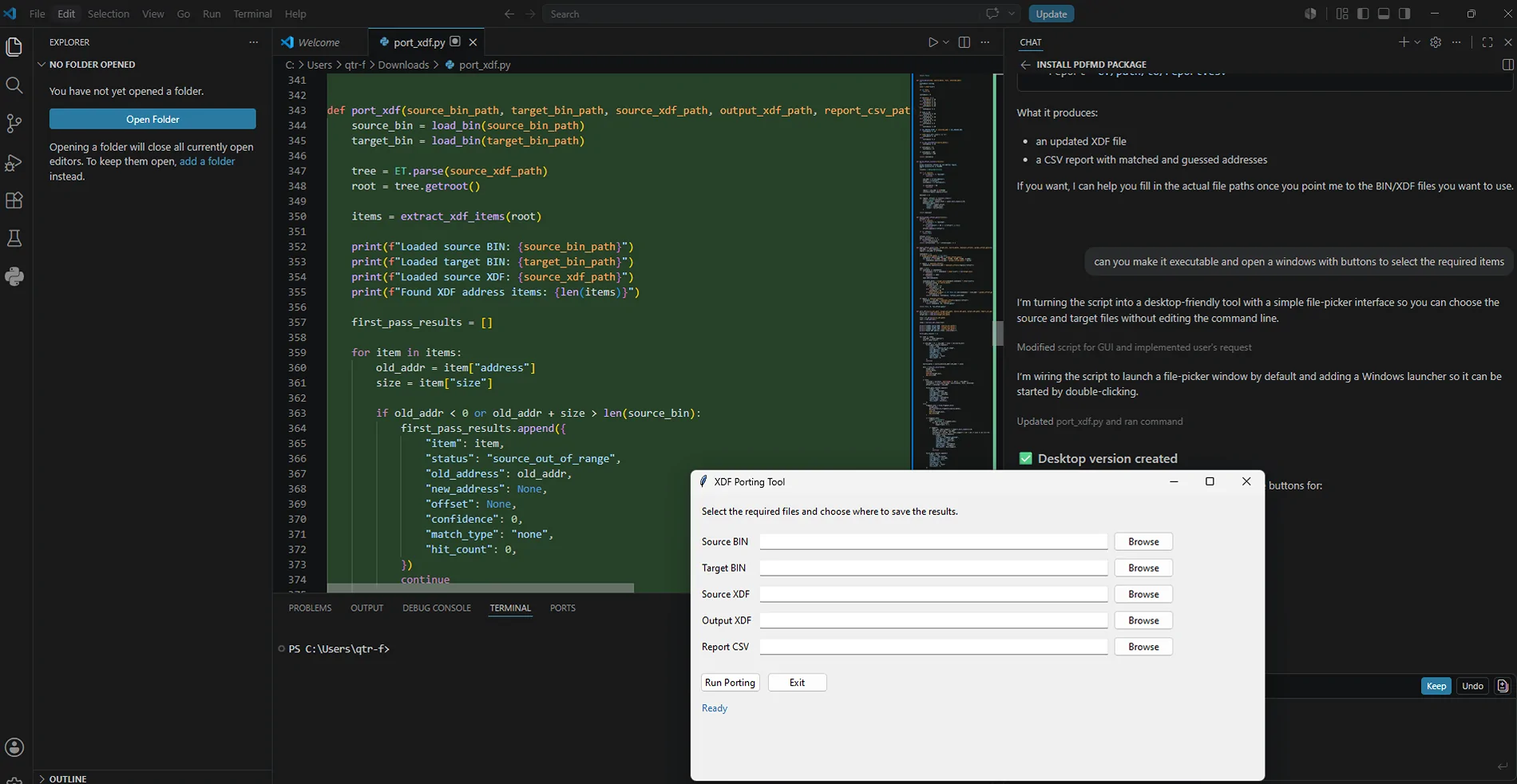
Last month, I was testing an idea with ChatGPT and then implemented it using visual studio code chatbot.

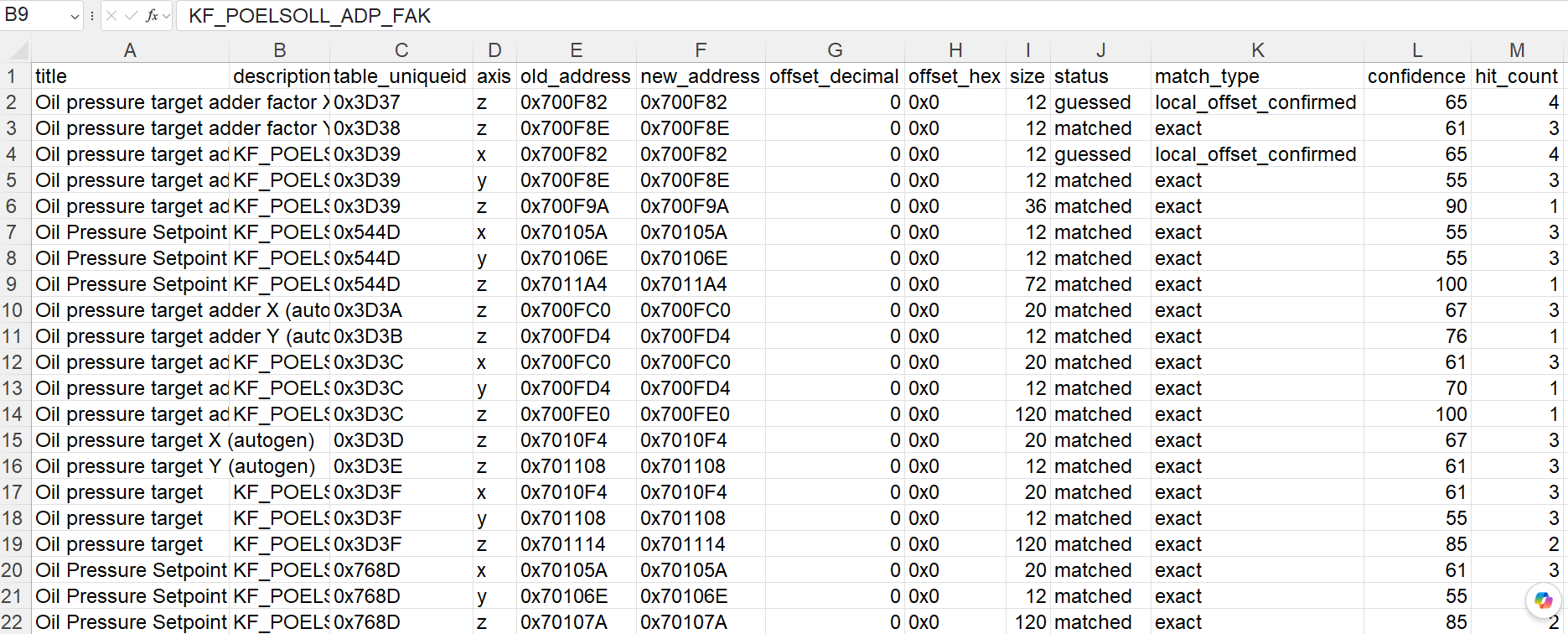
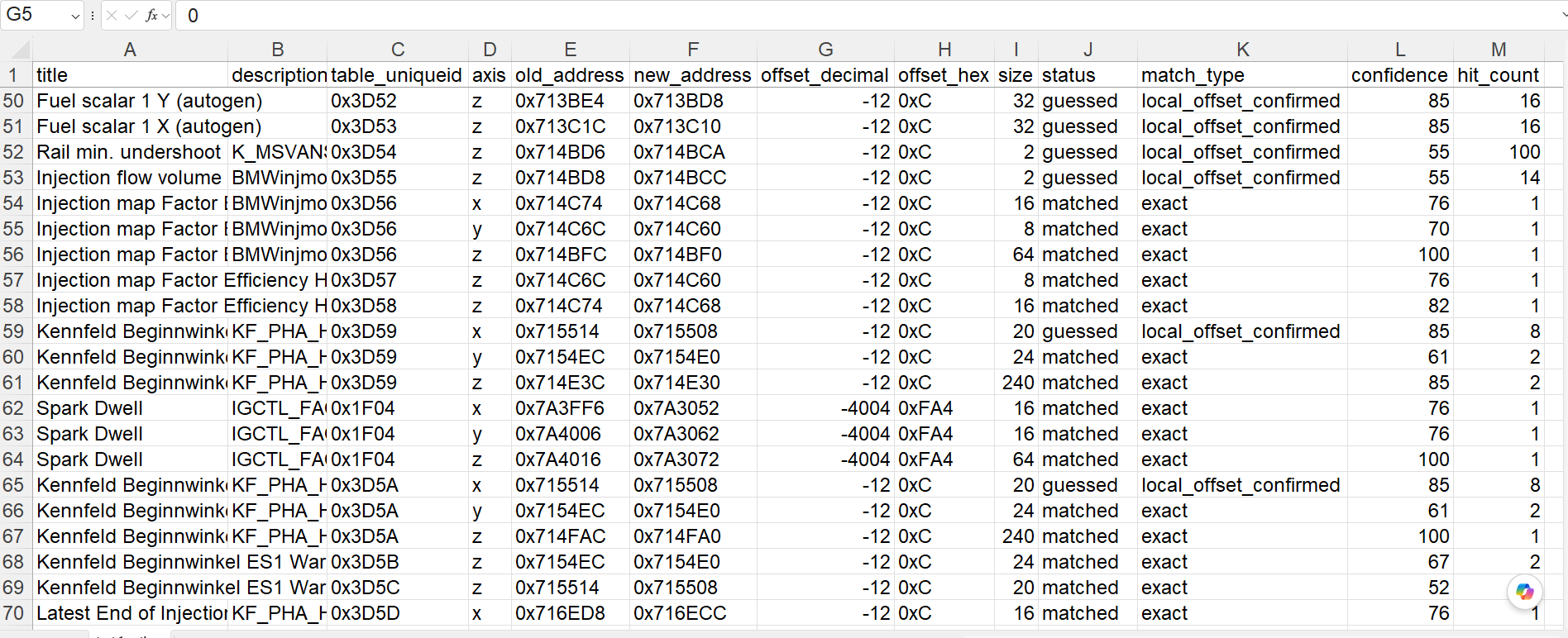
The idea was to create an XDF file by referencing another calibration ID for similarities, and to produce a report that shows how many tables were detected accurately and how many were partial matches.

it did work when i tried it on two different 6MT bin files but not when i tried to compare S58 xdf to B58 bin, because right now its looking at the table z values for comparison, since s58 tune is different than b58 it has trouble finding the tables, i need to add more logics to identify tables when the z value is different, for example afr should range from 10-14.7 and timing from -60 to 60, load upto 327.6, torque for example 500 or 660nm etc.

1786022104247-q6.webp


1786022914694-e3.png

1786024288810-ud.png

The reason I'm mentioning this idea is that if we can understand the bin files structure and break it down into section for torque/fuel/ignition etc, we probably can make a tool or a feature within your tool to auto detect all the tables from the a2l file you have for S58 or another master XDF files and then have all tables defined for all the bin files or atleast the ones that are similar rather than having multiple xdf files that has different number of tables.

I guess there might be some variance in structure between 6MT and AT and cars in different regions, like the ones that have OPF, but I still think this will cut down the numbers of XDF files that will need to be defined and worked on.
 
OP
OP
razorlab

razorlab

Well-Known Member
First Name
Bryan
Joined
Oct 2, 2021
Threads
29
Messages
8,669
Reaction score
16,995
Location
Not this fucking shit fuck stupid forum.
Car(s)
Not a Corvette.
Incredible progress on the tool. This makes me think of how lazy MHD is to not have their own dedicated software.

Have you thought about making your own flasher tool and datalogger? Because I think that should be your next step you are almost there.
Not really looking to compete with flashing tools, but as far as mobile...

Sponsored


Top