Sponsored

Supra Coding Step By Step

stormsupra

New Member
First Name
Alan
Joined
Jul 21, 2021
Threads
0
Messages
3
Reaction score
3
Location
Sydney, Australia
Car(s)
2020 A90 Supra
Hi guys, I currently have my car start up animation to "M Variant 2" but would like to revert it back to the OEM Supra animation. I've looked around in both normal mode and expert mode on Bimmercode but can't seem to find anything. Any help?
Sponsored


 

spdandpwr

Well-Known Member
Joined
Aug 6, 2021
Threads
0
Messages
52
Reaction score
29
Location
NY / Tri-State
Car(s)
2021 Supra // 2020 BMW X3M
Does anyone know how to code out the auto headlights? I want to be able to drive the car and choose when the headlights go on/off. Sometimes when it's overcast, I like driving with the "parking" light mode.
 

spdandpwr

Well-Known Member
Joined
Aug 6, 2021
Threads
0
Messages
52
Reaction score
29
Location
NY / Tri-State
Car(s)
2021 Supra // 2020 BMW X3M
I believe that the headlight control switch is your solution to this problem. See section 4-1 in the owners manual (page 153-154).
Right but I cannot turn off the headlights...it says I cannot turn off lights while driving.
 

Suprastar_671

Member
First Name
Jerry
Joined
Aug 15, 2021
Threads
0
Messages
5
Reaction score
1
Location
Guam
Car(s)
2021 Toyota Supra 3.0 GR
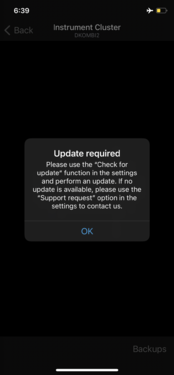
My BimmerCode app doesn’t let me select the instrument tab….. I did the update for the OBD and app but still shows gray and says to check for update or use support request… I thought I saw a way to have this fixed…. Any help is greatly appreciated….
 

Attachments

gdi2290

Well-Known Member
First Name
PatrickJS
Joined
Oct 18, 2019
Threads
13
Messages
280
Reaction score
240
Location
Los Angeles, California
Car(s)
GR Supra 3.0 Premium
Vehicle Showcase
1
Does anyone know how to code out the auto headlights? I want to be able to drive the car and choose when the headlights go on/off. Sometimes when it's overcast, I like driving with the "parking" light mode.
I also need this
 

eastwest2300

Well-Known Member
First Name
Dee
Joined
Jun 16, 2021
Threads
5
Messages
158
Reaction score
74
Location
Miami, FL
Car(s)
QX70
Following for a possible update on how to code/turn off the auto headlights feature..

anyone know?
 
Last edited:
OP
OP
CarGuy11

CarGuy11

Well-Known Member
Joined
Jul 10, 2019
Threads
50
Messages
656
Reaction score
615
Location
Pittsburgh
Car(s)
'20 Supra Prem/Assist DS Blue, '16 C7 Z51, '22 Mach-E, '24 Emira

Tsuki

Well-Known Member
Joined
May 15, 2021
Threads
12
Messages
382
Reaction score
399
Location
Charlotte, NC
Car(s)
2022 A91-CF
My BimmerCode app doesn’t let me select the instrument tab….. I did the update for the OBD and app but still shows gray and says to check for update or use support request… I thought I saw a way to have this fixed…. Any help is greatly appreciated….
I'm having the same problem getting to that section. It worked great in my 2021, but does NOT work on my 2022, same adapter. Possibly because my 2021 did not have the recall update?
 

kurumi

Well-Known Member
Joined
Feb 29, 2020
Threads
5
Messages
394
Reaction score
269
Location
Northern Virginia
Car(s)
2020 GR Supra, 2013 Fiat 500 Abarth
I'm having the same problem getting to that section. It worked great in my 2021, but does NOT work on my 2022, same adapter. Possibly because my 2021 did not have the recall update?
I used a Belkin Lighting Network adapter as well as an ENET cable on both a 2020 (pre-recall) and a 2021 (post-recall). Both work fine.

I had to move to a Belkin MFi-certified adapter due to iOS 14/15 killing support for non-MFi network adapters.

Android 11 also has issues with USB-C adapters.

I know the Kiwi3 BT adapter works but doesn't give me all the options. I haven't tested it with the MX adapter.
Sponsored


Top