Sponsored

Supra Connect App controls - 2026 Supra Nothing works

d0gg

Member
First Name
J
Joined
May 26, 2026
Threads
1
Messages
5
Reaction score
3
Location
North Chicago Burbs, IL
Car(s)
2026 Supra - 3.0 Premium - Absolute Zero
I have the Toyota app set up. I have the super connect app set up.

My Supra is in the app garage. It shows as active.

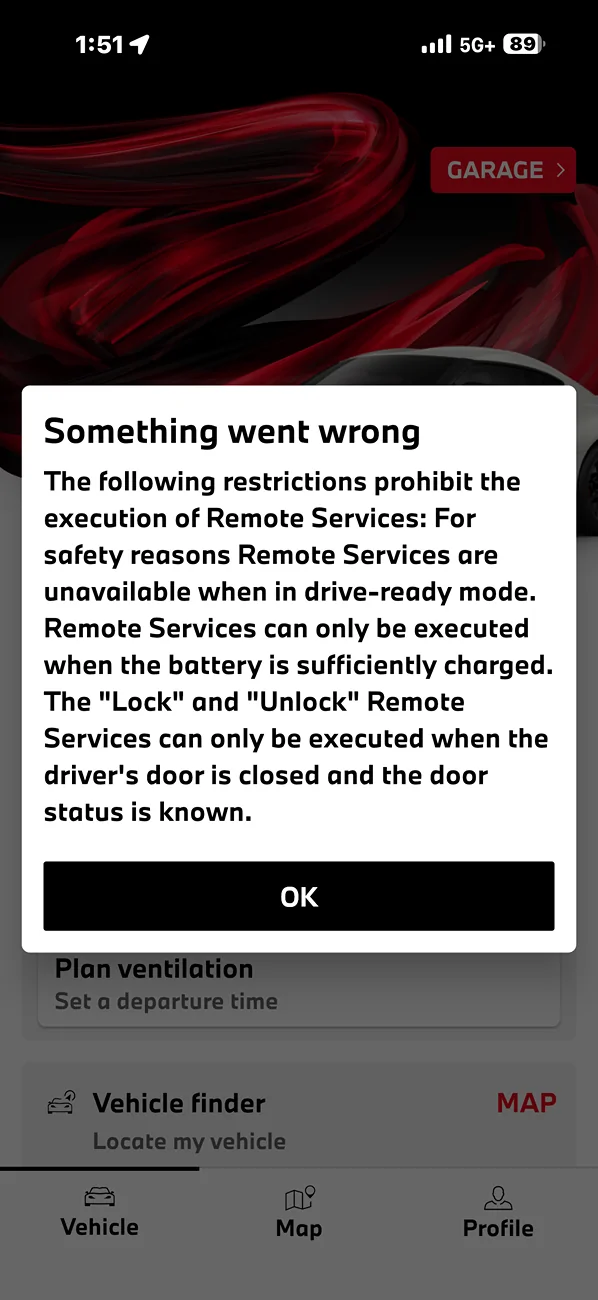
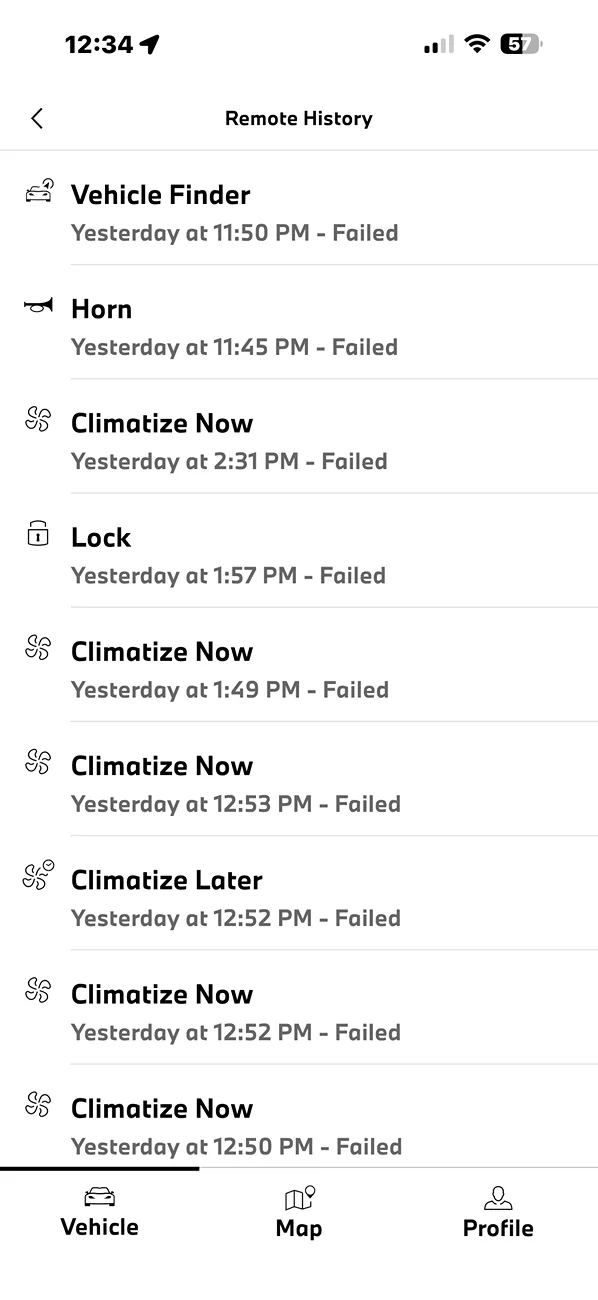
No matter what command I attempt to send, unlock, lock, flashlights, honk, or climatez all of them fail.

When I called Toyota for Support, at connected services, they told me that I don't have an ECM in my car. And the Supra is listed in the garage and is activated.

Does anyone have any suggestions or ideas? I'm at a loss. No one in the Toyota world seems to care about figuring this out with me.

LOVING my new Supra. Would really like to have the remote features working.

The support rep also told me that the SOS button in the Supra wouldn't work because the ECM isn’t installed… So that is really odd. Because when I picked it up, they were pointing it out to me.
IMG_4933.webp
IMG_4938.webp
Sponsored


NocturnalEmber

Well-Known Member
Joined
Feb 3, 2023
Threads
23
Messages
169
Reaction score
139
Location
US
Car(s)
3.0
The Supra Connect app is pretty terrible, just putting that out there.

But that aside, if your car is a 2026 and premium, it should come standard with connected services or at the very least a trial of it. I can't say with 100% certainty but I don't know how much weight I would put on support saying you "don't have an ecm" in your car.
 
OP
OP
d0gg

d0gg

Member
First Name
J
Joined
May 26, 2026
Threads
1
Messages
5
Reaction score
3
Location
North Chicago Burbs, IL
Car(s)
2026 Supra - 3.0 Premium - Absolute Zero
Thank you so much for the quick reply!

I went kind of nuts, trying everything I could think of.

I ended up trying to install the app onto an old android tablet that I had. I'm not 100% sure if the command that I sent from there was the one that worked. I issued a command to honk.

But I went back out to the car and sat down with it off with the door open. I had my iPhone in my hand when I was in the car like this. I then sent a command to flash the lights.

All of a sudden, about two minutes after I gave the command to flash the lights the ventilation kicked on, and I saw the icon start flashing on the audio display. Then the Horn honk twice, which is another command that I had sent.

Then when I looked in the past commands that were sent I all of a sudden saw eight or nine more failed commands for ventilation that I don't even remember sending. So it would appear that the backend is having a massive Stack of repeated failures at this time.

Not sure exactly who I have to talk to because it doesn't appear that it's my app or my account as far as I can tell it's something about the actual main backend of the system.

If you think it's something that is related to my account do you have any idea who I would talk to?
 

NocturnalEmber

Well-Known Member
Joined
Feb 3, 2023
Threads
23
Messages
169
Reaction score
139
Location
US
Car(s)
3.0
Thank you so much for the quick reply!

I went kind of nuts, trying everything I could think of.

I ended up trying to install the app onto an old android tablet that I had. I'm not 100% sure if the command that I sent from there was the one that worked. I issued a command to honk.

But I went back out to the car and sat down with it off with the door open. I had my iPhone in my hand when I was in the car like this. I then sent a command to flash the lights.

All of a sudden, about two minutes after I gave the command to flash the lights the ventilation kicked on, and I saw the icon start flashing on the audio display. Then the Horn honk twice, which is another command that I had sent.

Then when I looked in the past commands that were sent I all of a sudden saw eight or nine more failed commands for ventilation that I don't even remember sending. So it would appear that the backend is having a massive Stack of repeated failures at this time.

Not sure exactly who I have to talk to because it doesn't appear that it's my app or my account as far as I can tell it's something about the actual main backend of the system.

If you think it's something that is related to my account do you have any idea who I would talk to?
Being that the connected services are managed by BMW, the normal Toyota portal doesn't work for it I don't think. In terms of registering your car and the like, and in terms of app functionality.

I'm going off of memory here so I may be a bit hazy, but you have to specifically request help through Supra Connect, not Toyota's general app support/line. Supra connect has their own phone support number if memory serves.

Like I said though, this app is insanely clunky and poorly designed so part of it (if not more) can likely be attributed to that. I've only used the android version, but as a whole its just not very well designed or implemented. When I had my GR:Corolla its normal Toyota app were leaps and bounds better by comparison. Even Nissan's connect with the Z was better.

Provided your car is closed and the doors are locked and you have it in the correct state the app is expecting, it should respond to all of your commands, albeit slowly.

Try to not ever use this app in a hurry and you will be less disappointed; managing expectations I think is key here, its just very poorly designed.

But all that rambling to say, I'd call the number specifically for Supra Connect and have proof of ownership handy in case they ask, they can probably do some troubleshooting to see what would be causing failed requests, or at least tell you if there's anything on your end that you can do/change that might help.

I know for some services (like car location) you have to physically enable it in the infotainment settings, so there might be something going on there with other settings as well.
 

Eastwood

Well-Known Member
Joined
Dec 20, 2022
Threads
11
Messages
736
Reaction score
1,004
Location
SoCal
Car(s)
2023 Toyota GR Supra 3.0 Premium - Stratosphere
Make sure you didn’t turn off the data communication option in the cars menu.
 
OP
OP
d0gg

d0gg

Member
First Name
J
Joined
May 26, 2026
Threads
1
Messages
5
Reaction score
3
Location
North Chicago Burbs, IL
Car(s)
2026 Supra - 3.0 Premium - Absolute Zero
I think the support number in the Supra Connect app is the same as the Connected Services at Toyota.

Make sure you didn’t turn off the data communication option in the cars menu.
Didn't see the cars menu or the option =)
 
OP
OP
d0gg

d0gg

Member
First Name
J
Joined
May 26, 2026
Threads
1
Messages
5
Reaction score
3
Location
North Chicago Burbs, IL
Car(s)
2026 Supra - 3.0 Premium - Absolute Zero
Being that the connected services are managed by BMW, the normal Toyota portal doesn't work for it I don't think. In terms of registering your car and the like, and in terms of app functionality.

I'm going off of memory here so I may be a bit hazy, but you have to specifically request help through Supra Connect, not Toyota's general app support/line. Supra connect has their own phone support number if memory serves.

Like I said though, this app is insanely clunky and poorly designed so part of it (if not more) can likely be attributed to that. I've only used the android version, but as a whole its just not very well designed or implemented. When I had my GR:Corolla its normal Toyota app were leaps and bounds better by comparison. Even Nissan's connect with the Z was better.

Provided your car is closed and the doors are locked and you have it in the correct state the app is expecting, it should respond to all of your commands, albeit slowly.

Try to not ever use this app in a hurry and you will be less disappointed; managing expectations I think is key here, its just very poorly designed.

But all that rambling to say, I'd call the number specifically for Supra Connect and have proof of ownership handy in case they ask, they can probably do some troubleshooting to see what would be causing failed requests, or at least tell you if there's anything on your end that you can do/change that might help.

I know for some services (like car location) you have to physically enable it in the infotainment settings, so there might be something going on there with other settings as well.
I went looking for the support number in the Supra App. The number given is the same as the Toyota Connected services support. Do you know a different number to call?

I do have an update!
Total insanity!!!! Last night I uninstalled and installed the app. Went out to the Supra and reconnected. It let me lock, unlock and ventilate!

This morning... same errors.

So... I do have the confirmation that the app and Supra entertainment setup is correct. But I have no idea where the communication dies.
 

NocturnalEmber

Well-Known Member
Joined
Feb 3, 2023
Threads
23
Messages
169
Reaction score
139
Location
US
Car(s)
3.0
I went looking for the support number in the Supra App. The number given is the same as the Toyota Connected services support. Do you know a different number to call?

I do have an update!
Total insanity!!!! Last night I uninstalled and installed the app. Went out to the Supra and reconnected. It let me lock, unlock and ventilate!

This morning... same errors.

So... I do have the confirmation that the app and Supra entertainment setup is correct. But I have no idea where the communication dies.
I'm going off my experiences from 2023, so it may have changed or it could just be a case of the mandala effect, but the number I found was 1-800-331-4331, which may indeed just route back to a toyota brand engagement center.

Either way, I think you might want to try getting to a different phone agent, because assuming you are in the continental us, your car should have the connected services hardware regardless. Both my 2023 3.0 Premium 6MT and my 25 3.0 6MT both have connected services enabled.

Are you maybe parking the car in an area without reception? That might play into it.
 

Decreasing Dave

New Member
First Name
Dave
Joined
Mar 11, 2021
Threads
1
Messages
4
Reaction score
2
Location
Temecula, CA
Car(s)
2026 Supra 3.0 Premium 6MT
My son bought a 2026 3.0 Premium 6MT. When he initially sat in the car after purchase, Apple CarPlay was showing as an option. After hooking up his phone via Bluetooth, not Apple CarPlay, for the ride home, he was unable to connect to Apple CarPlay because it was "greyed out" in the menu.

Since then we have tried multiple things multiple times. Things like reboots and reconnects. all to no avail. Even worse, Apple CarPlay is no longer an option, grey or otherwise.

Upon calling the Customer Support Tech Line, they claim that the car is not Apple CarPlay compatible. I called a different dealer than ours and they said the same based on their database.

Me and A.I. have been going back and forth and what we determined, but have yet to prove, is that the DMU Telematics lost the provisioning upon delivery. Something that is quite common with new car deliveries, according to my A.I. bud.

I have been getting some seriously stupid responses from my Service Writer and Service Writer Lead. Essentially telling me that I'm wrong/crazy and that the car doesn't come with it. AFTER they literally looked up the window sticker to check. o_O:(:mad::doh:
 

MyCorolla

Well-Known Member
Joined
Jun 4, 2020
Threads
1
Messages
300
Reaction score
293
Location
NM
Car(s)
ICE
My son bought a 2026 3.0 Premium 6MT. When he initially sat in the car after purchase, Apple CarPlay was showing as an option. After hooking up his phone via Bluetooth, not Apple CarPlay, for the ride home, he was unable to connect to Apple CarPlay because it was "greyed out" in the menu.
Was WiFi enabled and connected to the car? CarPlay requires WiFi and Bluetooth.
Sponsored


Top