Sponsored

supra xhp transmission tune flash fail

jaxmacintosh

Member
First Name
jax
Joined
Jan 18, 2026
Threads
6
Messages
16
Reaction score
1
Location
July2904$!
Car(s)
Supra mk5
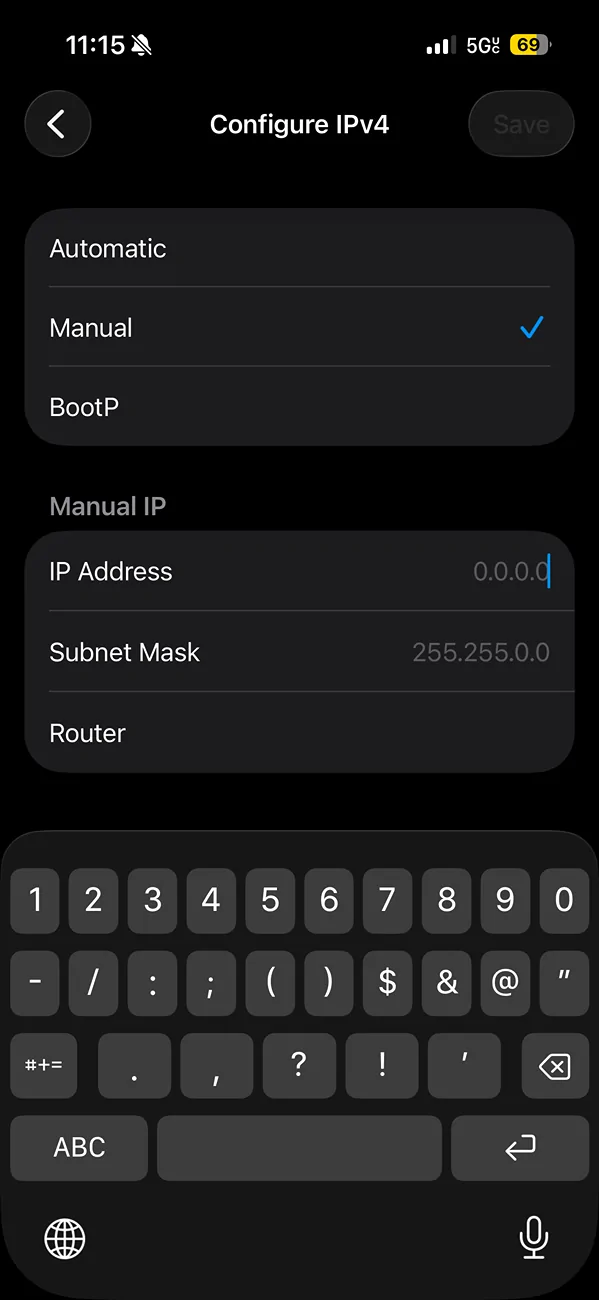
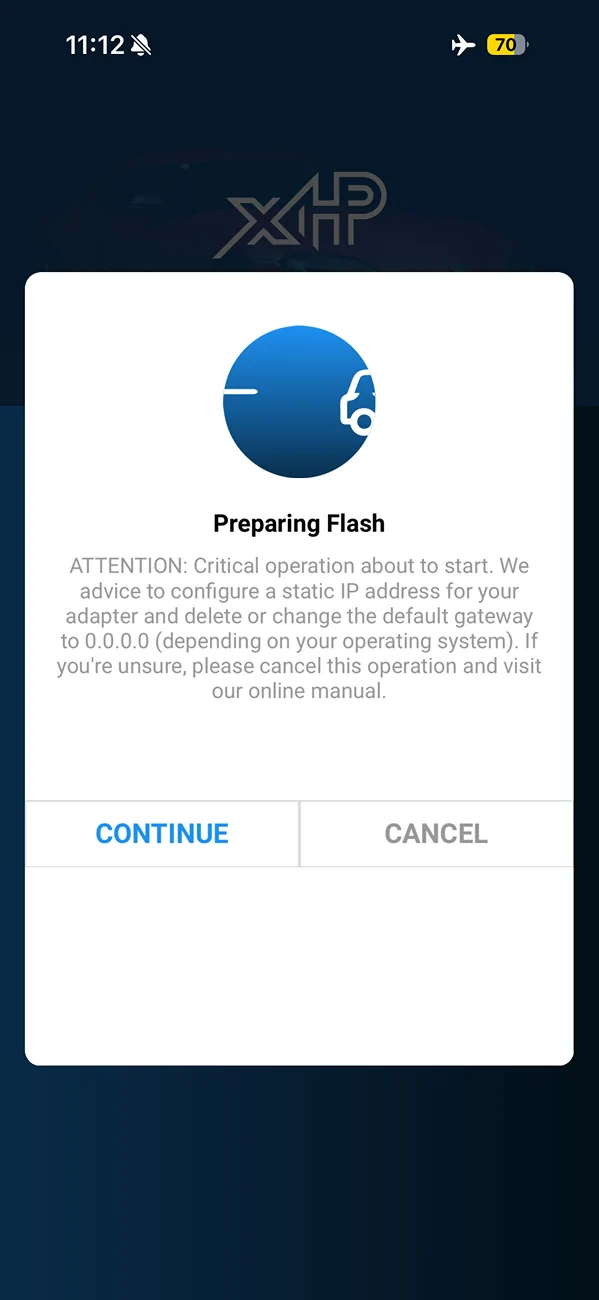
i just got an xhp transmission tune but am running into issues when trying to flash. it fails halfway through and it won’t even complete the process to undo the flash. so my car is now stuck. it gives me this message before i flash. i go into my wifi settings to change this in my adapter but it won’t let me save. can anyone tell me if im putting in the numbers wrong or maybe where specifically in what slot they go in.

IMG_8086.webp


IMG_8087.webp
Sponsored


itzTang

Well-Known Member
Joined
May 17, 2023
Threads
2
Messages
808
Reaction score
780
Location
Socal
Car(s)
2024 Supra 3.0
I did not have to touch those settings at all. Not sure why you’re touching anything. Hopefully that’s the reason why it’s not flashing and you didnt brick the tcm. Hopefully your battery wasn’t weak when you flashed. That’s why it’s safest bet to put on a tender when doing a flash if you aren’t sure your battery is under/over 12v
 
Last edited:

i3igpete

Well-Known Member
Joined
May 16, 2022
Threads
44
Messages
1,255
Reaction score
1,486
Location
Chicago
Car(s)
2023 3.0L 8AT
If you're on android, turn OFF wifi assistant as well. This will cause your phone to failover to your home wifi if it can't detect internet on the obd adapter.
 

tampahusky

Member
First Name
Ricky
Joined
Jan 3, 2025
Threads
1
Messages
8
Reaction score
6
Location
Tampa
Car(s)
BMW Z4M
it’s your WiFi adapter. Make sure you can connect correctly before starting. It was a pain for me also and I had a MHD WiFi adapter
 

SavagePassenger

Well-Known Member
First Name
Michael
Joined
Apr 25, 2023
Threads
7
Messages
163
Reaction score
166
Location
Florida
Car(s)
2020 Supra
Are you sure your adapter is on the approved list they have?. I have the Thor wifi adapter and it just connects automatically.

If you're doing the initial flash/install, make sure you have your seatbelt buckled as well as the other flash tips mentioned
 
OP
OP

jaxmacintosh

Member
First Name
jax
Joined
Jan 18, 2026
Threads
6
Messages
16
Reaction score
1
Location
July2904$!
Car(s)
Supra mk5
i’ve done eveything right. connected to my adapter. seatbelt/dogionistic mode/airplane mode with no bluetooth on. but it never seems to work. not sure if i have to edit the settings of the adapter manually (which i’ve tried but it doesn’t let me save the settings for it). so i’m at a lost. and the adapter is a bm3 one which works with xhp
 
OP
OP

jaxmacintosh

Member
First Name
jax
Joined
Jan 18, 2026
Threads
6
Messages
16
Reaction score
1
Location
July2904$!
Car(s)
Supra mk5
i will try to put the 0.0.0.0 in the router spot but i swear i tried it and didn’t let me save the settings. but if any other advice let me know. will try later tonight
 
OP
OP

jaxmacintosh

Member
First Name
jax
Joined
Jan 18, 2026
Threads
6
Messages
16
Reaction score
1
Location
July2904$!
Car(s)
Supra mk5
when trying to enter 0.0.0.0 like the app tells me to the save button turns grey and i can’t press it. so not sure how to change it like it’s asking me too

IMG_8090.webp
 
OP
OP

jaxmacintosh

Member
First Name
jax
Joined
Jan 18, 2026
Threads
6
Messages
16
Reaction score
1
Location
July2904$!
Car(s)
Supra mk5
okay finally got it to work. i did not listen to all the instructions for it to work. i only turned off bluetooth. left cellular service on and did not turn on airplane mode. i didn't edit any of the wifi adapters settings like it told me to. went into diagnostics mode and flash went until about 80% finished and then i got a text message and the flash failed. i tried it again after that with no text message interruption and it went through. i didn't this time after time today so not sure why this time it was different. i know for a fact that my cellular service was off all the other times i tried and it failed, but when left on it worked somehow


Top