Sponsored

XHP Reviews and Feedback!

Loco38SUP

Well-Known Member
Joined
Feb 17, 2021
Threads
55
Messages
2,348
Reaction score
3,402
Location
Seattle
Car(s)
2021 GR Supra 3.0 (Renaissance Red)
For those that also have jb4 - did you only unplug the obd for jb4 or did you unplug the db25 prior to first flash or some other way to make sure it doesnt interfere?

Other than airplane mode on the phone and making sure you got enough voltage/current (I plan on jumping to another car with it running just to be safe) was there anything else to do?

Also. Now just trying to connect using Xhp WiFi adapter and can see the network show up but 99% of the time the adapter network wont connect with app. Tried BimmerCode/link and they don’t connect either during the few times the adapter network shows connected on my phone (ios18.1.1).

Anything stupid obvious I’m missing?
Mine was the same way, I would connect to the OBD dongle with Wifi then it would give me an error saying it couldn’t get to the website. I had to enable cellular data so it would work. Just got lucky no calls or text while it was loading.

-RJM
Sponsored


Xproplayer

Well-Known Member
First Name
Aaron
Joined
Apr 2, 2022
Threads
7
Messages
270
Reaction score
254
Location
Bay Area, California
Car(s)
2021 Supra White
Mine was the same way, I would connect to the OBD dongle with Wifi then it would give me an error saying it couldn’t get to the website. I had to enable cellular data so it would work. Just got lucky no calls or text while it was loading.

-RJM
Yeah the app wants you to be in airplane mode during the actual flash, but when you first open the app you have to have internet access so it can verify your license.
 

Bug2th

Well-Known Member
First Name
Rich
Joined
Jan 27, 2023
Threads
17
Messages
321
Reaction score
243
Location
Folsom, Ca
Car(s)
A91-CF AZ, 1998 GSX
Yeah the app wants you to be in airplane mode during the actual flash, but when you first open the app you have to have internet access so it can verify your license.
Mine was the same way, I would connect to the OBD dongle with Wifi then it would give me an error saying it couldn’t get to the website. I had to enable cellular data so it would work. Just got lucky no calls or text while it was loading.

-RJM
I’m just trying to connect to the dongle. Haven’t even added the car yet so haven’t even gotten to a point where it would tell me there’s no internet access. I did activate cell and was connected to the xhp_wifi for a while but the app still wouldn’t connect.

Got a reply back from xHP and they suggested trying a different dongle. Right. Like if I had another that would connect why did I buy yours?
 

Xproplayer

Well-Known Member
First Name
Aaron
Joined
Apr 2, 2022
Threads
7
Messages
270
Reaction score
254
Location
Bay Area, California
Car(s)
2021 Supra White
I’m just trying to connect to the dongle. Haven’t even added the car yet so haven’t even gotten to a point where it would tell me there’s no internet access. I did activate cell and was connected to the xhp_wifi for a while but the app still wouldn’t connect.

Got a reply back from xHP and they suggested trying a different dongle. Right. Like if I had another that would connect why did I buy yours?
I can try to help but we'll need to be very clear.

My order would be:
Get in car with it off, close driver door and fasten seatbelt
Press start 3x to access diagnostic mode
Turn off headlights (personal preference)
Plug in dongle
Open xhp, let it verify license
Turn on airplane mode
Open wifi settings, connect to dongle wifi, ensure your phone stays connected, your phone might be disconnecting the WiFi because there's no Internet access, on Android iirc I had to connect twice or something
Go back to xhp app, try to connect to the car.

Let me know exactly what happens and when I'm these steps with as much information as possible
 

Bug2th

Well-Known Member
First Name
Rich
Joined
Jan 27, 2023
Threads
17
Messages
321
Reaction score
243
Location
Folsom, Ca
Car(s)
A91-CF AZ, 1998 GSX
I can try to help but we'll need to be very clear.

My order would be:
Get in car with it off, close driver door and fasten seatbelt
Press start 3x to access diagnostic mode
Turn off headlights (personal preference)
Plug in dongle
Open xhp, let it verify license
Turn on airplane mode
Open wifi settings, connect to dongle wifi, ensure your phone stays connected, your phone might be disconnecting the WiFi because there's no Internet access, on Android iirc I had to connect twice or something
Go back to xhp app, try to connect to the car.

Let me know exactly what happens and when I'm these steps with as much information as possible
Thanks for the steps but when you say to let the app verify the license how do you tell if/when that happens?
 

Xproplayer

Well-Known Member
First Name
Aaron
Joined
Apr 2, 2022
Threads
7
Messages
270
Reaction score
254
Location
Bay Area, California
Car(s)
2021 Supra White
Thanks for the steps but when you say to let the app verify the license how do you tell if/when that happens?
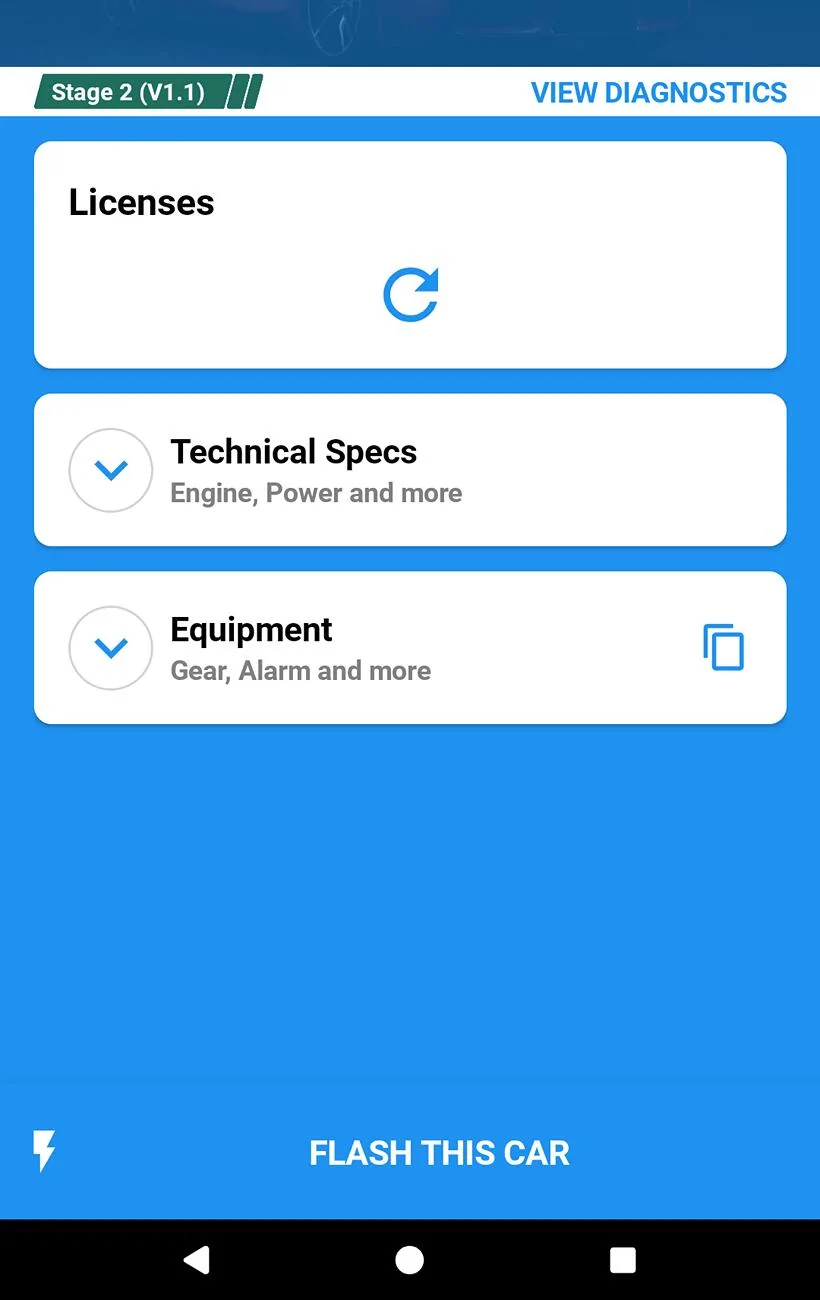
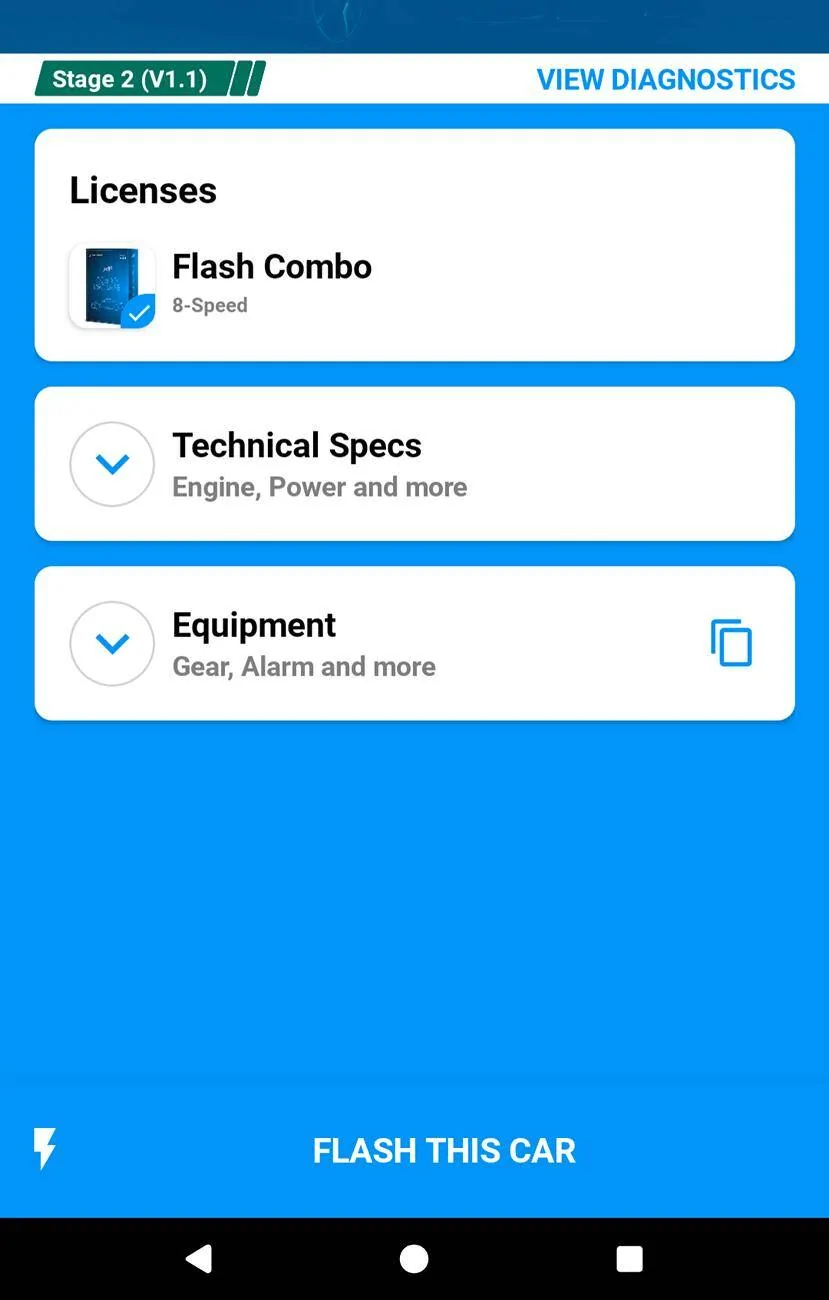
So for me it's when I open the app, it shows my car on the home page, then you click on the car and there's a licenses section that has a loading bar at first, then shows your license. Every time you open the app it will do that license check so if you did your order of operation starting on airplane mode before opening the app it won't be able to complete that license check and I assume it won't let you connect to the car. Pictures attached of it checking the license and then showing a valid license.

All of this is with the assumption that you have done the add a car section, I don't remember what it was like sitting up the app for the very first time. Maybe in your case if you don't have the car added or the license added it's not going to let you attempt to connect to a dongle even if you were doing the dongle connection steps correctly

Screenshot_20241219-125129~2.webp


Screenshot_20241219-125527.webp
 

Bug2th

Well-Known Member
First Name
Rich
Joined
Jan 27, 2023
Threads
17
Messages
321
Reaction score
243
Location
Folsom, Ca
Car(s)
A91-CF AZ, 1998 GSX
So for me it's when I open the app, it shows my car on the home page, then you click on the car and there's a licenses section that has a loading bar at first, then shows your license. Every time you open the app it will do that license check so if you did your order of operation starting on airplane mode before opening the app it won't be able to complete that license check and I assume it won't let you connect to the car. Pictures attached of it checking the license and then showing a valid license.

All of this is with the assumption that you have done the add a car section, I don't remember what it was like sitting up the app for the very first time. Maybe in your case if you don't have the car added or the license added it's not going to let you attempt to connect to a dongle even if you were doing the dongle connection steps correctly

Screenshot_20241219-125129~2.webp


Screenshot_20241219-125527.webp
I guess that’s my problem. I created the account with the same email address but was never prompted for a vin or any car info and I don’t see how to add that until I connect to the dongle.
 

Xproplayer

Well-Known Member
First Name
Aaron
Joined
Apr 2, 2022
Threads
7
Messages
270
Reaction score
254
Location
Bay Area, California
Car(s)
2021 Supra White
I guess that’s my problem. I created the account with the same email address but was never prompted for a vin or any car info and I don’t see how to add that until I connect to the dongle.
I don't have any ideas off the top of my head other than checking their own manuals or documentation. I don't think it should force you to pair a dongle before adding a car, but if that's the order then probably still follow my flow above, then turn Internet or cell service back on to let it add the car once the dongle is paired?
 

ky.supra

Well-Known Member
First Name
Kevin
Joined
Feb 1, 2023
Threads
2
Messages
250
Reaction score
454
Location
New York
Car(s)
A90 Supra
I can try to help but we'll need to be very clear.

My order would be:
Get in car with it off, close driver door and fasten seatbelt
Press start 3x to access diagnostic mode
Turn off headlights (personal preference)
Plug in dongle
Open xhp, let it verify license
Turn on airplane mode
Open wifi settings, connect to dongle wifi, ensure your phone stays connected, your phone might be disconnecting the WiFi because there's no Internet access, on Android iirc I had to connect twice or something
Go back to xhp app, try to connect to the car.

Let me know exactly what happens and when I'm these steps with as much information as possible
I would also disconnect your iphone (if you have one) from apple carplay on the vehicle as well. I did that before plugging in dongle and opening xhp, etc..
 

Loco38SUP

Well-Known Member
Joined
Feb 17, 2021
Threads
55
Messages
2,348
Reaction score
3,402
Location
Seattle
Car(s)
2021 GR Supra 3.0 (Renaissance Red)
I guess that’s my problem. I created the account with the same email address but was never prompted for a vin or any car info and I don’t see how to add that until I connect to the dongle.
Did you get it to work? I found this section in the online manual that might help, especially that iOS 15 and later part.

-RJM

“Most Android devices prefer Wi-Fi connections to 4G/LTE. Once you connect to the Wi-Fi network created by the Thor, MHD or xHP Wi-Fi adapter, you can no longer access the Internet, even if the cellular network is still active.
Therefore, unlocking the car for the first time requires a special procedure when using the Thor or orange MHD Wi-Fi adapter:

  • Start with an active Internet connection, i.e. not connected to the Wi-Fi wireless adapter. This only applies to the first start and is not required for subsequent flashes.
  • Connect the Wi-Fi adapter to the OBD port and wait 10-20 seconds. Connect to the created Wi-Fi on your device. Press the “Connect” button in the app.
    The app will retrieve the necessary data from your car to perform the online support check.
  • Disconnect from the adapter Wi-Fi. You can now perform the Online Support Check and redeem your previously purchased voucher codes.
  • You can then switch back to the Adapter Wi-Fi. The application has downloaded all necessary data and is now ready for offline use.”
“Setup requirements on iOS
IOS ONLY

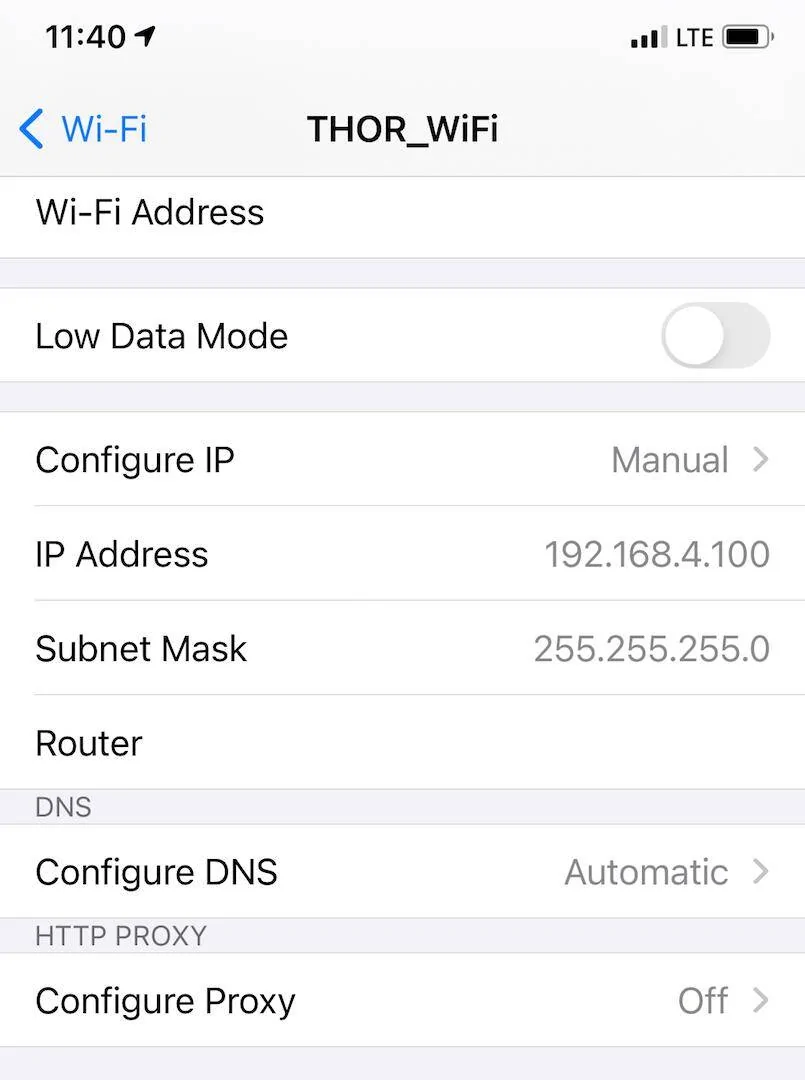
Go to Wi-Fi Settings and select the Wi-Fi adapter, then go into the settings and change the settings to those shown on the right:


  • Click: “Configure IP” - Manual
  • IP address: 192.168.4.100
  • Subnet Mask: 255.255.255.0
  • Router: Leave the field empty
  • Click “save”
IMG_8809.jpg


Local network settings on iOS 14 or later
Make sure your local network settings are set to ON.
iPhone -> Settings -> xHP Flashtool -> Local Network -> ON


iOS 14 and older - You can set the Wi-Fi to remain connected to the Internet even when you are connected to the Wi-Fi adapter.
iOS 15 and later - These IP settings must be set, otherwise the iOS device may not be able to find the Wi-Fi adapter.

Ensure that only one device (phone/tablet/laptop) is connected to the Wi-Fi adapter at a time.
Multiple devices connected to the same static IP will cause network conflicts.
This may cause your device to appear to be correctly connected to the Wi-Fi adapter, even though your car may not appear in the app or you may not be able to flash.”
 
Last edited:

AZ Zupra

Well-Known Member
First Name
Dev
Joined
Mar 18, 2024
Threads
0
Messages
47
Reaction score
61
Location
phoenix AZ
Car(s)
2020 GR Supra, 2009 GX470
Got a reply back from xHP and they suggested trying a different dongle. Right. Like if I had another that would connect why did I buy yours?
I had to buy another dongle as well to get mine to work. The MHD red dongle works for me. Also, make sure you turn off auto connect in your Wi-Fi settings for apple car play. I had a similar issue where I would connect to the dongle and by the time I would open MHD or XHP my phone would auto switch back to CarPlay.
 

FLtrackdays

Well-Known Member
First Name
Mark
Joined
Mar 6, 2022
Threads
33
Messages
5,075
Reaction score
4,970
Location
Florida
Car(s)
2022 Supra 3.0 (sold), 2025 Z06, ND MX5 Club, VW GTI MK7.5
I guess that’s my problem. I created the account with the same email address but was never prompted for a vin or any car info and I don’t see how to add that until I connect to the dongle.
I was worried about that as well. I didn’t do it either. Fortunately @Ruman told me not to worry about it. He had me do all the steps @Xproplayer mentioned above and he was patient as hell. I was freaking out inside because it wasn’t connecting and other little issues would come up (that I wouldn’t have known what to do). It was no big deal to him. I had the xHP brand dongle in the OBD port, windows up, seat belt on, diag mode, airplane mode on the phone. Ruman did some steps on my iPhone, turned off CarPlay, and made sure the IP address was correct (for some reason).

If it still doesn’t “work”, I would recommend having someone that is tech/phone (iOS in my case) savvy. He made it look easy.
 

Urmyson

Member
First Name
Joe
Joined
Jul 27, 2024
Threads
0
Messages
10
Reaction score
3
Location
Jacksonville, Florida
Car(s)
2024 Supra
The map I have installed is 1.0, made on 06/5/23. Is there a newer set of maps? I'm not having any issues, but I'd like to make sure it's up to date.
 

Xproplayer

Well-Known Member
First Name
Aaron
Joined
Apr 2, 2022
Threads
7
Messages
270
Reaction score
254
Location
Bay Area, California
Car(s)
2021 Supra White
The map I have installed is 1.0, made on 06/5/23. Is there a newer set of maps? I'm not having any issues, but I'd like to make sure it's up to date.
What stage? In my app I just checked stage 1, 2 and 3 and none of the dates and version numbers line up. When you go to flash, one of the popup questions is which version, thats where you'd select 1.0, or 1.1, I've always gone with the latest one.
Sponsored


Top